Our verdict: Descript is the pick when you want to edit as well as clip. Its Create Clips feature uses the Underlord AI to pull viral-worthy moments, but the real draw is that clipping sits inside a full transcript-based video and podcast editor with the deepest translation and dubbing in this comparison. The trade-off for a clipping shortlist is that clips are a secondary feature here, so there is no dedicated reframe, B-roll depth or social scheduler, and it is priced per seat.
How Descript measures up
What we look for →What Descript is, and who it is for
Descript is a full transcript-based editor for video and podcasts: you edit the media by editing the text, and it layers on AI tools including Create Clips, which uses its Underlord assistant to pick the most shareable moments from a long recording. It suits podcasters, YouTubers and teams who want to record, edit, polish and then clip in one place rather than bolt a clipper onto a separate editor.
Reach for Descript when editing depth and translation matter as much as clipping: it has the deepest dubbing here and lets you fix a clip end to end. If your job is purely turning long videos into shorts at speed, a dedicated clipper like Reap, Opus Clip or quso is faster and cheaper, since Descript’s clipping is one feature in a much larger tool.
How Descript performs, criterion by criterion
Editing control is Descript’s standout and the best in this comparison: the transcript-based editor, screen recording, overlays and multitrack timeline let you take a clip from raw to finished without leaving the app. Reach and languages is also a verified high point – caption translation in 61 languages, audio dubbing in 30 and natural-sounding AI voices in 14 – the deepest localization here.
Captions and visual polish are strong, and the tool exports and round-trips to Premiere, Final Cut and Pro Tools for pro workflows. Where it is deliberately lighter is clip selection and workflow for repurposing: Create Clips picks viral moments well enough, but there is no dedicated auto-reframe, B-roll depth or built-in social scheduler, because clipping is secondary to editing.
True cost and value reflects that breadth. Descript is priced per editor seat and meters both media hours and AI credits, so a team pays per person, and the free tier watermarks at 720p. For a pure clipping job you may be paying for a lot of editing power you will not use; for an all-in-one edit-and-clip workflow it earns its price.
Key features
- Create Clips: Underlord AI picks the most shareable moments
- Transcript-based editing: edit video and audio by editing the text
- Deepest localization here: 61 caption languages, 30 dubbing, 14 AI voices
- Screen recording, overlays, multitrack timeline and AI voices
- Round-trips to Premiere Pro, Final Cut Pro and Pro Tools
- Shareable web links with an embeddable player and batch export
Descript pricing and value
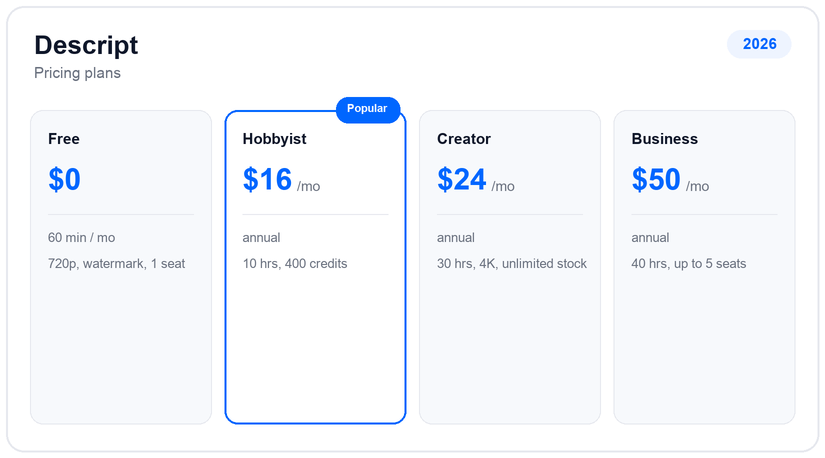
Descript has a free plan (60 minutes of media a month, 100 one-time AI credits, 720p watermarked, one seat, 25 transcription languages). Hobbyist is $24/mo (about $16 annually) for ten media hours and 400 credits; Creator is $35/mo (about $24 annually) for 30 hours, 800 credits, 4K and unlimited stock; Business is $65/mo (about $50 annually) for 40 hours, 1,500 credits and up to five seats. Enterprise adds SSO and Brand Studio.
The model is per editor seat, metered by media hours plus AI credits, which is normal for an editor but more than a standalone clipper costs. If clipping is all you need, you will likely spend less on a dedicated tool. If you want one place to record, edit, dub and clip, Descript’s pricing buys a lot of capability, and its dubbing depth is genuinely category-leading.
Pros and cons
- Best editing control here: full transcript-based editor
- Deepest translation and dubbing (61 caption, 30 dubbing, 14 voices)
- Record, edit, polish and clip in one tool
- Round-trips to Premiere, Final Cut and Pro Tools
- Clipping is a secondary feature, not the core job
- No dedicated auto-reframe, B-roll depth or social scheduler
- Priced per seat and metered by hours plus credits
- Free tier watermarks at 720p
Support and reliability
Descript support runs through email, a help center and an active community, with priority support on Business and dedicated success plus SSO on Enterprise. It is a mature, well-funded product with a large creator base and extensive tutorials, so most users self-serve. There is no public phone line on standard plans.
Descript vs the alternatives
If you want a dedicated clipper rather than an editor with clipping, Reap, Opus Clip and quso fit the job better and cost less. If you want record-and-clip in one, Riverside is the closest rival, and for dubbing depth few match Descript. See the podcast to shorts guide and the AI clip generators hub.
Frequently asked questions
How much does Descript cost?
Descript has a free plan (60 minutes a month, watermarked), Hobbyist at $24/mo (about $16 annually), Creator at $35/mo (about $24 annually) and Business at $65/mo (about $50 annually), priced per editor seat and metered by media hours plus AI credits.
Does Descript clip long videos?
Yes, via Create Clips, which uses its Underlord AI to pick shareable moments. But clipping is secondary to editing here, so there is no dedicated reframe, B-roll depth or scheduler; a standalone clipper is faster for that job.
How good is Descript for translation and dubbing?
It is the deepest here: caption translation in 61 languages, audio dubbing in 30 and natural AI voices in 14, which makes it a strong pick if localization matters as much as clipping.
Is Descript free?
There is a free plan with 60 minutes of media a month, 100 one-time AI credits and 720p watermarked export. Removing the watermark and raising limits requires a paid, per-seat plan.
Is Descript better than a dedicated clipper?
For editing and dubbing depth, yes; for pure speed and cost of turning long videos into shorts, a dedicated clipper like Reap or Opus Clip is better. Choose Descript if you want to edit and clip in one tool.
Related guides
Add us as a preferred source on Google, and our reviews and picks show up in your Top Stories and AI Overviews.