
How much does Cursor cost?
Cursor has a free Hobby plan and four paid tiers: Pro at $20 a month, Pro+ at $60, Ultra at $200, and Teams (Business) at $40 per user, with premium team seats at $120. Enterprise is custom, and annual billing takes 20% off every paid plan. The catch that trips people up is that each paid plan includes a monthly credit pool roughly equal to its price ($20 on Pro, $200 on Ultra) rather than unlimited frontier model use. Cursor’s own Auto mode runs unlimited and does not draw from that pool, but manually picking Claude, GPT or Gemini spends credits and can trigger pay-as-you-go overage at API rates once the pool runs out. There is a 7 day Pro trial and free Pro for verified students. Prices current September 2026.
| Hobby | $0, limited usage, unlimited Auto mode |
| Pro | $20/mo, about $20 monthly credit pool |
| Pro+ | $60/mo, larger credit pool for heavier use |
| Ultra | $200/mo, about $200 credit pool |
| Teams (Business) | $40/user, premium seats $120/user (5x usage) |
| Enterprise | Custom, adds SSO, audit logs, seat management |
Cursor pricing starts at $0 for the free Hobby plan, then moves to $20/month for Pro, $60/month for Pro+, and $200/month for Ultra on the individual side. Teams (Business) is $40 per user/month on standard seats or $120 per user/month on premium seats, and Enterprise is custom. Annual billing knocks 20% off every paid plan.
If you landed here from Cursor’s own pricing page, you probably do not need the sticker prices repeated. You need the plan logic in plain English: when the Hobby plan is actually enough, what changed in the June 2025 overhaul to credit-based pricing, how Auto mode quietly avoids your credit pool, and where buyers usually overpay or underpay.
This guide walks through every current Cursor plan, the credit and token system that drives the real bill, the student discount and free trial, and how Cursor’s effective cost compares with Claude Code, Copilot, and Windsurf. If you want the broader product context too, our coverage of Claude pricing and Claude Skills sits in the same lane.
Quick verdict: Cursor is easiest to justify at Pro ($20/mo) if you code daily – unlimited Tab completions, Auto mode that does not eat credits, and frontier model access in one bill. The free Hobby plan is real but most active developers burn through it in one focused session. Pro+ and Ultra only make sense if your monthly overages already cross $40 and $160 respectively.
How Cursor pricing works in 2026
Cursor’s pricing model went through a major reset in June 2025. The old “fast requests” and “slow requests” buckets were retired and replaced with a credit-based usage system tied to actual API costs from the underlying model providers (Anthropic, OpenAI, Google). Every paid plan now ships with a monthly credit pool plus an unmetered “Auto” mode that does not draw from it.
That single change is the most important pricing rule to understand before picking a plan: Auto mode is genuinely unlimited on Pro and above. When Cursor’s router picks a cost-efficient model for you under Auto, none of your $20 credit pool is spent. Manual model picks (Claude Sonnet, GPT-5.5, Gemini 2.5 Pro, etc.) draw from the pool at per-million-token rates.
The public plan ladder is straightforward once you separate the two layers – the seat fee and the usage credits. The seat fee is what you pay every month. The credits define how much manual-model work you can do before on-demand billing kicks in. Plans differ on both the seat fee and the size of the credit pool.
- Hobby (Free) for personal use and light team testing
- Pro for individual developers using Cursor daily
- Pro+ for heavier individual usage and background agents
- Ultra for power users who already overspend on Pro+
- Business (Teams) for teams that want admin controls and shared billing
- Enterprise for organizations that need SCIM, pooled usage, and procurement
Cursor plans compared
| Plan | Price | Monthly credits | Best for | Main catch |
|---|---|---|---|---|
| Hobby (Free) | $0 | 2,000 completions + 50 slow premium requests | Trying Cursor, students, occasional coding | Most daily users burn through it in one focused session; no Auto mode access |
| Pro | $20/mo | $20 in usage credits + unlimited Auto + unlimited Tab | Individual developers using Cursor daily | Heavy multi-hour sessions on frontier models can exhaust the credit pool |
| Pro+ | $60/mo | 3× the Pro credits + background agents | Solo devs already paying $40+ in Pro overages | Only saves money if you would actually have spent $60+ on Pro overages |
| Ultra | $200/mo | 20× Pro usage + priority routing | Power users who use Cursor all day, every day | Most people who think they need Ultra actually only need Pro+ |
| Business (Teams) | $40/user/mo (standard) or $120/user/mo (premium) | Per-seat allocation, doesn’t pool between users | Teams that want centralized billing, admin controls, SSO | Premium seats are 5× the usage but 3× the price; mix seats by user |
| Enterprise | Custom quote | Pooled usage shared across the org | Larger orgs that need SCIM, invoicing, dedicated support | Requires sales process; no self-serve |
The prices above are the standard monthly figures. Annual billing reduces every paid plan by 20%, so Pro effectively becomes $16/month if you commit for a year. The annual saving stacks across team seats, which makes it material for Business and Enterprise customers.
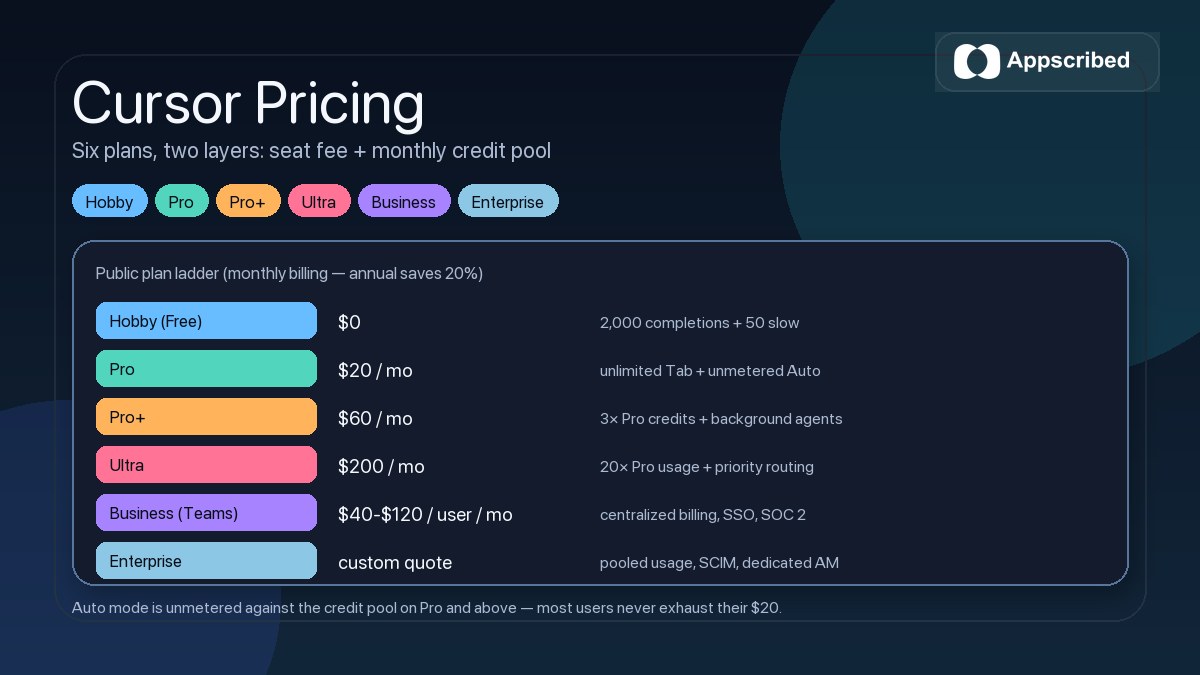
The biggest practical jump for most buyers is from Hobby to Pro. Hobby is a real free tier but it has a real ceiling – 2,000 completions and 50 slow premium requests is roughly half a day of serious agent work. Pro removes the ceiling on Tab completions and Auto mode, which is where most of the day-to-day pain disappears.
What you get on the free Hobby plan
Yes, Cursor is free. The Hobby plan needs no credit card and includes the full VS Code-based editor – all extensions, themes, Git integration, terminal, and standard IDE features work without restriction on every plan, including free.
The free monthly allocation is:
- 2,000 code completions from Cursor’s smaller Tab model
- 50 slow premium model requests – these queue behind paying users and can take noticeably longer to respond
- Full editor functionality, plus a one-time 7-day Pro trial when you sign up
The trade-off is honest: Auto mode is not on Hobby, response times on premium models are deliberately throttled, and there is no access to MCPs, skills, hooks, or cloud agents. For trying Cursor against your real workflow it is more than enough. For sustained daily coding it stops being workable after a few sessions.
Cursor Pro: $20/month, what you actually get
Pro is the plan most individual developers should default to. At $20/month (or $16/month billed yearly), you get:
- Unlimited Tab completions – the inline autocomplete is removed from any quota
- Unlimited Auto mode – Cursor picks a cost-efficient frontier model, charges happen, but they do not draw from your credit pool
- $20 in monthly usage credits for manual model selection (Claude Sonnet, GPT-5.5, Gemini 2.5 Pro, etc.)
- Access to MCPs, skills, hooks, and cloud agents – the same extensibility layer that paid Claude Code users get
- Faster response times – your requests skip the slow queue
The most common confusion: people assume the $20 credit means $20 of usage every month and nothing more. That is not how it works. Auto mode is genuinely unmetered against the credit pool. The $20 only matters when you manually pick a specific frontier model. If you live in Auto, you can do far more than $20 of effective work per month before on-demand billing ever kicks in.
On-demand usage kicks in automatically once the credit pool is exhausted unless you set a spend limit. Most Pro users never see it. Heavy users who insist on manual Claude Opus or GPT-5.5 selections will see it within the first week.
Cursor Pro+ ($60/mo) and Ultra ($200/mo): when to upgrade
Pro+ and Ultra exist for people who already overshoot Pro every month. The rule of thumb is simple: only upgrade when your overage bill consistently beats the price gap.
- Pro+ at $60/month triples the Pro credit pool and adds background agents that can run in the cloud while you work locally. Worth it when your Pro overages cross roughly $40/month. Below that, you are paying more for the same effective usage.
- Ultra at $200/month gives roughly 20× Pro usage and priority routing on premium models. Worth it when your Pro+ overages cross roughly $140/month. Most people who think they need Ultra actually need Pro+ with a slightly higher spend limit.
The honest test for both: look at your last three monthly Pro bills with overages included. If the total stays under $60, you do not need Pro+. If it crosses $100, Pro+ becomes the cheaper option. Ultra only makes sense if you regularly hit $180+ on Pro+.
Cursor Business (Teams): $40 per user, $120 for premium seats
The Business plan – Cursor’s name for it inside the product is “Teams” – costs $40 per user/month for standard seats or $120 per user/month for premium seats that come with roughly 5× the usage allocation. The two seat types can be mixed inside the same team, which is the right move for most organizations.
Business adds the team and admin layer:
- Centralized team billing and one invoice
- Admin controls – privacy mode enforcement org-wide, usage analytics, member management
- SAML and OIDC SSO
- Agentic code reviews via Bugbot – automated PR review and fix suggestions
- A team marketplace for internal rules, skills, and plugins so engineers share standards
- SOC 2 Type II certification
- Configurable monthly team-wide spend limits to cap the total bill
One nuance that catches teams off guard: usage is allocated per user, not pooled. If one engineer uses 80% of their credit and another uses 10%, the unused 90% does not transfer. Pooled usage is an Enterprise-only feature. For teams with a few power users and several lighter users, mixing premium and standard seats is the practical workaround.
Cursor Enterprise: when custom pricing makes sense
Enterprise pricing is custom and only worth pursuing if your team needs one or more of the things Business does not include: pooled usage across all seats, SCIM provisioning, invoicing instead of credit card billing, priority support with a dedicated account manager, or advanced security controls beyond SOC 2 Type II.
The pooled-usage feature is the one that materially changes the unit economics. On Business, every seat has its own monthly credit allowance that does not transfer. On Enterprise, the entire team shares a single pool, which smooths out the variance between heavy and light users. For a 30-person team where five engineers do most of the AI-heavy work, pooled usage typically lowers the per-seat effective cost.
Per-member spend limits are also Enterprise-only. That is the right control if you want pooled usage without one engineer accidentally draining the whole pool.
How Cursor’s credit system and token pricing actually work
This is the part of Cursor pricing most people misunderstand. The headline figures (Pro at $20, Pro+ at $60, etc.) are the seat fees plus an included monthly credit pool. What that credit pool actually buys depends entirely on which model you use and how heavily you use it.
Cursor’s credits are billed per million tokens – separately for input, output, and cache reads. Auto mode is priced at roughly $0.25 per million cache-read tokens, $1.25 per million input tokens, and $6.00 per million output tokens, but those Auto rates do not draw from your credit pool. Manual model picks are billed at the underlying provider’s effective rate, which is where the credits go.
A few practical implications:
- Output tokens cost 2–4× input tokens because generating new content is more expensive than reading existing context. Long agentic runs that produce a lot of code burn credits faster than long reading runs.
- Cache reads are cheap. If you stay in one project where Cursor caches your codebase context, repeated questions become much cheaper than the first one.
- Auto mode is the default escape hatch. If you do not pick a specific model, Cursor picks for you, charges at fixed rates, and does not touch the credit pool. That is why most Pro users never come close to exhausting their $20.
- Manual Claude Opus or GPT-5.5 selections are expensive. If you insist on the highest-tier model for every request, you can burn $20 in credits in a day.
The credit system replaced Cursor’s old “fast requests” and “slow requests” buckets in June 2025. If you remember those terms, the mental model is: fast requests are gone, slow requests are gone, and what you see now is a credit pool plus an unmetered Auto mode.
Annual vs monthly billing: 20% off
Cursor offers annual billing on every paid plan with a flat 20% discount. Effective monthly figures:
- Pro: $20/mo → $16/mo annual ($192/year)
- Pro+: $60/mo → $48/mo annual ($576/year)
- Ultra: $200/mo → $160/mo annual ($1,920/year)
- Business standard: $40/user/mo → $32/user/mo annual
- Business premium: $120/user/mo → $96/user/mo annual
The annual saving compounds on team plans – a 20-person Business team saves $1,920/year switching from monthly to annual on standard seats alone. For an individual, the breakeven is straightforward: if you plan to use Cursor for more than 9.6 months in a year, annual wins.
Cursor student discount: free Pro
Cursor offers free Pro access for students with a verified school email. The discount applies to active university students and covers the full Pro feature set – unlimited Tab completions, unlimited Auto mode, the $20 credit pool, and access to MCPs and cloud agents.
Verification happens through SheerID or a direct school-email check. The discount is for individual use; teams of students cannot pool student verification into a free Business plan.
Cursor free trial: 7 days of Pro
Every new Cursor account starts with a 7-day free Pro trial – full Pro access, no credit card required to start, no rollover after the trial ends. You drop back to Hobby unless you actively subscribe.
The trial is the right test if you want to know whether Pro fits your workflow before committing $20. Use it on real projects, not toy scripts – the difference between Hobby and Pro shows up most clearly during sustained agent runs.
Cursor spend limit: how to cap billing and overage charges
Cursor lets you set a hard spend limit at the account level – the billing setting that controls usage-based pricing and on-demand overage charges. Once you cross your limit, on-demand usage stops and Cursor returns to the slow/queued tier until your next billing cycle. The default is no limit – on-demand billing runs uncapped unless you change this.
- Open Cursor settings → Account → Billing
- Set a monthly spend limit in dollars
- Optionally enable spend alerts at 50% and 80% of the limit
- For teams, Business admins set a team-wide spend limit; Enterprise can also set per-member limits
If you ever see a surprise Cursor bill, the cause is almost always one of two things: someone manually selected a frontier model for a large agentic run, or the spend limit was never set. Both are fixable in five minutes.
Cursor vs Claude Code, GitHub Copilot, and Windsurf – pricing at a glance
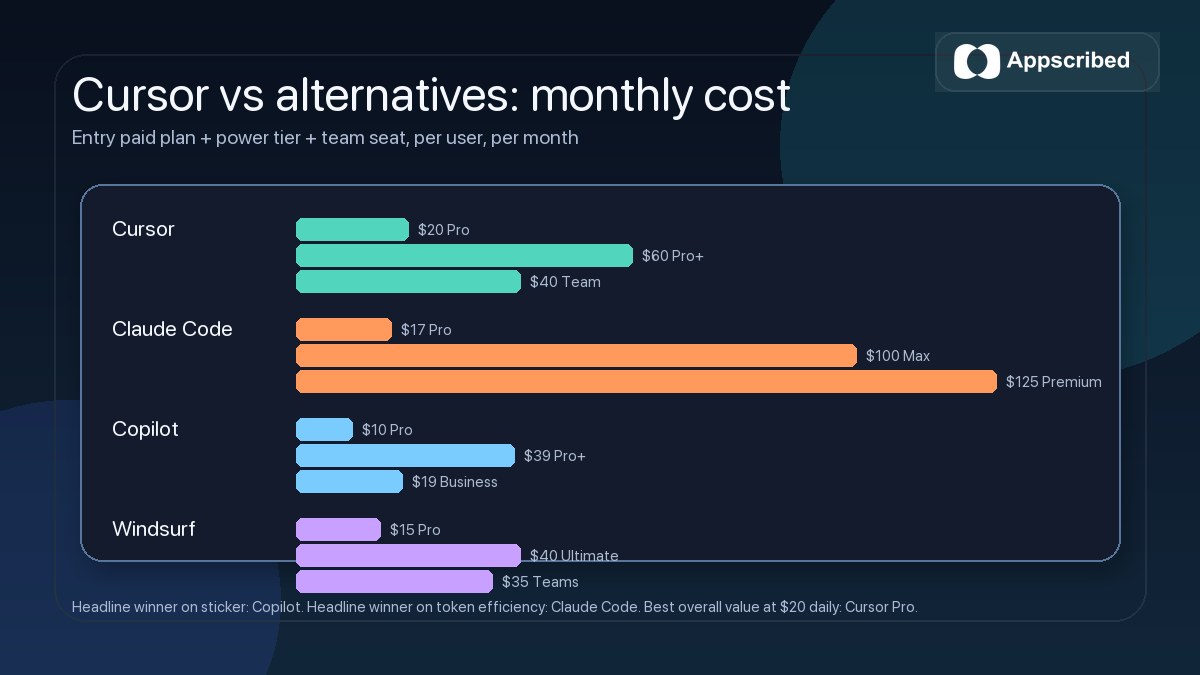
The pricing comparison most buyers actually want runs between Cursor and three obvious alternatives. The headline gap is smaller than people assume; the practical gap depends on how each tool meters usage.
| Tool | Entry paid plan | Power-user plan | Team plan | Metering style |
|---|---|---|---|---|
| Cursor | Pro $20/mo | Pro+ $60 / Ultra $200 | $40/user (standard) or $120/user (premium) | Credit pool + unmetered Auto mode |
| Claude Code | Pro $17/mo | Max $100/mo | Premium seat $125/user | Per-token with prompt caching savings |
| GitHub Copilot | Pro $10/mo | Pro+ $39/mo | Business $19/user / Enterprise $39/user | Flat-rate per seat, no token metering |
| Windsurf | Pro $15/mo | Pro Ultimate $40/mo | Teams $35/user (Teams Ultimate $90/user) | Credit-based per request |
| Blackbox AI | Pro $10/mo | Pro Plus $20 / Pro Max $40 | Pro Max $40/user (team features included) | Credit pool across Claude, GPT, Gemini, Grok |
The headline winner on sticker price is a tie between Copilot at $10/month and Blackbox Pro also at $10/month, but Copilot’s flat-rate model is also the most limiting on frontier model access. The headline winner on raw token efficiency is Claude Code (independent testing has measured around 5× lower token consumption than Cursor for identical agent tasks), but Claude Code’s team pricing is the most expensive in the set.
If you want a deeper comparison between Cursor and Claude Code specifically – pricing, agent quality, and which one is right for your workflow – see our Claude pricing breakdown, which covers the Claude side of the same question.
Hidden costs and gotchas to know before you upgrade
Sticker prices are honest, but the effective bill changes in five common ways. None of these are tricks – they are just rules buyers do not always notice on the public pricing page.
- Manual model picks deplete credits fast. Picking Claude Opus or GPT-5.5 for every request will exhaust a Pro credit pool in days. Use Auto unless you have a specific reason not to.
- Cursor charges per Workspace context size. A large monorepo with full codebase indexing costs more in cache-read tokens than a small project, even at the same model.
- Pro+ doesn’t pool with team credits. If you have a Pro+ subscription and also belong to a Business team, the two credit pools do not merge.
- Business seats don’t pool credit either. Pooled usage is an Enterprise-only feature. Plan team-seat mix accordingly.
- Spend limits default to none. If you do not set a cap, on-demand billing runs uncapped. Set one before your first heavy session.
Pricing-fit tip: Most individual developers should start on the 7-day Pro trial, then move to Pro. If overages cross $40/month for two months running, move to Pro+. Skip Ultra unless your Pro+ overages cross $140/month consistently.
Is Cursor worth paying for?
For developers who code daily and want frontier-model-backed agentic editing, Cursor at $20/month is one of the strongest value plays in AI coding. Unlimited Tab completions plus unmetered Auto mode means most people get far more than $20 of effective use per month without ever seeing the credit ceiling.
It is less compelling for people who only need light autocomplete a few times a week, or for teams where one or two power users would dominate a per-seat credit allocation – Enterprise pooled usage is the right answer there, not standard Business.
The most sensible buying path for most teams is straightforward:
- Start every new user on the 7-day Pro trial to validate fit
- Move to Pro when the trial ends, and set a spend limit before the first heavy session
- Upgrade to Pro+ only when monthly overages cross $40 for two consecutive months
- For teams, default to Business standard seats; upgrade individuals to premium seats as their usage warrants
- Pursue Enterprise only when pooled usage, SCIM, or procurement are real requirements
That is the real Cursor pricing story in 2026. The credit system makes the sticker price look smaller than it is in heavy hands and larger than it is in normal use. Match the plan to actual usage – not aspirational usage – and Cursor is one of the better-priced tools in its category.
Frequently Asked Questions
How much does Cursor cost?
Cursor pricing starts at $0 for the free Hobby plan, $20/month for Pro, $60/month for Pro+, and $200/month for Ultra on the individual side. Business (Teams) is $40 per user/month for standard seats or $120 per user/month for premium seats, and Enterprise is custom. Annual billing saves 20%.
Is Cursor free?
Yes. Cursor has a free Hobby plan that includes 2,000 code completions and 50 slow premium requests per month with no credit card required. Every new account also gets a 7-day free Pro trial.
What does the Cursor free plan include?
The Hobby plan includes 2,000 monthly Tab completions, 50 slow premium model requests, and full access to the VS Code-based editor (extensions, themes, Git, terminal, all standard IDE features). It does not include Auto mode, MCPs, skills, hooks, or cloud agents.
How much is Cursor Pro?
Cursor Pro is $20/month, or $16/month billed annually (a 20% saving). It includes unlimited Tab completions, unlimited Auto mode, $20 in monthly credits for manual model selection, plus access to MCPs, skills, hooks, and cloud agents.
What is the difference between Cursor Pro, Pro+, and Ultra?
Pro ($20/mo) is the standard daily-developer plan. Pro+ ($60/mo) triples the credit pool and adds background agents. Ultra ($200/mo) gives roughly 20× Pro usage and priority routing. Upgrade only when overages on the current tier consistently exceed the price gap to the next tier.
How does Cursor’s usage-based pricing work?
Since June 2025, Cursor uses a credit-based usage model tied to actual API costs. Each plan ships with a monthly credit pool plus unmetered Auto mode. Auto mode picks a cost-efficient model and does not draw from the credit pool. Manual model selections (Claude Sonnet, GPT-5.5, Gemini 2.5 Pro) are billed per million tokens, separately for input, output, and cache reads.
How much does Cursor Business cost?
Cursor Business (Teams) is $40 per user/month for standard seats or $120 per user/month for premium seats (roughly 5× the usage). Annual billing saves 20%. Business includes centralized billing, SSO, admin controls, SOC 2 Type II, Bugbot code reviews, and team-wide spend limits.
What is Cursor Enterprise pricing?
Cursor Enterprise is custom-quoted. It adds pooled usage across all seats, SCIM provisioning, invoicing, priority support with a dedicated account manager, and per-member spend limits. Worth pursuing only if you need one of those specific capabilities – Business is enough for most teams.
Is there a Cursor student discount?
Yes. Verified university students get full Cursor Pro access for free with a school email. Verification happens through SheerID or direct school-email check. The discount applies to individual use only.
Does Cursor have a free trial?
Yes. Every new account starts with a 7-day free Pro trial – full Pro access, no credit card required to start. You drop back to Hobby unless you actively subscribe.
How much does Cursor cost per year?
With annual billing (20% off): Pro is $192/year, Pro+ is $576/year, Ultra is $1,920/year, Business standard is $384/user/year, and Business premium is $1,152/user/year.
Is Cursor Pro worth it?
For developers using Cursor daily, Pro at $20/month is one of the strongest value plays in AI coding. Unlimited Tab plus unmetered Auto mode means most users get far more than $20 of effective work per month without exhausting credits. It is less compelling for light or occasional use, where Hobby is enough.
- ChatGPT pricing Free, Go $8, Plus $20, Pro $200
- Claude pricing Free, Pro $20, Max $100 and $200
- Gemini pricing Free, Google AI plans from $4.99
- Grok pricing Free, SuperGrok from $10
- Midjourney pricing $10 to $120 a month
Add us as a preferred source on Google, and our reviews and picks show up in your Top Stories and AI Overviews.