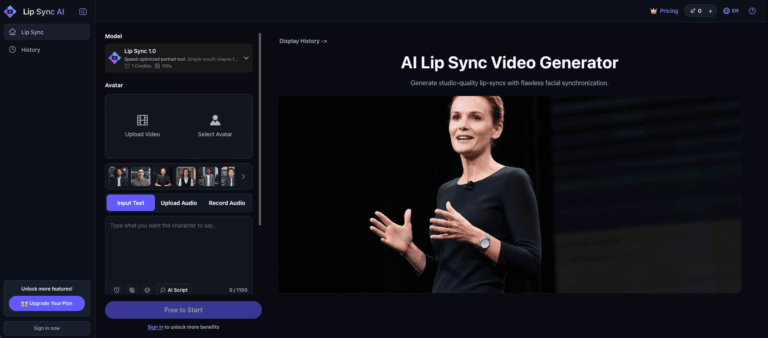
Lip Sync AI is a free, web-based AI lip sync video generator that lets you create realistic talking videos in under a minute without recording anything. It solves the problem of costly, time-consuming video production by syncing any audio to a video automatically, making it ideal for ads, e-learning, and social content.
Lip Sync AI enables creators, marketers, and educators to produce studio-quality talking videos simply by uploading a video and providing an audio track. The platform handles all facial synchronization automatically, eliminating the need for expensive studios or technical expertise.
Trusted by teams at global brands like Meta, L’Oreal, Shopify, and Dyson, Lip Sync AI serves solopreneurs, small businesses, and large enterprises alike. It is accessible entirely through the browser with no sign-up required to get started.
Key Features of Lip Sync AI
- AI Lip Sync Video Generation: Automatically synchronizes uploaded audio with video to produce realistic, studio-quality talking videos.
- No Sign-Up Required: Users can generate their first lip sync video for free without creating an account.
- AI Avatars: Choose from built-in AI avatars to create talking video content without using real footage.
- Voice Integration: Add custom voices or use built-in AI voice options to bring video characters to life.
- Video Templates: Access pre-built templates to speed up the video creation process for various use cases.
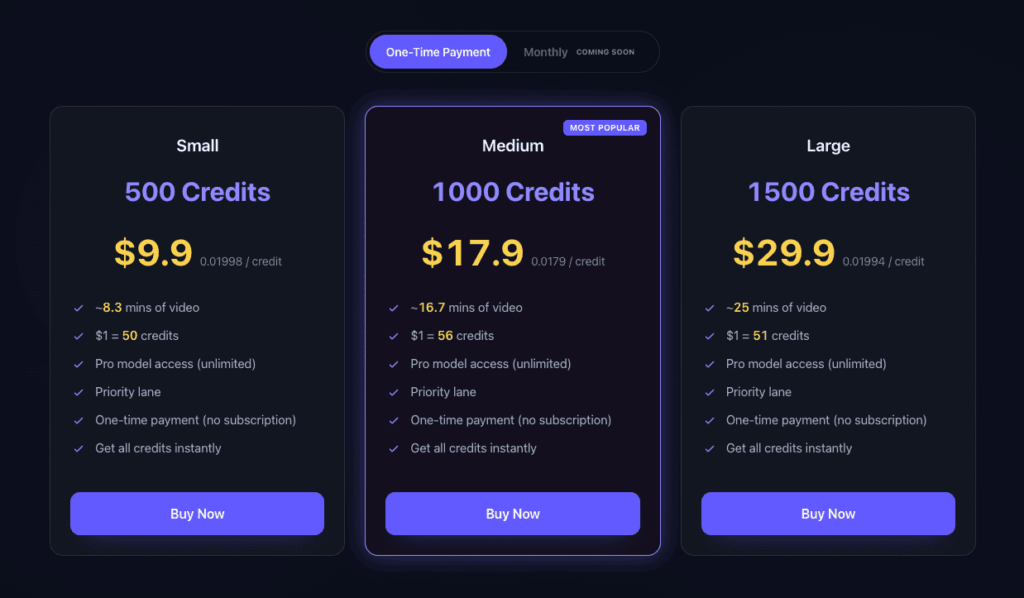
- Pro Model Access: Credit plan holders get unlimited access to the high-quality Pro generation model.
- Priority Processing Lane: Paid credit users receive faster video rendering through a dedicated priority queue.
- Multilingual Interface: Platform supports multiple languages including English and Chinese for a global user base.
- Creation History: Users can access and manage previously generated videos from their personal history dashboard.
- One-Time Credit Purchases: Buy credits once with no recurring subscription; purchased credits never expire.
- Mobile Browser Support: Full access to all features and credits through any mobile browser without limitations.
- Multiple Payment Methods: Supports Google Pay, Apple Pay, Visa, Mastercard, American Express, JCB, and UnionPay.
How to Use Lip Sync AI
- Visit lip-sync.ai and click “Create Your Free Video” without any sign-up needed.
- Upload the video file you want to animate or select an AI avatar from the available options.
- Upload your audio file or use a built-in AI voice to provide the speech for lip syncing.
- Choose a video template if desired to structure your output for a specific use case.
- Click generate and wait approximately one minute for the AI to process and sync your video.
- Preview the output and download your finished lip sync video to use across platforms.
- Purchase a credit package to unlock Pro model quality and priority lane processing for future videos.
Key Use Cases for Lip Sync AI
- Social Media Content: Create engaging talking videos for TikTok, Instagram Reels, and YouTube Shorts without filming yourself.
- Video Advertising: Produce professional lip-synced ad creatives for digital marketing campaigns quickly and affordably.
- E-Learning Modules: Animate instructors or avatars to deliver educational content in engaging, lifelike video format.
- Corporate Training: Develop internal training videos with synchronized audio at a fraction of traditional production costs.
- Product Demos: Showcase products with talking avatar presenters to boost conversions and engagement online.
- Multilingual Video Localization: Swap audio tracks and re-sync lips to localize existing videos for different language audiences.
- Personal Branding: Build a consistent video presence with AI avatars that represent your brand without constant filming.
Pros and Cons
Pros
- Free to use with no sign-up required
- Generates realistic lip sync videos in one minute
- Trusted by global enterprise brands
- One-time credits that never expire
- Works on any mobile or desktop browser
Cons
- Free usage is limited and advanced features require purchasing credit packages to unlock.
- All purchases are generally non-refundable due to the computational costs of AI video generation.
Frequently Asked Questions
What is Lip Sync AI?
Lip Sync AI is a free online tool that automatically synchronizes audio with video to create realistic AI-powered talking videos.
Is Lip Sync AI Free to Use?
Yes, Lip Sync AI offers free video generation with no sign-up required, though advanced features require purchased credits.
Do I Need to Create an Account to Use Lip Sync AI?
No, you can generate your first lip sync video without registering or creating an account on the platform.
Do Lip Sync AI Credits Expire?
No, one-time purchased credits on Lip Sync AI never expire and remain available indefinitely in your account.
What Video Types Can I Create with Lip Sync AI?
You can create ads, social media videos, e-learning content, and corporate training videos using AI lip sync technology.
Can I Use Lip Sync AI on My Phone?
Yes, Lip Sync AI works fully through any mobile browser, giving you complete access to all features and credits.
What Payment Methods Does Lip Sync AI Accept?
Lip Sync AI accepts Google Pay, Apple Pay, Visa, Mastercard, American Express, JCB, and UnionPay for credit purchases.
How Long Does It Take to Generate a Lip Sync Video?
Lip Sync AI generates a finished, realistic talking video in approximately one minute after you submit your files.
Want a full talking-avatar tool with built-in lip-sync? See the best AI avatar generators.