

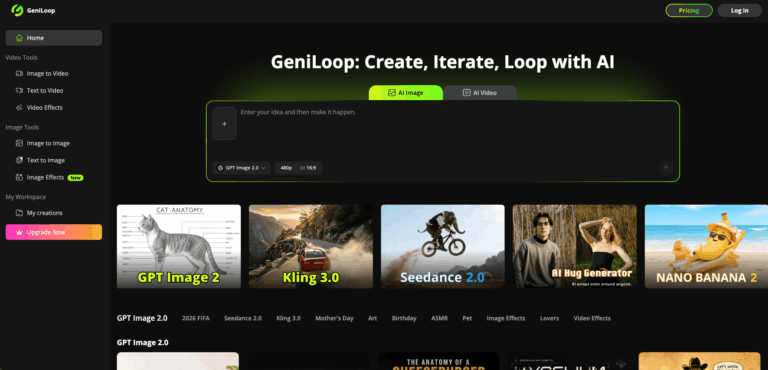
GeniLoop is an AI-powered creative studio that lets users generate images, videos, animations, and visual effects from text or image prompts. It consolidates multiple top AI models into one platform, eliminating the need to juggle separate subscriptions for image and video generation workflows.
GeniLoop is built for creators, marketers, designers, and entrepreneurs who need fast, high-quality visual content without complex production setups. By unifying text-to-image, image-to-video, text-to-video, and style effects under one dashboard, it reduces the friction of managing multiple AI tools. Users gain access to leading models like Seedance 2.0, Kling 3.0, GPT Image 2, Nano Banana, Runway, and FLUX all from a single workspace.
Whether you need short-form social videos, product concept images, animated clips, or campaign storyboards, GeniLoop provides a credit-based studio environment with watermark-free exports and commercial use rights on paid plans. It is designed for speed and iteration, making it ideal for teams that need to test creative ideas rapidly and at scale.
Key Features of GeniLoop
- Text-to-Image Generation: Create high-resolution images from natural language prompts with control over style, mood, and canvas size.
- Image-to-Image Editing: Transform existing photos by changing style, replacing backgrounds, adjusting outfits, or adding and removing elements.
- Image-to-Video Animation: Convert still images into short animated clips with AI-powered motion for social and marketing content.
- Text-to-Video Generation: Describe a scene in text and generate cinematic video clips with control over duration, aspect ratio, and model selection.
- Seedance 2.0 Integration: Access ByteDance’s multi-shot video model supporting text, image, audio, and video inputs for structured narrative video creation.
- GPT Image 2 Access: Use OpenAI’s advanced image model for photoreal depth, fine detail, prompt understanding, and batch storyboarding workflows.
- Nano Banana Natural Language Editing: Edit images conversationally with instructions like background changes, object replacements, or style adjustments without technical prompting skills.
- Multi-Model Hub: Access Kling 3.0, Runway, FLUX, Grok, Sora, Hailuo, Vidu, Qwen, Wan, and more models from a single creative workspace.
- 500+ Video and Image Effects: Apply seasonal, artistic, and stylized effects including Ghibli, Pixar-style, clay, 3D, watercolor, pixel, and dozens of named video effects.
- Credit-Based Pay-As-You-Go Packs: Purchase one-time credit packs ranging from 500 to 7,000 credits for flexible usage without committing to a subscription.
- Watermark-Free Commercial Export: Download generated images and videos without watermarks with full commercial use rights on all paid plans.
- Priority Queue Access: Paid plan subscribers receive faster generation queue priority compared to free tier users.
How to Use GeniLoop
- Visit geniloop.ai and create a free account to receive initial credits for testing the platform.
- Choose your desired generation mode: text-to-image, image-to-image, image-to-video, or text-to-video from the dashboard.
- Select an AI model such as Seedance 2.0, Kling 3.0, GPT Image 2, or Nano Banana based on your output goal.
- Enter a text prompt describing your subject, style, mood, setting, and any motion or visual requirements.
- Optionally upload a reference image, audio file, or video clip as input for image-to-video or Seedance workflows.
- Choose your preferred aspect ratio, duration, and quality resolution settings before generating.
- Review the generated output and iterate by refining your prompt, switching models, or adjusting style settings.
- Apply any desired video or image effects from the 500+ effects library for additional creative styling.
- Download your final asset watermark-free on a paid plan and use it for social, ads, campaigns, or internal projects.
- Monitor your credit balance regularly and top up with pay-as-you-go credit packs when needed for project bursts.
Key Use Cases for GeniLoop
- Social Media Content Creation: Produce short-form vertical videos and animated clips for TikTok, Instagram Reels, and YouTube Shorts quickly.
- Ad Creative Testing: Generate multiple ad visual variations rapidly to test concepts before committing to photography or video production budgets.
- Product Concept Imagery: Create realistic product mood boards and concept shots for ecommerce listings or pre-launch campaign planning.
- Campaign Storyboarding: Build visual storyboard sequences for marketing campaigns, brand pitches, or client approval presentations efficiently.
- Music Video Drafts: Animate music-led short clips and visual stories for independent artists and music marketing teams using Seedance 2.0.
- Blog and Newsletter Visuals: Generate on-theme illustrations and header images for written content without requiring a graphic designer for every piece.
- Event Promotional Graphics: Create seasonal and event-specific animated visuals for launches, holidays, and brand milestones using themed effects.
- Training and Internal Presentations: Quickly produce visual aids, instructional imagery, and scenario-based video clips for internal business communications.
Pros and Cons
Pros
- All major AI video and image models in one workspace
- Affordable entry price starting at $7.99 per month
- 500-plus creative effects for images and videos
- Watermark-free commercial exports on paid plans
- Flexible pay-as-you-go credit packs available
Cons
- Subscription credits expire at the end of each billing cycle and do not roll over to the next month.
- AI-generated video outputs may still require manual review for product accuracy, brand consistency, and visual drift issues.
Frequently Asked Questions
What is GeniLoop?
GeniLoop is an AI creative studio for generating images, videos, animations, and effects using multiple top-tier AI models in one platform.
Is GeniLoop Free to Use?
GeniLoop offers registration credits for new users, with paid plans starting at $7.99 per month billed annually for full access.
What AI models does GeniLoop support?
GeniLoop supports Seedance 2.0, Kling 3.0, GPT Image 2, Nano Banana, Runway, FLUX, Grok, Sora, Hailuo, Wan, Qwen, and more models.
Can I use GeniLoop outputs commercially?
Yes, commercial use rights are included on all paid GeniLoop subscription plans, with watermark-free exports available for published content.
How does the GeniLoop credit system work?
Each generation consumes credits based on the model used, duration selected, and resolution chosen; subscription credits reset monthly without rollover.
What video formats and aspect ratios does GeniLoop support?
GeniLoop supports standard aspect ratios including 16:9 and 9:16 vertical formats, with HD and 4K resolution outputs depending on the chosen model.
Who is GeniLoop best suited for?
GeniLoop is ideal for content creators, marketers, designers, musicians, agencies, and small businesses needing fast AI-generated visual content.
Does GeniLoop offer one-time credit purchases?
Yes, GeniLoop offers one-time credit packs ranging from 500 credits at $6.99 to 7,000 credits at $49.99 for flexible non-subscription use.
Need a talking-head presenter rather than clip generation? See our roundup of the best AI avatar generators.