
As AI moves into laptops, smartphones, cloud infrastructure, and edge devices, hardware terms like CPU, GPU, TPU, and NPU matter more than ever. These chips may sound similar, but they are optimized for very different workloads, from everyday computing to graphics, large-scale model training, and low-power on-device AI.
The quickest way to think about them is this: CPUs run general system tasks, GPUs accelerate parallel workloads, TPUs specialize in machine learning at scale, and NPUs are built for efficient local AI inference. That difference matters when you are buying an AI PC, choosing cloud hardware, or trying to understand how modern AI products actually run.
In this guide, we’ll compare CPU vs GPU vs TPU vs NPU in plain English, explain where each one performs best, and show how they often work together in real systems.
What Are CPUs, GPUs, TPUs, and NPUs?
CPU (Central Processing Unit)
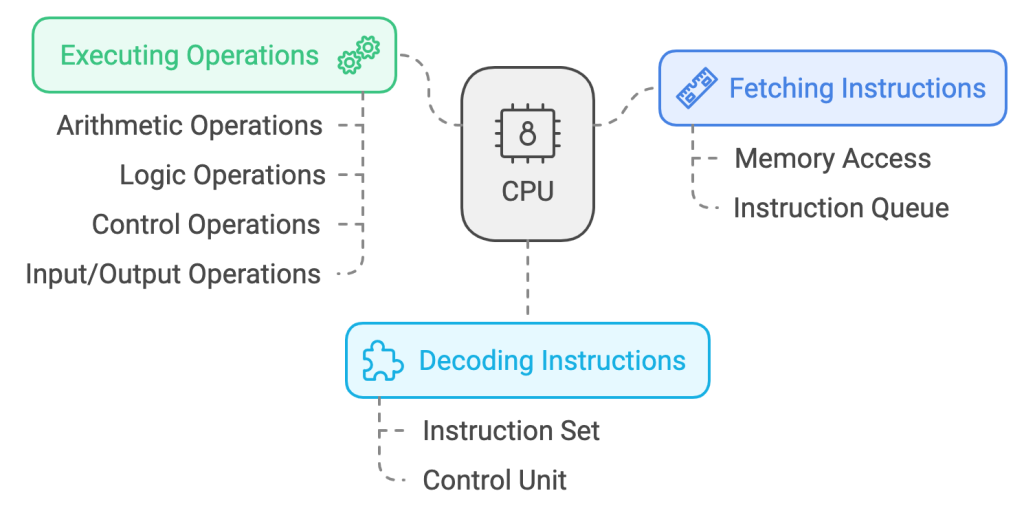
The CPU is the core processing unit responsible for executing instructions and managing the overall operations of a system. It excels at handling diverse, sequential tasks and is the backbone of general-purpose computing.
- What it Does:
- Versatile for a wide range of applications, including office tasks and system management.
- Handles sequential operations efficiently.
- Integrates seamlessly with other hardware components to ensure task accomplishment.
- Limitations:
- Not suited for large-scale parallel computations like graphics rendering or AI training.
GPU (Graphics Processing Unit)
The GPU is specialized for parallel processing, making it ideal for handling tasks that involve large-scale computations. Originally designed for rendering graphics, GPUs are now widely used in fields such as gaming, video editing, and AI model training.

- What It Does:
- Processes thousands of tasks simultaneously, enhancing performance in graphics-intensive and AI workloads.
- Critical for deep learning tasks and scientific simulations.
- Limitations:
- Consumes more power compared to CPUs.
- Less effective for sequential, general-purpose tasks.
Find out more about how GPUs work.
TPU (Tensor Processing Unit)
Developed by Google, TPUs are custom accelerators built specifically for machine learning workloads. They are optimized for the large matrix and tensor operations common in modern AI training and inference, especially inside Google Cloud workflows.

- What It Does:
- Highly efficient for training and inference in machine learning.
- Designed to work seamlessly with TensorFlow frameworks.
- Delivers significant energy savings compared to GPUs for specific AI tasks.
- Limitations:
- Limited versatility; focused mainly on machine learning tasks.
- Requires compatibility with TensorFlow, restricting flexibility.
Find out more about how TPUs work.
NPU (Neural Processing Unit)
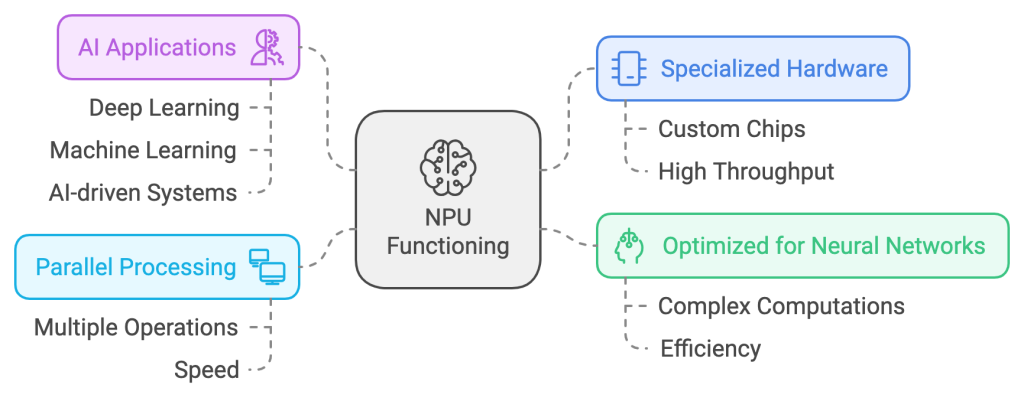
The NPU is a processor tailored for on-device AI tasks, now commonly found in AI PCs, smartphones, and edge devices. It accelerates real-time inference workloads such as image enhancement, speech processing, local copilots, and natural language features without relying as heavily on the cloud.
- What It Does:
- Extremely energy-efficient for AI inference tasks.
- Enables on-device processing, reducing latency and reliance on cloud computing.
- Limitations:
- Task-specific; not suitable for general-purpose computing or AI training.
Key Differences – CPU vs GPU vs TPU vs NPU
| Feature | CPU | GPU | TPU | NPU |
|---|---|---|---|---|
| Primary Role | General computing | Graphics and parallel tasks | Machine learning tasks | On-device AI inference |
| Processing Type | Sequential | Parallel | Tensor-based parallelism | Parallel |
| Energy Efficiency | Moderate | High power consumption | Energy-efficient for AI | Extremely efficient |
| Best Use Cases | Office work, system ops | Gaming, AI training | Training large AI models | Mobile AI applications |
When to Use Each Processor
CPU: Versatility in Everyday Computing
CPUs are indispensable for everyday computing, including web browsing, document editing, and managing hardware components. They handle sequential tasks efficiently and act as the central coordinator for other components.
Example: A CPU ensures your operating system and applications work seamlessly together to achieve normal day to day personal and work related tasks.
GPU: Performance for Graphics and AI
GPUs are the preferred choice for applications requiring extensive parallel processing. They excel in rendering high-quality visuals and accelerating AI training processes.
Example: A data scientist training a neural network uses a GPU to process large datasets and achieve faster results. Similarly, a video editor benefits from a GPU’s ability to render high-resolution content quickly.
TPU: Efficiency for AI Model Training
TPUs are optimized for machine learning workloads, particularly when working with TensorFlow-based models. They are ideal for both training large datasets and performing inference tasks efficiently.
Example: A technology firm deploying a language translation AI uses TPUs to train the model, achieving faster results with lower energy consumption compared to GPUs.
NPU: Real-Time AI in Mobile and IoT
NPUs are specifically designed for real-time AI computations in low-power environments. They enable AI features such as facial recognition, voice assistants, and image processing on mobile devices.
Example: Your smartphone uses its NPU for real-time image enhancement when capturing photos or for biometric authentication like face unlock.
How These Processors Work Together
In modern systems, these processors often work in tandem to maximize performance:
- CPU: Manages overall system operations and task allocation.
- GPU: Handles intensive workloads like rendering or deep learning tasks.
- TPU: Optimizes AI training and inference for large-scale models.
- NPU: Enables efficient on-device AI processing for quick and private computations.
Storage Integration: Pairing these processors with an SSD ensures fast data retrieval and minimizes delays in tasks like loading large datasets or running complex applications.
Real-World Applications
- Gaming:
- CPU: Processes game logic and interactions.
- GPU: Renders high-quality graphics.
- SSD: Reduces loading times for assets and levels.
- AI Research:
- CPU: Allocates tasks and manages resources.
- TPU: Accelerates model training.
- SSD: Provides quick access to large datasets during computations.
- Smartphones:
- CPU: Coordinates system operations.
- NPU: Executes real-time AI tasks like voice recognition and image processing.
Also Read: What are AI Chips and How are they Different from Traditional Chips?
Conclusion
Choosing the right processor depends on the workload you care about most:
- CPU: Best for general-purpose tasks like running applications and managing hardware.
- GPU: Ideal for graphics-intensive tasks, AI training, and video editing.
- TPU: Suited for large-scale AI training and inference, particularly in TensorFlow.
- NPU: Designed for efficient, real-time AI tasks on mobile and IoT devices.
In 2026, many modern systems rely on more than one of these at once, especially AI PCs, cloud AI stacks, and smartphones. Understanding the role of each chip helps you make smarter decisions whether you are buying hardware, deploying AI workloads, or comparing local versus cloud performance.
Add us as a preferred source on Google, and our reviews and picks show up in your Top Stories and AI Overviews.