Our verdict: Reap is the AI clipper we would hand most teams first. It clips a 90-minute podcast in minutes rather than the half hour some rivals take, translates captions into 100+ languages, dubs into 80+, and is the only tool here with both a public API and a native MCP server for hands-off, agent-driven workflows. It is a newer, smaller brand than Opus Clip, and its hour-based caps can bite very heavy users, but on speed, reach and automation it leads the field.
How Reap measures up
What we look for →What Reap is, and who it is for
Reap turns long videos – podcasts, webinars, talking-head recordings – into captioned vertical shorts, and it is built for people who ship a lot of them. Multi-signal, genre-specific moment detection tuned for talking-head, gaming and presentation footage finds the highlights, then reframing, 50+ caption styles, B-roll and a native scheduler carry each clip from source file to posted short.
Reach for Reap when speed, language reach or automation matter: agencies and content teams clipping at volume, creators localizing into many markets, and developers who want to wire clipping into a pipeline. If your single priority is the very best viral-moment detection on English talking-head content, Opus Clip still edges it; if you want an all-in-one suite with built-in analytics, quso is the closer fit.
How Reap performs, criterion by criterion
Reach and languages is Reap’s standout and the reason it tops our ranking: caption and subtitle translation into 100+ languages, AI dubbing into 80+, and voice cloning on Enterprise, which is the widest spread of any clipper we tested. Workflow and automation is close behind – a native scheduler to six platforms, batch processing, and the only combination of a public API and a native MCP server, which lets an AI agent run clipping unattended.
Clip selection is excellent and the fastest here: an independent 2026 benchmark clocked Reap at four to five minutes to first clip on a 90-minute podcast against roughly 25 for Opus Clip Pro. It reads talking-head and gaming footage well, though Opus still has the edge on pure natural-language moment search. Captions and visual polish are strong, with 50+ animated styles, emoji and keyword highlighting, templates and B-roll.
Editing control is solid – multi-ratio reframing with speaker tracking, brand kits, intros and outros. The one place to weigh carefully is true cost and value: paid plans start at a genuinely cheap $9.99/mo watermark-free, but Reap meters by processing hours rather than credits, so very heavy users can hit the hour ceiling, and as a newer brand it has a thinner public track record than Opus.
Key features
- Fastest-in-class AI moment detection (multi-signal, genre-specific for talking-head, gaming, presentation)
- Caption translation in 100+ languages and AI dubbing in 80+ (voice cloning on Enterprise)
- 50+ animated caption styles with emoji and keyword highlighting
- Auto-reframe to 9:16, 1:1, 4:5 and 16:9 with active-speaker tracking
- Native scheduler to TikTok, Reels, Shorts, LinkedIn, X and Facebook, plus batch
- Public REST API and a native MCP server for agent-driven, unattended clipping
Reap pricing and value
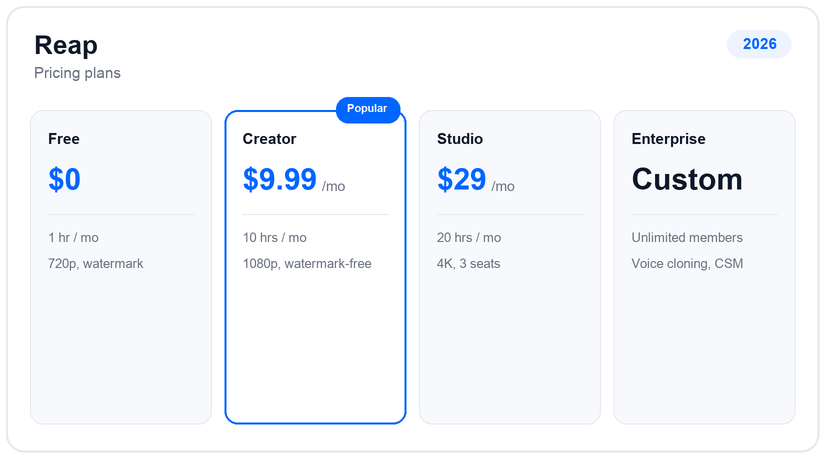
Reap has a real free tier (one hour of clipping a month, 720p, watermarked, projects expire after seven days). Creator is $9.99/mo (about $119 a year) for 10 hours a month, 1080p watermark-free exports and two hours of dubbing and translation. Studio is $29/mo (about $348 a year) for 20 hours, 4K exports, five hours of dubbing and up to three seats. Enterprise is custom, adding unlimited members, custom hours, voice cloning and a dedicated manager.
The model is refreshingly readable: you buy processing hours, not credits that vary by feature, and watermark removal comes at the cheapest paid tier rather than being held back. The only ceiling to watch is the monthly hour cap – a very high-volume clipper can exhaust Studio’s 20 hours – so size the plan to how much source video you actually push through each month.
Pros and cons
- Fastest time-to-first-clip we tested, by a wide margin
- Widest language reach here: translation 100+, dubbing 80+
- Only tool with both a public API and a native MCP server
- Watermark-free from just $9.99/mo, with readable hour-based pricing
- Hour caps (not credits) can bite very heavy users
- Newer, smaller brand with a thinner track record than Opus Clip
- Voice cloning is reserved for Enterprise
- Natural-language moment search is not as deep as Opus Clip’s
Support and reliability
Reap support runs through a help center, email and in-app chat, with developer documentation for the API and MCP server. As a fast-growing product it iterates quickly, and the API-plus-MCP surface means teams can self-serve a lot of the workflow rather than lean on support. There is no public phone line, and Enterprise plans add a dedicated account manager.
Reap vs the alternatives
If Reap’s hour caps or newness give you pause, Opus Clip leads on natural-language moment search, quso bundles scheduling and analytics into one suite, and Vizard matches it on multilingual captions with generous 4K exports. See the best Opus Clip alternatives and the AI clip generators hub for the full field.
Frequently asked questions
How much does Reap cost?
Reap has a free plan (one hour a month, watermarked), then Creator at $9.99/mo (about $119 a year) for 10 hours and watermark-free 1080p, Studio at $29/mo for 20 hours and 4K, and custom Enterprise. It bills by processing hours, not credits.
Is Reap better than Opus Clip?
On speed, language reach and automation, yes – it clips far faster, translates into 100+ languages and is the only tool with an API and MCP server. Opus Clip still leads on natural-language viral-moment search and has a longer track record.
How many languages does Reap support?
Caption and subtitle translation covers 100+ languages and AI dubbing covers 80+, the widest spread of any clipper we tested; voice cloning is available on Enterprise.
Does Reap have an API?
Yes. Reap offers a public REST API and, uniquely, a native MCP server, so an AI agent or pipeline can run clipping unattended – useful for teams automating repurposing at scale.
Is Reap free?
There is a free plan with one hour of clipping a month at 720p with a watermark and seven-day project expiry. Watermark-free exports start on the $9.99/mo Creator plan.
Related guides
Add us as a preferred source on Google, and our reviews and picks show up in your Top Stories and AI Overviews.