Our verdict: Submagic is the tool to reach for when captions are the point. Its animated, word-level captions and fast, template-driven editing flow are the best here, which is why so many short-form creators run every clip through it. The catch for a clipping shortlist is that Submagic’s actual long-video clipping, Magic Clips, is a paid add-on rather than part of the base plan, and video counts and length are capped per tier, so it is a caption-first editor with clipping bolted on rather than a clipper first.
How Submagic measures up
What we look for →What Submagic is, and who it is for
Submagic is a short-form video editor built around captions. You upload a vertical clip and it adds animated, word-level captions, B-roll, sound effects and templates in a fast, polished flow that has made it a staple for TikTok, Reels and Shorts creators. In 2026 it added basic scheduling and a Magic Clips feature that turns long videos into shorts.
Reach for Submagic when you are producing a high volume of short clips and want them to look sharp with minimal effort, especially the captions. If your core need is turning long podcasts or webinars into clips, note that this is an add-on here rather than the base job – a dedicated clipper like Reap, Opus Clip or quso is a better first pick, with Submagic layered on for the caption pass.
How Submagic performs, criterion by criterion
Captions and visual polish is Submagic’s clear strength and scores highest: word-level animated captions with a deep template library, emoji and keyword highlighting, plus B-roll and sound effects that make a plain talking clip feel produced. This is the feature people actually buy it for.
Clip selection is where a clipping shortlist has to be careful. The long-video-to-short engine, Magic Clips, processes about ten long videos a month into shorts but is a paid add-on (around $19/mo) rather than part of the base plan, so the headline price understates the cost of the clipping job. Editing control and workflow are solid – custom templates on higher tiers, scheduling added in 2026, and an API on Business.
Reach and languages is respectable at 48+ caption languages with AI translation from the Pro tier up, though there is no voice dubbing. True cost and value is dragged down by the add-on model and tight caps: base tiers limit both the number of videos a month and their maximum length, so heavy or long-form users climb the ladder quickly.
Key features
- Best-in-class word-level animated captions with a large template library
- Magic Clips add-on: turn long videos into short clips (paid add-on)
- B-roll, sound effects and emoji highlighting for produced-looking shorts
- Custom brand templates on Pro and above
- Basic scheduling to TikTok, Reels and Shorts (added 2026)
- AI caption translation (Pro+) and an API on Business
Submagic pricing and value
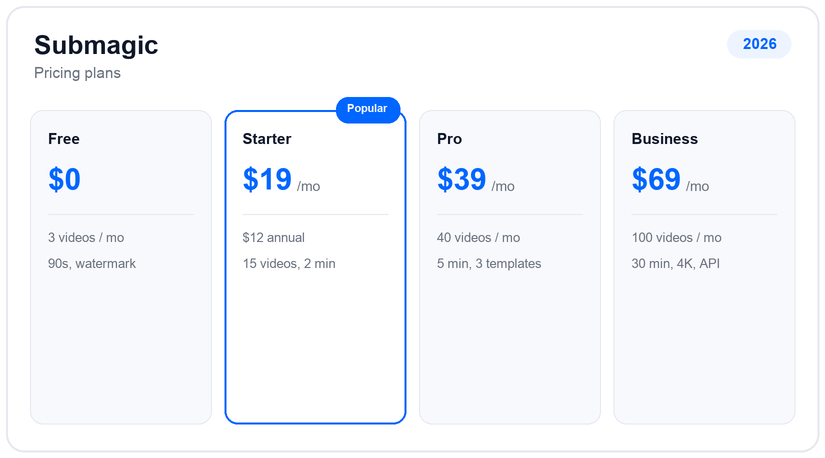
Submagic is priced per member per month. Free gives three videos a month at up to 90 seconds, watermarked. Starter is $19/mo (about $12 annually) for 15 videos a month at up to two minutes; Pro is $39/mo (about $23 annually) for 40 videos at up to five minutes with three custom templates; Business is $69/mo (about $41 annually) for up to 100 videos at up to 30 minutes, 4K/60fps and unlimited templates.
Two things shape the true cost. First, the long-video clipper, Magic Clips, is a separate add-on at around $19/mo (about $12 annually) on any tier, so if clipping is why you are here, budget for it on top. Second, the per-tier caps on video count and length are tight, so long-form creators and teams tend to need Pro or Business rather than Starter.
Pros and cons
- Best animated captions and template library in the category
- Fast, polished short-form editing flow
- B-roll, sound effects and emoji highlighting built in
- Now includes scheduling and, via add-on, long-to-short clipping
- The long-video clipper (Magic Clips) is a paid add-on, not base
- Video count and length are capped tightly per tier
- No voice dubbing (caption translation only)
- Priced per member, so teams multiply quickly
Support and reliability
Submagic support runs through email, a help center and an active creator community, with API documentation for Business users. The company grew fast to around $8M ARR on a small team, so support is lean but responsive, and its heavy creator following means plenty of third-party tutorials. There is no public phone line.
Submagic vs the alternatives
If you want clipping in the base plan rather than as an add-on, Reap, Opus Clip and quso are dedicated clippers, while Vizard matches Submagic on captions with stronger long-to-short detection. For the captions job specifically, few beat it. See the best AI caption generators and the AI clip generators hub.
Frequently asked questions
How much does Submagic cost?
Free covers three videos a month. Paid is per member: Starter $19/mo (about $12 annually), Pro $39/mo (about $23 annually) and Business $69/mo (about $41 annually). The Magic Clips long-to-short add-on is about $19/mo (about $12 annually) on top.
Does Submagic clip long videos?
Yes, but through the Magic Clips add-on rather than the base plan. It turns about ten long videos a month into shorts; if long-to-short clipping is your main need, budget for the add-on or use a dedicated clipper.
Is Submagic good for captions?
Yes – its animated, word-level captions and template library are the best in this comparison, which is the main reason creators use it.
How many languages does Submagic support?
Captions cover 48+ languages, with AI caption translation from the Pro tier up. There is no voice dubbing, only caption translation.
Is there a free version of Submagic?
Yes, a free plan with three videos a month at up to 90 seconds, watermarked. Removing the watermark and raising the caps requires a paid tier.
Related guides
Add us as a preferred source on Google, and our reviews and picks show up in your Top Stories and AI Overviews.