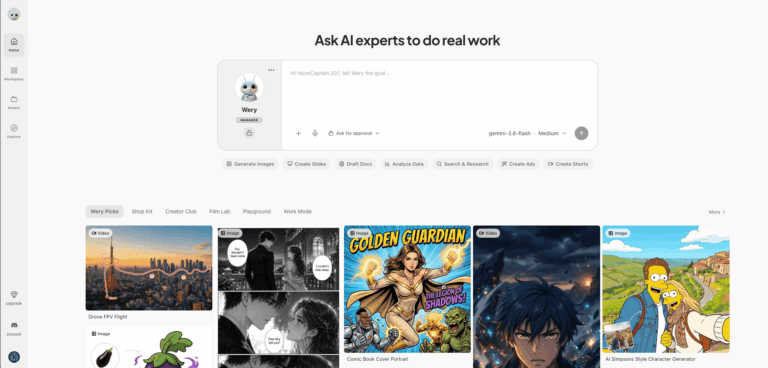
Wery AI is an AI expert workspace that turns a single goal into finished work. Instead of one generic chatbot, it routes tasks to specialist agents for research, documents, spreadsheets, slides, images, video, and music. It solves the problem of juggling many separate AI tools by running experts in parallel inside one workspace.
Wery AI acts as a manager agent that understands your objective, builds an execution plan, and coordinates eleven expert agents. Results stay saved in Workspace and Assets, so projects keep context and can be edited or reused later.
Freelancers, marketers, solopreneurs, and small teams use it to produce reports, decks, budgets, short videos, and designs without switching between tools or writing complex prompts.
Key Features of Wery AI
- Wery Manager Agent: Interprets your goal, breaks it into steps, and routes work to the right specialist experts automatically.
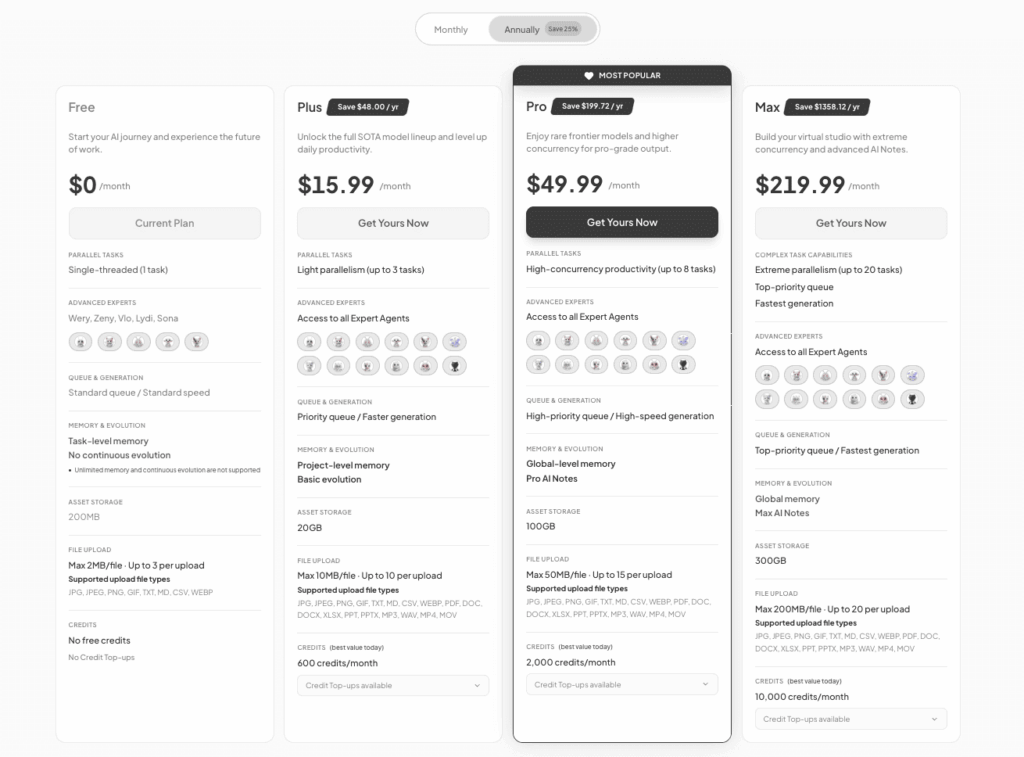
- Parallel Task Execution: Runs multiple AI experts simultaneously on one objective, with concurrency rising from single tasks up to twenty on higher plans.
- Execution Plan Review: Shows a structured plan before work begins, letting you review and approve steps before the experts start running.
- Cella Spreadsheet Expert: Cleans data, designs formulas, and builds charts and KPI reports from Excel and CSV files without manual spreadsheet effort.
- PPTea Slides Expert: Turns notes, ideas, and proposals into structured presentation decks with clear outlines, slide copy, and persuasive flow.
- Xdoc Document Expert: Drafts, rewrites, and restructures reports, proposals, articles, scripts, and meeting minutes into polished, send-ready formal documents.
- Nolan Director Expert: Breaks stories and video briefs into shots, scenes, pacing, and storyboards before any video generation begins.
- Zeny Design Expert: Generates and edits images, logos, posters, covers, and UI revisions, and also supports OCR for text extraction.
- Vlo Video Generation: Creates short videos and motion footage from text prompts or images using leading video models and template references.
- Lydi Music Expert: Generates custom music from one sentence, choosing mood, rhythm, and scene from templates for background tracks and scoring.
- Onir Podcast Expert: Converts topics, articles, or viewpoints into podcast scripts, host flow, interview questions, and structured episode outlines.
- Doi Research Expert: Finds sources, verifies facts, compares options, and synthesizes defensible research reports for market research and competitor analysis.
- Komp Post-Production: Handles editing, captions, translated subtitles, audio cleanup, aspect ratio fitting, and final exports for existing footage.
- Sona Companion: Offers tarot, astrology, MBTI, and personality readings while keeping memories that make later conversations feel more personal.
- Project Memory: Retains context across tasks so each expert knows what earlier experts found, removing the need for manual bridging.
- User Context and Brand Soul: Learns your industry, audience, red lines, aesthetic preferences, and tone of voice to keep outputs consistent over time.
- Workspace and Assets: Stores every result in Workspace and Assets so you can edit, reuse, and build on finished deliverables later.
- Scheduled Tasks: Runs recurring or time-based tasks automatically, such as reports, content, reminders, and refreshed results on a fixed cadence.
- Template Library and Tools: Provides ready-made tools and templates for rewriting, translation, headshots, thumbnails, resumes, subtitles, and other everyday creative tasks.
- Multi-Language Interface: Offers the website interface in ten languages, including English, Chinese, Japanese, French, Spanish, Korean, German, Arabic, and Portuguese.
- Private Wiki Knowledge Base: Pro and Max plans include a private wiki knowledge base and global-level memory for deeper personalization.
How to Use Wery AI
- Visit wery.ai and sign up or log in to open your workspace.
- Type your goal to @Wery, or lock a specific expert if you already know who should handle it.
- Review the proposed execution plan and confirm it so the experts can begin.
- Let the experts run in parallel and follow progress inside your Workspace.
- Edit, refine, and download finished outputs from Workspace and Assets.
- Schedule recurring tasks or upgrade your plan for more credits and concurrency.
Key Use Cases for Wery AI
- Marketing Budget Reports: Build spreadsheets with ROI charts, conversion funnels, and forecasts that summarize channel spend and campaign performance for stakeholders.
- Pitch Decks and Presentations: Turn rough notes and proposals into polished slide decks with outlines and persuasive flow for investors, clients, or classes.
- Short Video Production: Generate cinematic shorts from one sentence, with storyboards, video clips, music, and subtitles handled by coordinated specialist experts.
- Market and Competitor Research: Compile evidence-backed research notes, fact-checks, and competitor comparisons to support strategy decisions without manually searching many sources.
- Brand and Social Content: Create posters, thumbnails, memes, logos, and content calendars that keep a consistent tone and visual identity across channels.
- Podcasts and Audio Shows: Turn articles or ideas into podcast scripts, host flow, and episode outlines ready for recording and publishing.
- Career Documents: Draft resumes, cover letters, and interview review notes quickly using ready-made templates for job seekers and students.
Pros and Cons
Pros
- One workspace replaces many separate AI tools
- Specialist experts run tasks in parallel
- Covers documents, sheets, slides, video, and music
- Results saved for editing and reuse
- Free plan available with clear upgrade path
Cons
- Outputs from parallel experts still need human review, since generated research, documents, and designs may require edits before use.
Frequently Asked Questions
What is Wery AI?
Wery is an AI expert workspace where you state a goal and specialist agents deliver the finished work.
Is Wery AI Free to Use?
Yes, Wery has a free plan with one task at a time, though it includes no free credits.
How much does Wery cost?
Paid plans include Plus at $15.99, Pro at $49.99, and Max at $219.99 monthly, with annual billing saving 25 percent.
How do credits work in Wery?
Credits power requests and generation, vary by task complexity, reset monthly, and purchased top-up credits never expire.
Which AI experts does Wery include?
Wery includes eleven experts: Cella, PPTea, Xdoc, Nolan, Zeny, Lydi, Onir, Doi, Vlo, Komp, and Sona.
How is Wery AI different from chatbots?
Wery builds a structured plan and runs specialists in parallel, rather than handling one prompt at a time.
Can I schedule recurring tasks in Wery?
Yes, you can schedule Wery to run tasks on a fixed or recurring cadence, such as reports or content.
How can I contact Wery support?
You can reach the Wery support team by emailing support@wery.ai, listed in the site footer and privacy policy.