TL;DR: HyperWrite is an AI writing and personal assistant tool for drafting, rewriting, research, email, and everyday productivity tasks. It is best for users who want fast writing help plus browser-based assistance across different workflows.
App Score: We give HyperWrite 8/10 for its strong writing assistance, TypeAheads, custom personas, citation support, and broad set of AI tools.
HyperWrite has evolved beyond a simple AI writer into a broader AI assistant for writing, research, and productivity. It offers drafting help, rewriting, brainstorming, content generation, citations, custom personas, and browser-based assistance through its extension and tool library. It is especially useful for students, professionals, marketers, and everyday users who want quick writing support without juggling multiple separate tools.
Who is HyperWrite For?
Writers and content creators: Useful for drafting, rewriting, brainstorming, and improving content faster.
Students and researchers: Helpful for note-taking, outlining, citations, and research-backed writing tasks.
Professionals and knowledge workers: A strong fit for emails, summaries, reports, and day-to-day writing support.
Users who want an AI assistant in the browser: HyperWrite stands out for TypeAheads, extension-based help, and workflows that continue across websites.
Key Features of HyperWrite
AI Writing Assistant: Helps generate drafts, rewrite text, brainstorm ideas, and improve writing quality.
TypeAheads: Offers predictive writing suggestions as you type, which is one of HyperWrite’s most recognizable features.
Citations and Real-Time Info: Paid plans include cited and research-oriented outputs for more factual writing workflows.
Custom Personas: Lets users shape the assistant around different tones, voices, and writing styles.
Large AI Tool Library: Includes many pre-built tools for writing, productivity, communication, and content workflows.
How to Use HyperWrite
Create an account, install the browser extension if needed, and start with drafting or rewriting tasks inside HyperWrite or across supported websites. Use TypeAheads for in-line help, experiment with tools and personas, and upgrade if you need more AI messages or broader access.
Pros
- Strong browser-based writing assistance with TypeAheads and extension support
- Good mix of drafting, rewriting, and productivity-focused AI tools
- Premium and Ultra plans add stronger research and personalization features
- Helpful for both professional and personal writing workflows
Cons
- Message limits on lower tiers can feel restrictive for heavy users
- Best features are gated behind paid plans
- Some users may want deeper team, workflow, or publishing features than HyperWrite offers
FAQs
What is HyperWrite?
HyperWrite is an AI writing and personal assistant tool that helps with drafting, rewriting, research, productivity, and browser-based writing workflows.
Is HyperWrite free?
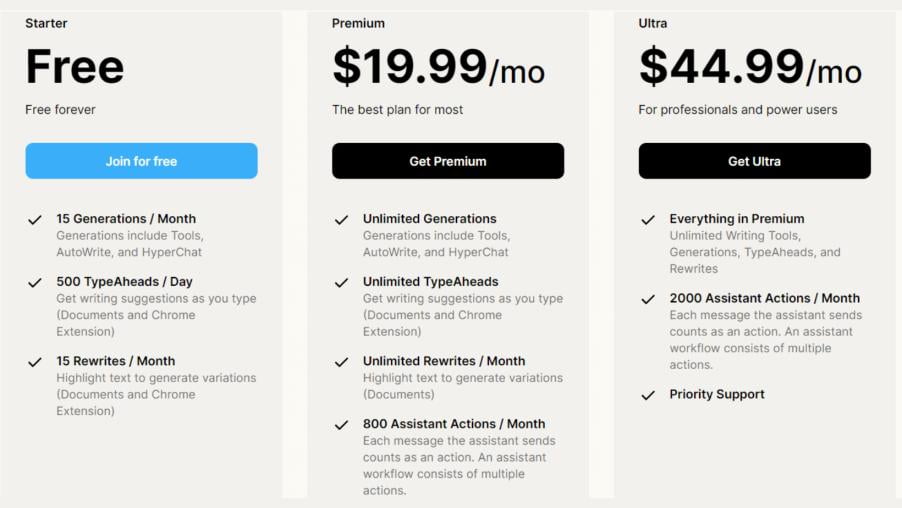
Yes. HyperWrite offers a free plan with limited access, while paid plans unlock more AI messages, personas, and assistant features.
How much does HyperWrite cost?
Based on HyperWrite’s current official pricing, Premium is $19.99 per month or $16 per month billed annually, and Ultra is $44.99 per month or $29 per month billed annually.
What makes HyperWrite different?
HyperWrite stands out for TypeAheads, browser-based assistance, custom personas, and a wide library of writing and productivity tools.