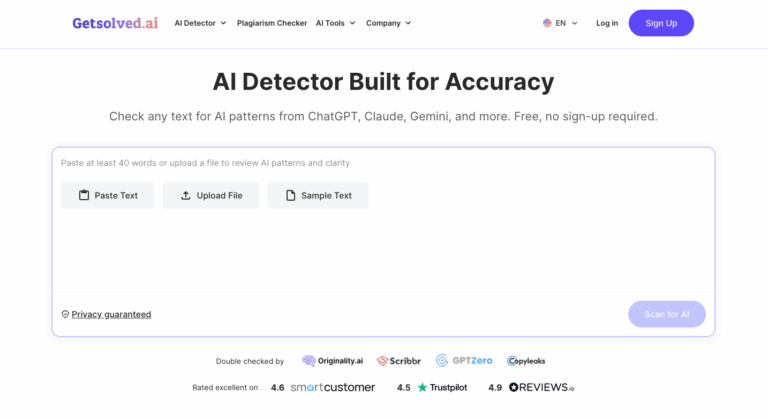
Getsolved AI Detector is an online checker that scans text for patterns typical of ChatGPT, Claude, and Gemini writing. It provides sentence-level feedback and clarity scores, helping writers, editors, and educators review drafts, spot machine-like phrasing, and refine content before publishing or submission.
Getsolved AI Detector analyzes pasted text or uploaded documents and highlights sentences that read as artificial, overly formal, or inconsistent. Instead of a bare percentage, it explains why sections were flagged so users know exactly what to fix.
Teachers, content writers, editors, recruiters, and business teams use it to review articles, reports, essays, and drafts, check authenticity, and polish tone before work goes out.
Key Features of Getsolved AI Detector
- Sentence-Level Analysis: Highlights individual sentences that sound artificial or overly formal, showing exactly which phrases triggered the AI detection flags.
- Multi-Model Detection: Identifies writing patterns from ChatGPT, Claude, Gemini, and other popular AI models, flagging machine-like phrasing and inconsistent tone across documents.
- Clarity Score: Delivers an AI score alongside a detailed report explaining why certain sections sound awkward or overly formal.
- Rewrite Suggestions: Offers guidance on adjusting tone and phrasing in inconsistent or mechanical sections, helping text read more naturally and consistently throughout.
- Document Upload: Scans PDF, DOCX, TXT, and Google Docs files directly, so you never need to copy and paste.
- Multilingual Support: Analyzes writing in more than 20 languages, so checks are not limited to English-only content or single-language teams.
- Long Document Support: Processes up to 10,000 words per request, covering everything from a single paragraph to a complete draft in one scan.
- Fast Results: Returns results in under ten seconds directly in your browser, making quick checks practical before deadlines or publication.
- Privacy Protection: Processes uploads in a secure environment and never uses submissions to train models or shares them with third parties.
- Plagiarism Checker: Scans text across billions of web pages and private databases to find matching content alongside AI detection.
- AI Text Improver and Paraphraser: Refines or rephrases text in one click to sound more natural while preserving the original meaning and your voice.
- Grammar and Fact Checking: Fixes grammar, punctuation, and clarity issues and verifies claims against reliable sources within the same workspace.
How to Use Getsolved AI Detector
- Open the Getsolved AI Detector page in your browser; no account is needed for a quick free check.
- Paste your text into the input box, or upload a PDF, DOCX, TXT, or Google Docs file.
- Start the scan and wait a few seconds while the tool analyzes your content.
- Review the overall AI content percentage and the highlighted sentences that were flagged.
- Read the sentence-level feedback to understand why each passage sounds artificial, mechanical, or inconsistent.
- Edit flagged sections yourself, or use the paraphraser or AI text improver to refine tone and flow.
- Rescan the revised draft and run a final check before publishing or submitting your work.
Key Use Cases for Getsolved AI Detector
- Academic Review: Teachers and program staff run a fast first-pass check across student submissions and use explanations to guide conversations.
- Freelance Writing: Writers and copywriters catch AI-style passages early and refine them to keep their authentic tone before work reaches an editor.
- Editorial Screening: Editors and content managers review guest posts, website copy, and client drafts to spot AI patterns before publication.
- Business Communications: Teams polish reports, proposals, and internal communications by finding tone inconsistencies and awkward phrasing that could weaken credibility.
- Recruiter Screening: Recruiters check application materials such as cover letters and writing samples for AI-generated text during candidate screening.
- Revision Workflow: Writers scan early drafts, rescan after major revisions, and run a final check to confirm text reads naturally.
Pros and Cons
Pros
- Free checks without creating an account
- Detailed sentence-level feedback explains every flag
- Supports more than 20 languages
- Handles documents up to 10,000 words
Cons
- Sentence-level highlights focus on style patterns, so heavily edited or mixed human and AI text can be harder to judge.
- The 10,000-word per-request limit means very long manuscripts must be split into several separate scans for full coverage.
Frequently Asked Questions
What is Getsolved AI Detector?
It is an online tool that scans text for ChatGPT, Claude, and Gemini patterns and explains each flagged sentence.
Is Getsolved AI Detector Free to Use?
Yes, free AI checks are available without signing up, and paid plans bundle extra tools like plagiarism checking.
Which AI models can Getsolved AI Detector identify?
It checks for writing patterns from ChatGPT, Claude, Gemini, and other major models, so detection is not limited to one.
How accurate is Getsolved AI Detector?
The site claims 98 percent accuracy with a false-positive rate below 0.2 percent, though results should still be reviewed manually.
Can I upload documents to Getsolved AI Detector?
Yes, you can upload PDF, DOCX, TXT, and Google Docs files, with documents up to 10,000 words per request.
Is my content safe on Getsolved AI Detector?
Uploads are processed securely, and Getsolved states it never trains models on submissions or shares them with third parties.
Does Getsolved AI Detector support languages other than English?
Yes, it analyzes writing in more than 20 languages, including German, Spanish, French, Italian, and Portuguese.