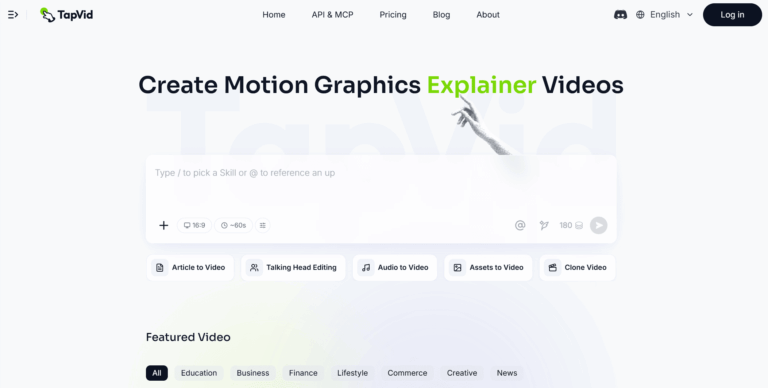
TapVid is an AI explainer video generator that turns prompts, PDFs, scripts, or links into finished motion graphics videos. It replaces slow manual scripting, animation, and editing with an automated pipeline, letting marketing, content, and education teams publish polished explainer videos in minutes instead of weeks.
Traditional explainer video production needs writers, editors, and animators working through a slow manual process. TapVid removes that bottleneck by generating structured, narrated motion video directly from a prompt, document, or script, so the output is ready to publish without a production team.
TapVid is used by product marketing and content teams, educators and course creators, and brand studios that need motion video at volume. Teams at companies like Amazon, Alibaba, and ByteDance, along with university programs, rely on it to turn source material into finished video quickly.
Key Features of TapVid
- Explainer Video: Turns a prompt, PDF, or link into a motion graphics explainer video without editing or design work.
- One Shot: Generates a complete publish-ready video from outline to script to final render in a single pass.
- Intelligent Edit: Refines and adjusts generated videos using plain natural language instructions instead of a timeline editor.
- Multi-Source Input: Converts articles, PDFs, PPT slides, Word docs, blogs, and URLs directly into video content.
- Talking Head Editing: Enhances and edits presenter-style talking head footage as part of the video workflow.
- Audio to Video: Builds a structured motion video from an existing audio track or voiceover recording.
- Assets to Video: Assembles uploaded brand assets and media into an animated finished video.
- Clone Video: Remixes existing featured videos as a starting template for new projects.
- Credit-Based Rendering: Charges only for successfully rendered seconds, with credits refunded automatically on failed renders.
- MCP Integration: Can be called directly from other tools and workflows through the Model Context Protocol.
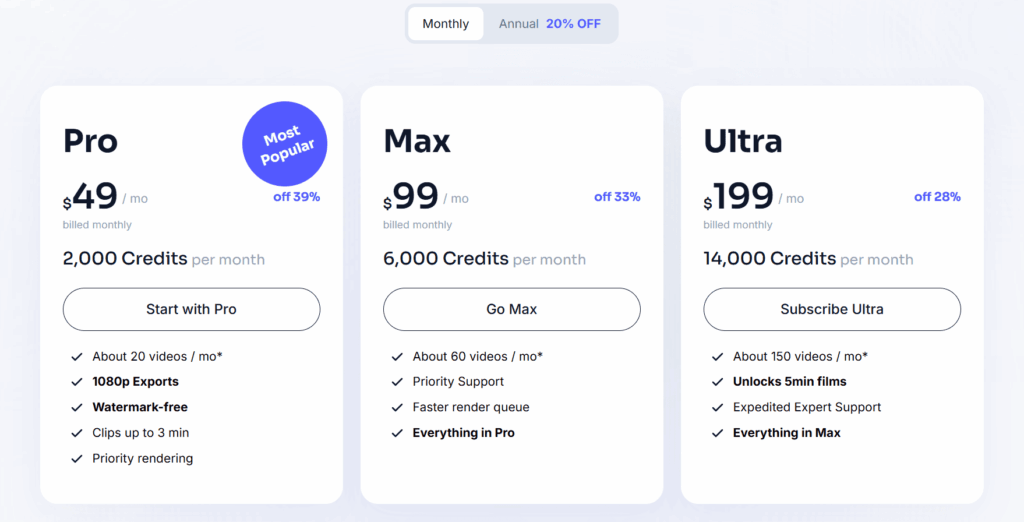
- Maximum clip length is capped at three to five minutes depending on the subscription plan.
How to Use TapVid
- Create an account and log in to the TapVid dashboard.
- Choose an input source: a text prompt, PDF, script, article, or URL.
- Set the video format, aspect ratio, and target duration.
- Generate the video in One Shot mode or step through outline, script, and render stages.
- Review the draft and refine it using Intelligent Edit’s natural language commands.
- Export the finished video in 1080p and publish or share it.
Key Use Cases for TapVid
- Product Marketing Explainers: Turns product docs into publish-ready explainer videos without waiting on an agency.
- SaaS Onboarding Videos: Produces help center and customer onboarding clips directly from support documentation.
- Course Content Creation: Converts lesson slides and course material into engaging video for students.
- Social Media Clips: Generates short motion graphics videos for marketing and social distribution at scale.
- Feature Announcements: Creates investor pitch and feature announcement videos from existing written content.
Pros and Cons
Pros
- Fast prompt-to-video generation
- No editing skills required
- Natural language video editing
- Multiple input formats supported
- Credits refunded on failed renders
Cons
- The trial pass only includes a single video generation.
- No dedicated mobile app is offered; TapVid currently works only through the web platform.
Frequently Asked Questions
What is TapVid?
TapVid is an AI platform that turns prompts, documents, or scripts into finished explainer videos with motion graphics.
Is TapVid Free to Use?
TapVid offers a paid 24-hour trial pass for one video; ongoing use requires a Pro, Max, or Ultra subscription.
Can TapVid turn a PDF into a video?
Yes, you can upload a PDF and TapVid automatically structures its content into a narrated motion video.
Does TapVid support voiceovers and subtitles?
Yes, generated videos include AI voiceover narration and can display on-screen text and subtitles automatically.
Can I edit a TapVid video after it’s generated?
Yes, Intelligent Edit lets you refine scenes, pacing, and visuals using plain natural language instructions.
Does TapVid integrate with other tools?
Yes, TapVid is accessible via MCP, allowing it to be called from other tools teams already use.
What is TapVid’s refund policy?
Subscriptions aren’t refunded for partial billing periods, but credits for failed renders are returned automatically.