
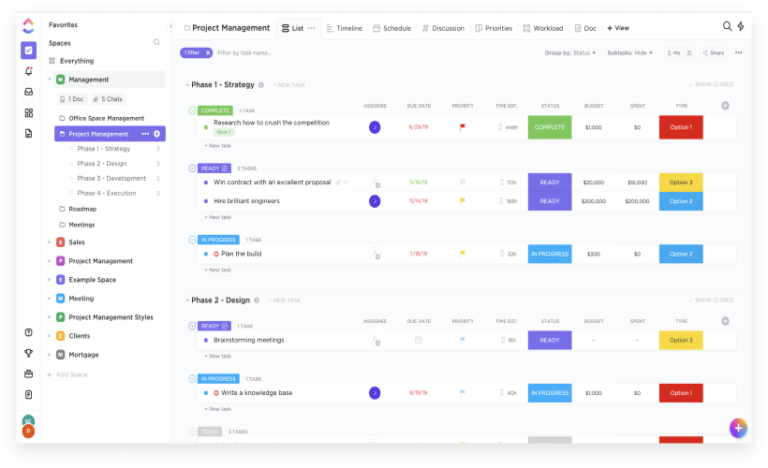
TL;DR: ClickUp is one of the strongest project management and work management platforms for teams that want tasks, docs, dashboards, automations, chat, and reporting in one workspace. It is a better fit for operations-heavy teams, agencies, and cross-functional startups than for teams that just want a simple task list. The main tradeoff is complexity: ClickUp can replace a lot of tools, but it usually asks for more setup and stronger workspace discipline than lighter alternatives.
App Score: We give ClickUp 8.9/10 for breadth, value on the core plans, and how much control it gives growing teams. It scores lower on simplicity, because the same flexibility that makes ClickUp powerful can also make it feel heavier than a lighter Asana, Trello, or Monday.com setup.
ClickUp is easiest to justify when your team is already outgrowing a basic task manager and wants project management, internal docs, workflows, dashboards, and collaboration in one place. If you only need a clean to-do tool, it can be more software than you need. If you want one workspace that can replace several work tools, ClickUp is still one of the best options to shortlist.
Try ClickUp before you over-compare: if you already know your team needs one place for tasks, docs, dashboards, and automations, start with ClickUp’s free workspace here and test the structure on real work before you pay.
Quick Verdict
- Best for: agencies, operations teams, marketing teams, PMOs, and startups that want one platform for planning, documentation, execution, and reporting.
- Skip if: your team wants the fastest possible onboarding, minimal setup, or only needs a lightweight task tracker.
- Biggest strength: ClickUp gives you unusual breadth for the money, especially if you want tasks, docs, dashboards, automations, and team collaboration in one workspace.
- Biggest risk: complexity and separate AI pricing can make ClickUp feel heavier and more expensive in practice than the base plan first suggests.
What ClickUp is and who should use it
ClickUp is an all-in-one work management platform. At its best, it acts like the operating system for a team’s work: tasks, project views, documentation, reporting, goals, time tracking, automations, whiteboards, and collaboration all sit in the same workspace.
- Use ClickUp if: you want to standardize work across multiple teams and reduce tool sprawl.
- Use ClickUp if: recurring workflows, approvals, dashboards, and cross-functional visibility matter more than having the simplest interface.
- Be careful if: your team resists setup work, ignores process, or mainly needs a clean list-and-board tool with very little admin overhead.
ClickUp pricing and plans
ClickUp’s pricing is attractive on the surface, but buyers should think about it in layers: the core workspace plan first, then whether AI is worth adding after the team is already using the platform well.
- Free Forever: good for evaluation, solo use, or very small teams. The free plan includes unlimited tasks and members, collaborative Docs, Kanban boards, sprint management, calendar view, and 60MB storage.
- Unlimited: currently listed at $7 per user/month billed yearly. This is the sweet spot for most small teams that need unlimited storage, integrations, Gantt charts, goals, resource management, and ClickUp Chat.
- Business: currently listed at $12 per user/month billed yearly. This is the better fit when you need advanced dashboards, timeline and activity views, automation integrations, custom exporting, workload management, and Google SSO.
- Enterprise: custom pricing for governance, custom roles, audit controls, data residency, enterprise-scale automations, onboarding, and higher support depth.
- AI pricing is separate: Brain AI is currently listed at $9 per user/month, while Everything AI is listed at $28 per user/month.
- Pricing tip: treat ClickUp as a workspace-level buying decision. Even when the per-seat price looks low, the real cost depends on team size, plan depth, and whether you add AI.
Good fit for a paid ClickUp plan? If you need unlimited storage, integrations, dashboards, workload views, or broader team visibility, check ClickUp’s current pricing and plans and model the total seat cost before rollout.
Is ClickUp worth paying for?
Yes, when your team is replacing several work tools or running complex recurring processes. ClickUp becomes easier to justify when it is not just “task software” but the place where planning, docs, reporting, and execution actually meet.
- Worth paying for: teams that need unlimited storage, integrations, dashboards, recurring workflows, and cross-functional visibility.
- Less worth paying for: teams that only use a small fraction of the platform and could run fine on a lighter task tool.
- Best buying path: prove the structure in the free plan first, then move to Unlimited or Business only when the team is clearly using the extra depth.
ClickUp features that matter in real teams
ClickUp wins less because of one killer feature and more because the core pieces work together in one place.
- Views and task structure: list, board, calendar, timeline, workload, Gantt, and other views make it easier to support different teams inside one system.
- Docs close to execution: keeping SOPs, briefs, project notes, and internal knowledge close to tasks is one of ClickUp’s biggest practical advantages.
- Dashboards and reporting: strong fit for teams that want visibility across deliverables, workloads, goals, and performance without exporting everything elsewhere.
- Automations and integrations: useful when your process is repeatable and you want the platform to handle assignments, status changes, reminders, or external tool handoffs.
- Collaboration layer: comments, chat, whiteboards, and shared views help when your team wants fewer context switches between planning and communication.
ClickUp Brain and AI pricing
ClickUp Brain is not the reason to buy ClickUp first. It is the reason to deepen usage after the workspace is already useful. The AI layer can help with summaries, search, writing, and workflow assistance, but it is priced separately, so buyers should treat it as an add-on decision rather than assuming it is part of the core value.
- Worth the extra cost: teams already living in ClickUp all day that want AI help inside docs, tasks, chat, and search.
- Harder to justify: teams still learning basic workspace structure or teams that can get by with cheaper standalone AI help.
- Practical advice: stabilize your workflows first, then test whether Brain AI saves enough time to earn the extra per-seat cost.
Where ClickUp is strongest
- All-in-one workspace consolidation: strong fit when the team is tired of running work across docs, chat, dashboards, and task tools separately.
- Operational depth: ClickUp is especially good when recurring work, approvals, dependencies, capacity, and reporting matter.
- Cross-functional visibility: useful for teams that need marketing, operations, product, leadership, and delivery views inside the same system.
- Value on core plans: the free tier is unusually capable, and the Unlimited plan is still one of the better value points in the category.
Where ClickUp feels heavy
- Setup takes real effort: statuses, views, folders, permissions, dashboards, and automations can overwhelm teams that want instant simplicity.
- Interface density: some teams love the depth, while others feel buried by options.
- Performance can be a complaint: heavier workspaces and more complex setups can feel slower than lighter competitors.
- AI raises total cost: Brain AI and Everything AI can materially change the effective cost of rollout if a lot of seats need them.
ClickUp vs alternatives
- ClickUp vs Asana: Asana is usually easier to adopt. ClickUp is stronger when you want more depth, more views, more operational control, and tighter docs-plus-execution workflows.
- ClickUp vs Monday.com: Monday.com is often easier on the eyes and easier to explain to new teams. ClickUp is usually the better choice when you want more feature breadth and a stronger all-in-one workspace.
- ClickUp vs Notion: Notion is the better docs-first environment. ClickUp is stronger if task execution, dashboards, and workflow structure are the main job.
- ClickUp vs Jira: Jira is still a cleaner fit for engineering-heavy teams with software delivery at the center. ClickUp is broader for cross-functional business work.
Should you buy ClickUp?
Buy ClickUp if your team is ready to consolidate work into one platform and has enough operational maturity to benefit from the extra depth. Skip it if you know your team will fight the setup, ignore structure, or only needs a simple task tool with very light administration.
Bottom line: if your team is trying to replace a patchwork of task, docs, and reporting tools, start with ClickUp’s free workspace and only move up to paid plans once your team has proved it will actually use the depth.
Pros and Cons
Pros:
- One of the broadest project management platforms in the category.
- Strong free plan and good value on the Unlimited tier.
- Useful blend of tasks, docs, dashboards, automations, and reporting.
- Very strong fit for cross-functional teams that want to standardize work.
Cons:
- Steeper learning curve than lighter alternatives.
- Can feel overbuilt for small teams or simple workflows.
- AI is priced separately, which can change the real cost quickly.
- Interface density and performance can frustrate some teams.
FAQs
Is ClickUp free?
Yes. ClickUp has a Free Forever plan that is genuinely useful for solo users, evaluation, and very small teams, especially if you want unlimited tasks and members while you test the workspace.
What is the best ClickUp plan for small teams?
For most small teams, the Unlimited plan is the best starting point because it unlocks the core value of ClickUp without pushing you into the heavier Business tier too early.
Is ClickUp Brain included in the normal ClickUp price?
No. ClickUp currently prices Brain AI and Everything AI separately from the main workspace plans, so buyers should factor AI into the total seat cost instead of assuming it is bundled in.
Is ClickUp better than Asana or Monday.com?
It depends on what your team values. ClickUp is stronger when you want depth, more views, docs tied to execution, and a fuller all-in-one workspace. Asana and Monday.com are often easier to adopt if simplicity matters more than breadth.
Is ClickUp hard to set up?
It can be. ClickUp rewards teams that are willing to spend time on statuses, views, dashboards, and workflow design. That is one of its biggest strengths and one of its biggest adoption risks.