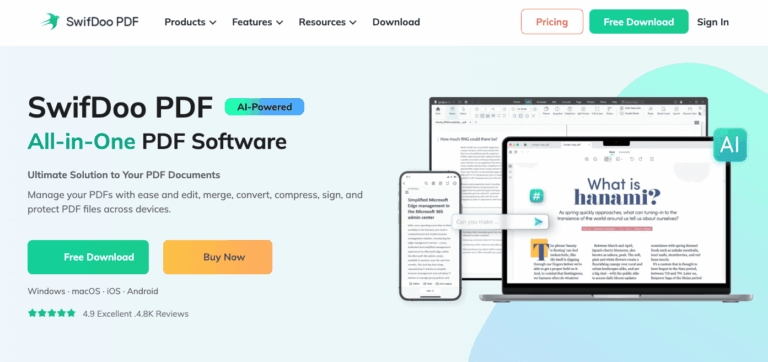
SwifDoo PDF is an all-in-one PDF editor for Windows, Mac, iOS, and Android that lets users edit, convert, merge, compress, sign, and chat with PDF files using built-in AI tools, solving the hassle of juggling multiple PDF apps for document tasks.
SwifDoo PDF helps individuals and teams handle everyday document work without switching between separate editors, converters, and readers. It solves the problem of fragmented PDF workflows by combining editing, conversion, OCR, and AI summarization in a single lightweight program.
Freelancers, students, and small business users rely on it to edit contracts, convert files for sharing, and extract text from scanned documents. Its cross-platform support means people can keep working on PDFs whether they are on a desktop, laptop, or mobile device.
Key Features of SwifDoo PDF
- AI PDF Assistant: Summarizes, translates, explains, proofreads, and chats with PDF content to speed up document comprehension.
- PDF Editing: Add, delete, or rearrange text, images, and hyperlinks directly inside a PDF like a word processor.
- File Conversion: Converts PDFs to and from Word, Excel, PowerPoint, JPG, HTML, EPUB, DWG, and more formats.
- Merge and Split: Combines multiple PDFs into one file or splits a document into separate pages or sections.
- Compression: Shrinks PDF file size at different compression levels while preserving readability.
- OCR Recognition: Turns scanned or image-only PDFs into searchable, editable, and copyable text documents.
- Annotation Tools: Highlight, underline, add sticky notes, stamps, and shapes to mark up PDF pages.
- E-Signature: Create handwritten or digital signatures and apply them directly to PDF documents.
- Password Protection: Encrypt PDFs with passwords and set permissions for viewing, editing, or printing.
- Batch Processing: Convert, merge, compress, or encrypt multiple PDF files at once to save time.
How to Use SwifDoo PDF
- Download and install SwifDoo PDF for your device from the official website or app store.
- Open the PDF file you want to work with inside the program.
- Choose a tool from the toolbar, such as Edit, Convert, Merge, or Compress.
- Make your changes, then preview the document before saving.
- Use the AI Assistant panel to summarize, translate, or ask questions about the file.
- Save, export, or share the finished PDF via email, Google Drive, or Dropbox.
Key Use Cases for SwifDoo PDF
- Contract Editing: Quickly update text, clauses, or signatures in business contracts without retyping documents.
- Document Conversion: Turn scanned reports or CAD drawings into editable Word, Excel, or image files.
- Research Summarization: Use AI chat to extract key points from lengthy academic papers or reports.
- File Organization: Merge multiple invoices or chapters into a single organized PDF document.
- Secure Sharing: Password-protect sensitive files before sending them to clients or colleagues.
Pros and Cons
Pros
- Lightweight installer under 30 MB
- Works across Windows, Mac, iOS, Android
- Built-in AI summarizing and translation
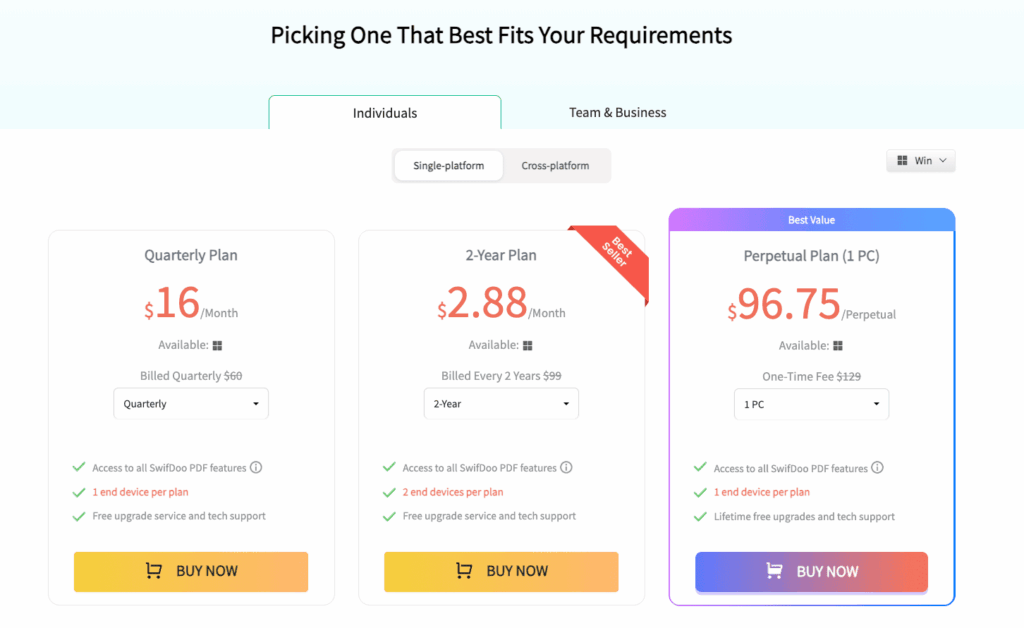
- Affordable one-time license option
- Strong OCR for scanned documents
Cons
- Initial learning curve
Frequently Asked Questions
What is SwifDoo PDF?
SwifDoo PDF is a PDF editor and converter with AI features for editing, signing, and managing documents.
Is SwifDoo PDF Free to Use?
It offers a free version with limited features and a seven-day trial of the full Pro toolkit.
Which devices does SwifDoo PDF support?
SwifDoo PDF runs on Windows, Mac, iOS, and Android, plus free online conversion tools.
Can SwifDoo PDF convert scanned documents?
Yes, its OCR engine recognizes text in scanned PDFs and makes them searchable and editable.
Does SwifDoo PDF offer a one-time purchase option?
Yes, perpetual license plans are available for one PC or two PCs with lifetime updates.
How do I contact SwifDoo PDF support?
Users can email the support team, since live chat and phone support are not currently offered.
What is the refund policy for SwifDoo PDF?
SwifDoo PDF offers a 30-day money-back guarantee on paid purchases after contacting support.