Kane CLI is an AI-native browser automation tool by TestMu AI that lets developers and QA engineers run end-to-end web tests using plain English commands from the terminal. It eliminates the need for brittle selectors or custom test frameworks, delivering real browser validation with a simple pass or fail result in minutes.
Kane CLI solves the problem of maintaining complex test scripts by allowing users to describe test flows in natural language. It is built for developers, QA engineers, and AI coding agents who need reliable browser-driven validation before every deployment. Teams use it to automate E2E flows, discover bugs early, and integrate browser checks into CI/CD pipelines without maintaining a heavy codebase.
Kane CLI works seamlessly with AI agents like Claude, Cursor, ChatGPT, and Gemini, making it a truly agent-native testing solution. Runs sync automatically to the KaneAI dashboard for replay, step-by-step logs, and test case management.
Key Features of Kane CLI
- Natural Language Test Authoring: Write and automate browser flows using plain English intent-based commands without any selectors.
- Real Browser Execution: Runs tests on an actual Chrome browser locally, returning clear pass or fail results in under two minutes.
- Auto-Heal and Smart Waiting: Automatically recovers from minor DOM changes and uses smart waits to handle dynamic page content reliably.
- Headless and Visible Modes: Switch between visible mode for debugging and headless mode for CI pipeline runs without script changes.
- Secure and Parameterized Flows: Use secrets and environment variables to build dynamic, reusable, and secure test scenarios.
- Ask Tool for Agent Unblocking: Lets agents pause and prompt humans to handle OTPs, CAPTCHAs, or other interactive blockers during test runs.
- Custom Profiles and Stateful Flows: Supports custom browser profiles and existing authenticated sessions for realistic flow automation.
- Shareable Test Evidence Links: Generates persistent, watchable, and shareable links for every test run as evidence.
- Native Playwright Export: Exports recorded flows directly into native Playwright scripts for further customization and extension.
- Test.md Agent-Native Framework: Captures any browser session as replayable Markdown files with imports, variables, and full replay capability.
- Multi-Environment Support: Run identical flows against staging and production environments by simply changing the target URL.
- AI Agent Integration: Works natively with Cursor, Claude Code, Codex, Gemini, and custom AI agents as a browser driving tool.
- KaneAI Dashboard Sync: All CLI-triggered runs sync automatically to the KaneAI web dashboard for team visibility and test management.
- CI/CD Ready: Integrates with Jenkins, GitHub Actions, and other CI tools to run browser checks before every deployment automatically.
How to Use Kane CLI
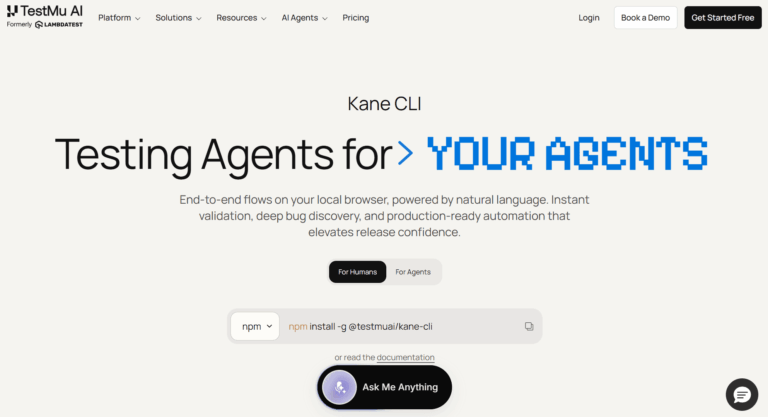
- Install Kane CLI globally via npm by running npm install -g @testmuai/kane-cli in your terminal.
- Sign up or log in to your TestMu AI account at testmuai.com and authenticate the CLI with your account credentials.
- Create a test flow by writing a plain English description of the steps you want Kane CLI to perform in the browser.
- Run your test from the terminal using the Kane CLI command and pointing it to the target URL you want to validate.
- Watch the test execute in visible mode to debug, or switch to headless mode for faster background execution in CI.
- Review the pass or fail result in your terminal and access step-by-step logs and screen recordings on the KaneAI dashboard.
- Export your validated flow as a native Playwright script if you need to extend or customize it further.
- Point AI agents like Cursor or Claude Code to Kane CLI to let them drive browsers and validate features autonomously.
Key Use Cases for Kane CLI
- Pre-Deployment Browser Checks: Run critical E2E flows like checkout or login directly from your terminal before opening a pull request.
- AI Agent Browser Control: Enable AI coding agents to navigate web apps, validate outputs, and extract data as part of automated workflows.
- CI/CD Pipeline Integration: Add browser-based validation steps to Jenkins or GitHub Actions pipelines without maintaining complex test codebases.
- Multi-Environment Regression Testing: Execute the same natural language flows against staging and production with a single URL change.
- Bug Discovery Before Release: Quickly explore web application flows in natural language to surface unexpected behaviors before they reach users.
- Authenticated Flow Automation: Automate flows requiring login using custom browser profiles and stateful sessions without re-entering credentials each time.
- QA Without Framework Overhead: Let QA engineers write and run tests in plain English without learning Selenium, Playwright, or other framework specifics.
Pros and Cons
Pros
- Run browser tests using plain English commands
- No selectors or test frameworks required
- Works natively with popular AI coding agents
- Auto-healing reduces flaky test failures significantly
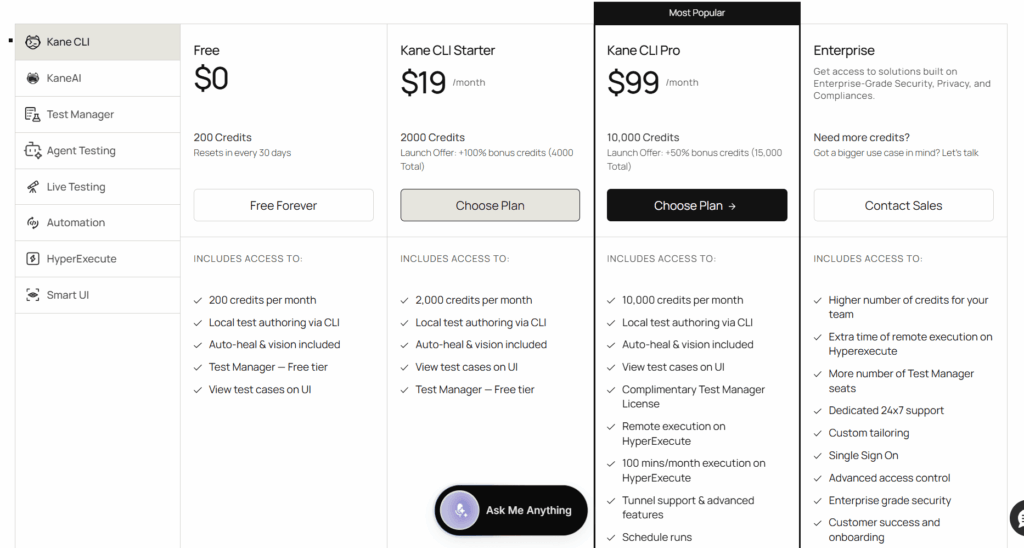
- Free tier available with 200 monthly credits
Cons
- Requires a TestMu AI account to authenticate and sync test runs to the dashboard.
- Credit-based execution model means heavy usage on paid plans can deplete credits faster than expected.
- Currently limited to Chrome browser for local execution, which may not cover all cross-browser testing needs.
Frequently Asked Questions
What is Kane CLI?
Kane CLI is an AI-powered terminal tool that runs end-to-end browser tests using plain English descriptions without any selectors.
Is Kane CLI Free to Use?
Yes, Kane CLI has a free tier offering 200 credits per month that reset every 30 days at no cost.
Who is Kane CLI designed for?
It is built for developers, QA engineers, DevOps teams, and AI coding agents needing reliable browser-based test automation.
Does Kane CLI require coding knowledge?
No coding is required. Users describe test flows in plain English and Kane CLI handles all browser interactions automatically.
Which AI agents does Kane CLI support?
Kane CLI integrates natively with Cursor, Claude Code, ChatGPT Codex, Gemini, and other custom AI coding agents.
Can Kane CLI run in CI/CD pipelines?
Yes, Kane CLI supports headless mode and integrates with Jenkins, GitHub Actions, and other popular CI/CD platforms seamlessly.
What happens to my test results after a run?
All runs sync to the KaneAI dashboard where you can review logs, screenshots, and shareable evidence links for each session.
Can I export Kane CLI tests to Playwright?
Yes, Kane CLI supports native Playwright script export so you can customize and extend your automated flows further.