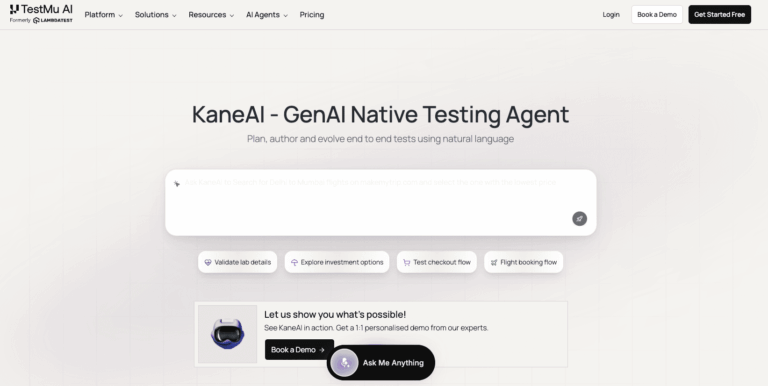
KaneAI is the world’s first GenAI-native end-to-end software testing agent by TestMu AI. It eliminates the complexity of traditional test authoring by letting QA engineers and developers plan, create, and evolve tests using plain natural language, dramatically accelerating software quality workflows without writing a single line of code.
KaneAI addresses one of the most persistent bottlenecks in software delivery: slow, fragile, and manually intensive test creation and maintenance. By leveraging large language models, it converts plain-language instructions, PRDs, JIRA tickets, PDFs, and other inputs into structured, executable test cases. Teams no longer need deep coding expertise to build comprehensive test coverage across UI, API, databases, and accessibility layers.
It is purpose-built for QA engineers, automation architects, and developer teams at mid-size to large enterprises who need to ship software at machine speed. KaneAI integrates natively with CI/CD pipelines, project management tools like Jira and Azure DevOps, and runs tests across 3000+ browser, OS, and real device combinations via the TestMu AI HyperExecute cloud.
Key Features of KaneAI
- Natural Language Test Authoring: Write test cases in plain English without any coding knowledge or technical setup required.
- Test Case Scenario Generation: Import JIRA tickets, PRDs, PDFs, images, audio, or spreadsheets to auto-generate structured test cases instantly.
- Smarter API Testing: Validate APIs alongside UI flows in a single, unified test strategy with no silos or coverage gaps.
- Real-Time Network Checks: Inspect network responses, HTTP status codes, and payloads inline during test execution for complete flow reliability.
- Pixel-Perfect Visual Validation: Compare UI screens automatically, flag visual regressions, and keep your interface flawless across releases.
- Database-Ready Test Generation: Connect directly to databases and generate tests from real queries without manual data preparation.
- Accessibility Testing Built-In: Automatically validate WCAG compliance within test flows without slowing down release cycles.
- Reusable Test Modules: Build modular, reusable test blocks once and deploy them across multiple projects and environments seamlessly.
- Dynamic Test Data Generation: Let KaneAI auto-generate variables, parameters, and secrets during the authoring flow without manual input.
- Auto Popup Dismissal: Automatically detect and dismiss browser popups so test flows continue uninterrupted without manual intervention.
- Plan Approval Workflow: Review and approve AI-generated test plans before execution to ensure they match your intended test coverage.
- Step-Level Execution Control: Configure each test step to stop, continue, or skip on failure for granular control over test runs.
- Flexible Test Scheduling: Schedule automated test runs on demand or at fixed intervals across multiple environments with one click.
- Jira and Azure DevOps Integration: Create, assign, and raise bug tickets directly from failed tests into your existing project management workflows.
- HyperExecute Cloud Execution: Run generated tests across 3000+ browser, OS, and real device combinations at blazing speed.
- SSO and RBAC Support: Manage enterprise access with single sign-on, role-based access control, audit logs, and compliance controls.
How to Use KaneAI
- Sign up for a free TestMu AI account at testmuai.com and navigate to the KaneAI section from the platform dashboard.
- Create a new testing project and connect your preferred integrations such as Jira, Azure DevOps, GitHub, or Slack.
- Input your test requirements using natural language, or import a JIRA ticket, PRD, PDF, or spreadsheet for automatic test case generation.
- Review the AI-generated test plan and approve it or refine individual steps using the plan approval workflow.
- Configure your test environment, including target browsers, OS versions, real devices, geographic locations, or local builds.
- Set up test data by either entering requirements in natural language or letting KaneAI auto-generate dynamic test data and variables.
- Run your tests on demand or schedule them at fixed intervals via HyperExecute for parallel cloud-based execution.
- Review detailed test reports, visual diffs, network logs, and failure analysis from the Test Insights dashboard.
- Raise bug tickets automatically in Jira or Azure DevOps directly from any failed test step with full context attached.
Key Use Cases for KaneAI
- End-to-End Regression Testing: Automate full regression suites using natural language to catch regressions before every production release.
- API and UI Combined Testing: Validate complete user journeys that span both frontend UI interactions and backend API calls simultaneously.
- Accessibility Compliance Validation: Embed WCAG accessibility checks into every test cycle without slowing down continuous delivery pipelines.
- Cross-Browser Compatibility Testing: Execute tests across 3000+ browser and OS combinations to ensure consistent experiences for all users.
- Database-Driven Test Scenarios: Connect to production databases to generate and validate data-driven tests reflecting real application states.
- Agile Sprint Test Automation: Convert user stories and JIRA tickets directly into executable test cases to keep pace with sprint velocity.
- Visual Regression Detection: Automatically compare UI screenshots across builds to identify unintended layout or design changes early.
- AI Agent Testing: Test chatbots, voice assistants, and other AI-powered agents using the Agent-to-Agent testing framework.
Pros and Cons
Pros
- No coding required for full test automation
- Supports UI, API, database, and accessibility testing
- Integrates natively with Jira, GitHub, and Azure DevOps
- Enterprise-ready with SSO, RBAC, and audit logs
- Runs on 3000+ browser and real device combinations
Cons
- As a GenAI-native platform, teams may require initial onboarding time to adapt existing workflows and test strategies effectively.
- Complex database or multi-environment test configurations may still require guidance from TestMu AI professional services for optimal setup.
Frequently Asked Questions
What is KaneAI?
KaneAI is the world’s first GenAI-native testing agent that lets teams plan, author, and evolve end-to-end tests using natural language.
Is KaneAI Free to Use?
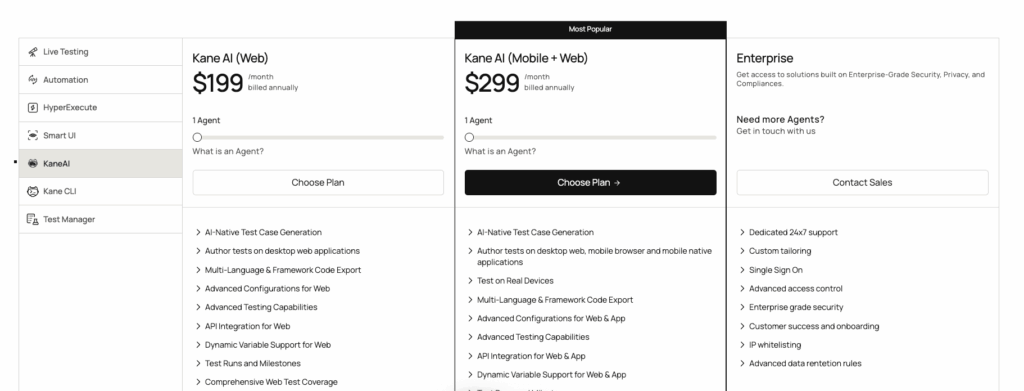
KaneAI is accessible under TestMu AI’s freemium plan, which includes limited free usage with paid plans for full feature access.
Do I need coding skills to use KaneAI?
No coding is required. KaneAI lets you create and manage tests entirely through natural language instructions and plain-text inputs.
What types of testing does KaneAI support?
KaneAI supports UI, API, database, accessibility, visual regression, and cross-browser testing within a single unified platform.
Can KaneAI integrate with Jira and Azure DevOps?
Yes, KaneAI natively integrates with Jira and Azure DevOps for test case creation, bug reporting, and workflow management.
Where does KaneAI run its tests?
Tests run on TestMu AI’s HyperExecute cloud across 3000+ browser, operating system, and real device combinations globally.
Is KaneAI suitable for enterprise teams?
Yes, KaneAI includes enterprise-grade SSO, RBAC, audit logs, compliance controls, and a dedicated customer success manager.
What inputs can KaneAI use to generate test cases?
KaneAI accepts natural language text, JIRA tickets, PRDs, PDFs, images, audio files, and spreadsheets as test case inputs.