Our verdict: Calendly is the meeting-scheduling standard, and the polished one. It turns your availability into a shareable link, adds round-robin and lead routing for sales teams, and it simply works – invitees need no instructions. The trade is scope and price: it schedules meetings, not salon or clinic appointments with payments and intake, and its per-seat pricing climbs fast across a team. New AI features help, but they are early.
How Calendly measures up
What we look for →What Calendly is, and who it is for
Calendly is a meeting-scheduling tool: you connect your calendar, share a link, and invitees pick a time that works for both of you, with no back-and-forth email. It is horizontal by design, but its center of gravity is sales, recruiting and customer success teams – the round-robin, lead routing and Salesforce and HubSpot integrations on the Teams tier are built for booking inbound leads with the right rep. It is the default most people mean when they say “send me a Calendly”.
Reach for Calendly when the job is scheduling meetings with people outside your company and you want the smoothest possible experience. Look elsewhere if you run a service business that books client appointments with deposits, intake forms and staff calendars – Acuity, SimplyBook.me or a salon platform like Fresha fit that far better – or if you want an open-source, self-hostable tool you can embed, where Cal.com leads.
How Calendly performs, criterion by criterion
Booking experience and calendar and integrations are where Calendly wins outright, both verified. The invitee flow is the cleanest in the category, calendar sync across Google, Outlook, iCloud and Exchange is rock solid, and reminders reliably cut no-shows. Its integration marketplace – Zoom, Meet, Teams, Salesforce, HubSpot, Stripe, Slack and 100-plus more – is the broadest here.
Team and availability is a strength too: round-robin, collective and group event types, plus logic-driven lead routing forms that qualify inbound and book it with the right owner, are what sales teams buy it for. AI and automation is catching up rather than leading – the Calendly Notetaker records and summarizes meetings, and the Callie assistant (in beta) handles scheduling over email – useful, but newer than the core product.
Where Calendly is deliberately narrow is vertical fit and payments: it takes Stripe and PayPal payments and has intake questions, but it is built for meetings, not for salon, spa or clinic appointments with deposits, packages, memberships and staff rosters. And on value it sits mid-pack: the free plan is genuinely useful, but the features teams need (reminders, multiple event types, routing) are gated to paid tiers billed per seat, so a full team gets expensive.
Key features
- Personalized booking pages with real-time calendar sync (Google, Outlook, iCloud, Exchange)
- Round-robin, collective and group event types for teams
- Logic-driven lead routing forms that qualify and book inbound leads
- Automated email and SMS reminders and follow-ups to cut no-shows
- Payments via Stripe and PayPal, plus a 100+ app integration marketplace
- Calendly Notetaker (AI meeting recap) and the Callie AI scheduling assistant (beta)
Calendly pricing and value
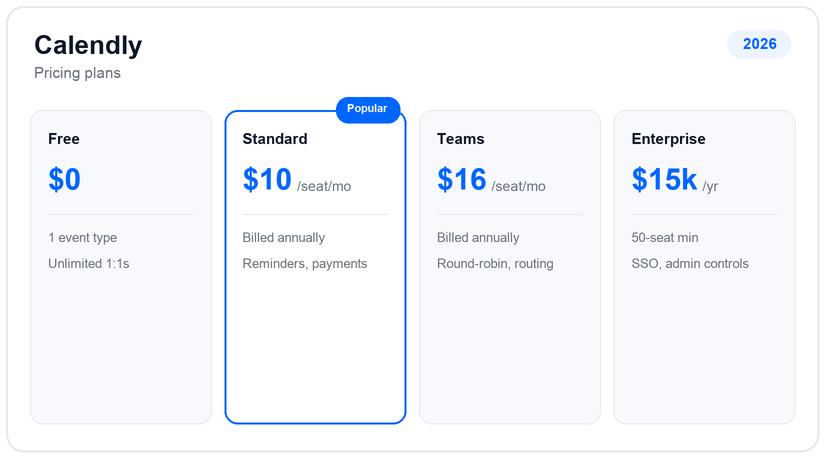
Calendly starts free: one event type, one calendar connection and unlimited one-on-one meetings, which is enough for many solo users. Standard is $10 per seat a month billed annually (about $12 monthly) and unlocks unlimited event types, multiple calendars, reminders and payments. Teams is $16 per seat annually (about $20 monthly) and adds round-robin, lead routing and the Salesforce integration. Enterprise starts around $15,000 a year with a 50-seat minimum, SSO and admin controls.
The catch is per-seat math. Calendly prices by the person, so the features a sales team actually needs – round-robin and routing on Teams – mean paying $16 a seat for everyone, not just the reps who take inbound. A newer AI tier layers roughly $8 a seat on top of Standard or Teams for the Notetaker and Callie. For a solo user the free or Standard plan is a bargain; for a large team the seat count is where the real cost lives.
Pros and cons
- The cleanest invitee booking experience in the category – no instructions needed
- Broadest integrations here, with rock-solid calendar sync
- Strong team features: round-robin, collective events and lead routing
- Genuinely useful free plan for solo scheduling
- Per-seat pricing climbs fast across a full team
- Built for meetings, not client appointments with deposits, intake and staff calendars
- Key features (reminders, multiple event types, routing) gated behind paid tiers
- AI features (Notetaker, Callie) are newer and less proven than the core product
Support and reliability
Calendly support is mostly self-service on the lower tiers – an extensive help center, community and email – with priority support, onboarding and a customer success manager reserved for Teams and Enterprise. The company is US-based (Atlanta), reports strong uptime, and its Enterprise tier adds SSO, SAML, domain control and audit logs to clear procurement. There is no public phone support line.
Calendly vs the alternatives
If Calendly’s per-seat pricing or meeting-only scope is the sticking point, the closest swaps are Cal.com for an open-source, self-hostable alternative, Acuity for service-business appointments with intake and payments, and SimplyBook.me for the most customizable booking with real AI. See our best Calendly alternatives and the head-to-head Calendly vs Acuity.
Frequently asked questions
How much does Calendly cost?
Calendly has a free plan, Standard at $10 per seat a month (billed annually; about $12 monthly), Teams at $16 per seat (annually; about $20 monthly), and Enterprise from around $15,000 a year with a 50-seat minimum. A newer AI tier adds roughly $8 a seat for the Notetaker and Callie assistant. Confirm current rates on their site.
Is Calendly free?
Yes, there is a genuinely useful free plan: one event type, one calendar connection and unlimited one-on-one meetings. Reminders, multiple event types, team routing and payments require a paid tier.
Does Calendly have AI?
Yes, though it is newer than the core product. The Calendly Notetaker records and summarizes meetings, and the Callie assistant (in beta) handles scheduling back-and-forth over email. Both sit on a paid AI tier layered over Standard or Teams.
Is Calendly good for a salon or clinic?
Not really. Calendly is built for scheduling meetings, not client appointments with deposits, packages, memberships, intake forms and staff calendars. For salons, spas and clinics, Acuity, SimplyBook.me, Fresha or Boulevard are a much better fit.
Calendly or Cal.com?
Calendly is more polished with the broadest integrations; Cal.com is open-source, self-hostable and free for solo use, with a developer-friendly API and a Cal.ai phone agent. Choose Calendly for the smoothest experience, Cal.com for control, price and embeddability.
Related guides
Add us as a preferred source on Google, and our reviews and picks show up in your Top Stories and AI Overviews.