



Our verdict: Cal.com is the open-source answer to Calendly, and a strong one. It does the core scheduling job well, it is free forever for a solo user, and you can self-host the whole thing or extend it through a developer-friendly API – control and price that no closed competitor matches. The trade is polish and effort: it is less refined than Calendly, self-hosting needs real technical skill, and occasional bugs surface, so it rewards teams that value ownership over hand-holding.
How Cal.com measures up
What we look for →What Cal.com is, and who it is for
Cal.com is scheduling infrastructure as much as a scheduling app. At its core it does what Calendly does – connect your calendar, share a link, let people book a time – but it is open-source under the AGPL, self-hostable, and built to be extended through a well-documented API. That makes it the natural pick for developers, privacy-conscious and compliance-conscious teams, and anyone who wants to own their scheduling stack or embed booking deep inside their own product rather than rent a closed tool.
Reach for Cal.com when control, price and extensibility matter more than out-of-the-box polish – a solo user gets it free forever, and a team gets a genuinely capable scheduler for a low per-seat price. Look elsewhere if you want the most refined experience with zero setup, where Calendly still leads, or if you run a service business that books client appointments with deposits, intake and staff calendars, where Acuity or SimplyBook.me fit better.
How Cal.com performs, criterion by criterion
Calendar and integrations is Cal.com’s strongest verified area: it connects to the major calendars and conferencing tools, and because it is open-source with a developer-friendly API, you can integrate and embed it in ways a closed product simply will not allow – booking flows inside your own app, custom logic, self-hosted routing. AI and automation is real too: the Cal.ai phone agent books appointments and sends reminders over an actual voice call, billed at $0.29 a minute, with Teams members getting 750 credits each a month.
Booking experience is clean and capable, and team and availability covers what growing teams need – round-robin, routing forms and analytics arrive on the Teams plan, along with the option to remove Cal.com branding. It handles collective and managed event types and scales into organizations with proper admin controls. This is a serious team scheduler, not just a solo booking link.
Where Cal.com is weaker is vertical fit and payments: it is a horizontal meeting scheduler, so it does not carry the deposits, memberships, packages and staff-roster depth a salon or clinic needs – the same deliberate narrowness Calendly has. On value, though, it scores at the top of the roundup: free forever for one user, self-hostable at no license cost, and only $12 per user a month for Teams, so the ownership and price story is hard to beat if your team can handle a steeper learning curve and, for self-hosting, the technical lift.
Key features
- Open-source (AGPL) scheduling you can self-host and fully own
- Free forever for one user, with unlimited event types and calendar connections
- Developer-friendly API and embeds for building booking into your own product
- Cal.ai AI phone agent that books and reminds over a real voice call
- Round-robin, routing forms, analytics and branding removal on Teams
- Enterprise-grade compliance: SAML SSO, SCIM and SOC2/HIPAA/ISO on Organizations
Cal.com pricing and value
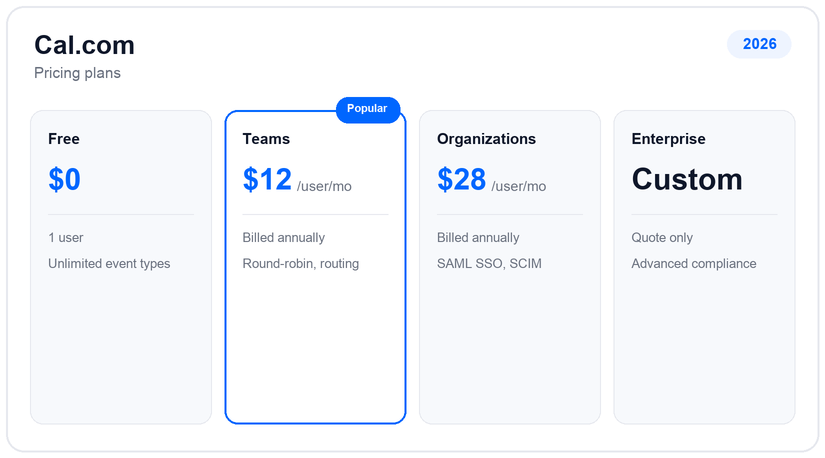
Cal.com is free forever for a single user, with unlimited event types and calendar connections – one of the most generous free tiers in the category – and because it is open-source you can also self-host it at no license cost. Teams is $12 per user a month billed annually and adds round-robin, routing forms, analytics and the ability to remove Cal.com branding. Organizations is $28 per user a month annually and layers on SAML SSO, SCIM provisioning and SOC2, HIPAA and ISO compliance, with Enterprise quote-only above that.
The value story is ownership. Between the free solo plan, the self-hostable open-source codebase and a $12 per-seat Teams price, Cal.com undercuts the closed competition while giving you far more control over data and integrations. The extra cost to budget for is AI usage: the Cal.ai phone agent is metered at $0.29 a minute, though Teams members each get 750 credits a month included, so light use often stays within the allowance.
Pros and cons
- Open-source and self-hostable – you own the stack and the data
- Free forever for solo use, with a genuinely generous feature set
- Developer-friendly API and embeds for building scheduling into your product
- Strong value: $12 per-seat Teams pricing plus real compliance on Organizations
- Steeper learning curve than the polished closed alternatives
- Self-hosting needs real technical skill to run and maintain
- Less refined than Calendly, with occasional bugs to work around
- Horizontal meeting scheduler – no deposits, memberships or staff-roster depth for service businesses
Support and reliability
Cal.com is supported the way open-source products usually are: an active community, public GitHub issues and email support, backed by thorough developer documentation, with priority support arriving on the paid tiers. The company is US-based (San Francisco, California), and the Organizations plan clears the enterprise compliance bar with SAML SSO, SCIM provisioning and SOC2, HIPAA and ISO coverage. Self-hosting shifts more of the operational burden onto your own team, which is the trade for full control, so factor in the engineering time alongside the low license cost.
Cal.com vs the alternatives
If Cal.com’s learning curve or self-hosting effort is a concern, the closest managed swap is Calendly for the most polished experience with no setup; for service-business appointments with intake and payments, Acuity and SimplyBook.me fit far better. See our roundup of Calendly alternatives and the guide to free appointment scheduling software to weigh the options.
Frequently asked questions
How much does Cal.com cost?
Cal.com is free forever for one user (unlimited event types and calendars) and is self-hostable at no license cost. Teams is $12 per user a month billed annually, Organizations is $28 per user a month annually (SAML SSO, SCIM, SOC2/HIPAA/ISO), and Enterprise is quote-only. The Cal.ai phone agent is billed at $0.29 a minute, with 750 credits per Teams member a month. Confirm current rates on their site.
Is Cal.com really free?
Yes. A single user gets unlimited event types and calendar connections for free, forever, and because Cal.com is open-source under the AGPL you can also self-host the full product at no license cost. Team features like round-robin and routing require the paid Teams plan.
Can I self-host Cal.com?
Yes – Cal.com is open-source under the AGPL and designed to be self-hosted, which is a big part of its appeal for privacy- and compliance-conscious teams. It does require technical skill to deploy and maintain, so budget engineering time for running it yourself.
Does Cal.com have AI?
Yes. The Cal.ai phone agent books appointments and sends reminders over a real voice call, billed at $0.29 a minute. Teams members each get 750 credits a month included, so lighter usage often stays within the allowance.
Calendly or Cal.com?
Calendly is more polished and needs no setup, with the broadest integrations; Cal.com is open-source, self-hostable and free for solo use, with a developer-friendly API and the Cal.ai phone agent. Choose Calendly for the smoothest experience, Cal.com for control, price and embeddability.
Related guides
Add us as a preferred source on Google, and our reviews and picks show up in your Top Stories and AI Overviews.