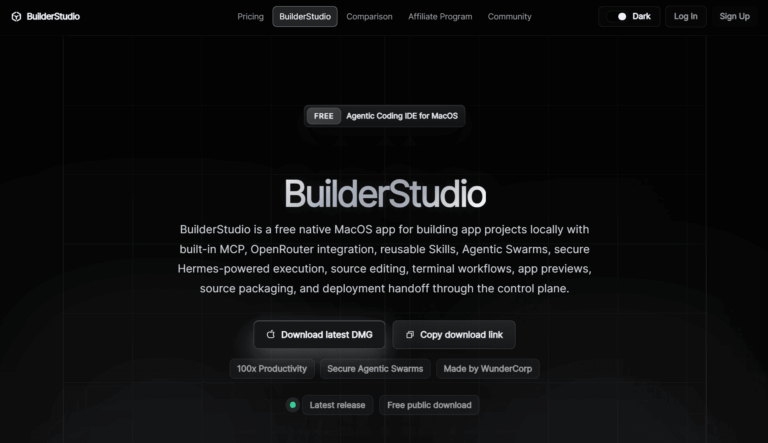
BuilderStudio is a free native macOS agentic coding IDE that helps developers build app projects locally with AI-assisted source editing, Docker previews, and safe dependency checks before deploying to the cloud.
BuilderStudio addresses the challenge of opaque AI-assisted development by giving developers full visibility into generated code. It combines source editing, terminal workflows, MCP-aware tooling, and reusable Skills into one focused desktop environment. Indie developers, startup founders, and technical builders use it to move from idea to a packaged, deployable app without losing control of the process.
Key Features of BuilderStudio
- Agentic Coding IDE: A dedicated macOS IDE that runs AI-assisted coding workflows locally for full project transparency.
- MCP-Aware Tooling: Supports Model Context Protocol tools natively so agents can interact with external services during builds.
- Reusable Skills: Curated, pre-built Skills covering design, copy, motion, components, and interface polish to accelerate development.
- OpenRouter Model Access: Integrates with OpenRouter to let developers choose from hundreds of AI models for their coding sessions.
- Aikido SafeChain Protection: Automatically scans frontend package dependencies for vulnerabilities before any install is executed.
- Docker-Contained Local Previews: Runs app previews inside Docker containers so live testing never touches your production environment.
- Source Editing and Terminal Workflows: Provides direct file and code access alongside an integrated terminal for full developer control.
- Command Review: Lets developers inspect and approve every agent-issued terminal command before it runs on their machine.
- Source Packaging: Bundles project files into a clean handoff-ready source package for upload to the BuilderStudio control plane.
- Deployment Handoff: Transfers the packaged local build to the cloud control plane for launch, scaling, and ongoing management.
- Apple Silicon Optimized: Ships as a recommended Apple Silicon DMG for native performance on modern MacBook and Mac hardware.
- BuilderStudio Matrix: An integrated comparison area that helps teams evaluate the platform and plan the next development step.
- Founder Tools: A dedicated startup tools section offering resources tailored to early-stage founders building their first product.
How to Use BuilderStudio
- Visit builderstudio.dev and download the Apple Silicon DMG or ZIP archive for macOS.
- Install the app by opening the DMG and dragging BuilderStudio into your Applications folder.
- Launch BuilderStudio and create a new project or open an existing local project directory.
- Connect your preferred AI models via OpenRouter or configure MCP tools relevant to your stack.
- Use the agentic chat or Skills to generate, edit, and refine source code across your project files.
- Review every terminal command the agent proposes before approving execution for full safety control.
- Run a Docker-contained local preview to test your app in an isolated environment before packaging.
- Use Aikido SafeChain to scan all frontend dependencies for known vulnerabilities prior to install.
- Package your source files into a clean bundle using the built-in source packaging feature.
- Hand off the packaged build to the BuilderStudio cloud control plane for deployment and scaling.
Key Use Cases for BuilderStudio
- Solo App Development: Independent developers build complete apps locally with AI assistance while retaining full code visibility.
- Startup MVP Building: Founders move from a product idea to a packaged, deployable MVP without a large engineering team.
- Safe Dependency Management: Teams use SafeChain scans to catch supply-chain vulnerabilities in frontend packages before they ship.
- Agentic Workflow Prototyping: Developers prototype multi-step AI agent workflows locally before scaling them to cloud infrastructure.
- Local-First AI Coding: Engineers who distrust cloud-only AI editors use BuilderStudio to keep code on their machine during generation.
- Design-to-Code Acceleration: Product builders apply curated Skills for UI polish, motion, and components to speed up front-end work.
- Multi-Model Experimentation: Developers test different LLMs from OpenRouter on the same codebase to find the best fit for their task.
Pros and Cons
Pros
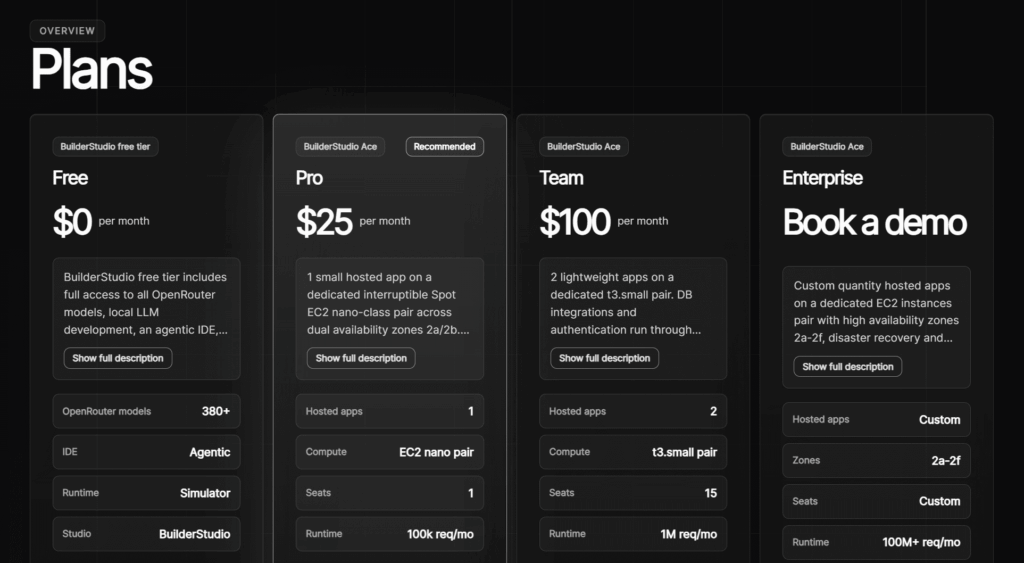
- Completely free to download and use on macOS
- Built-in SafeChain dependency vulnerability scanning
- Full source code visibility and command review
- Flexible multi-model access via OpenRouter
- Docker previews keep local environment clean
Cons
- Currently available only on macOS, limiting developers on Windows or Linux systems.
- Relies on OpenRouter for model access, meaning LLM costs are separate and usage-based.
- As a newer platform, community resources, tutorials, and third-party integrations are still limited.
Frequently Asked Questions
What is BuilderStudio?
BuilderStudio is a free native macOS agentic coding IDE for building, previewing, and deploying apps locally with AI assistance.
Is BuilderStudio Free to Use?
Yes, BuilderStudio is free to download and use; however, OpenRouter LLM model usage may incur separate API costs.
What operating systems does BuilderStudio support?
BuilderStudio currently supports macOS only, with an optimized DMG package available for Apple Silicon machines.
What is SafeChain in BuilderStudio?
SafeChain is an Aikido-powered dependency scanner that checks frontend packages for vulnerabilities before installation on your machine.
Can I use my own AI model with BuilderStudio?
Yes, BuilderStudio integrates with OpenRouter, giving access to hundreds of AI models for your coding and agent sessions.
What are Skills in BuilderStudio?
Skills are curated, reusable modules covering design, copy, motion, and UI components that accelerate common app-building tasks.
How does BuilderStudio handle deployment?
You package your local project into a source bundle and hand it off to the BuilderStudio cloud control plane for launch.
Does BuilderStudio support MCP tools?
Yes, BuilderStudio is MCP-aware and allows agents to connect to external services using Model Context Protocol during builds.