
TL;DR: Fliki AI is a user-friendly platform that allows you to create videos and voiceovers from text, using realistic AI-generated voices. It supports over 80 languages and offers features like blog-to-video conversion, PowerPoint to video, and AI avatars. With a range of plans, it caters to content creators, marketers, and educators looking for a quick and efficient way to produce quality video and audio content.
Let’s explore Fliki AI’s pricing, features, alternatives and more.
Fliki AI is an intuitive tool designed for content creators who want to generate high-quality audio and video content in minutes without needing video editing expertise. Its standout feature is the ability to turn blog posts, presentations, and other text formats into engaging videos with lifelike voiceovers. It supports 2000+ voices across 80 languages and dialects, making it a powerful tool for creators targeting a global audience. Additionally, its AI voice cloning feature allows you to replicate custom voices for unique video content creation.
Key Features
- Text-to-Video Creation: Convert any text, like blog posts or scripts, into engaging videos with AI-generated voiceovers.
- Text-to-Speech: Choose from over 2000 ultra-realistic AI voices in 80+ languages, perfect for voiceovers for podcasts, YouTube videos, and more.
- AI Voice Cloning: Record a 2-minute sample and Fliki can clone your voice or create a custom voice for use in your content.
- Blog to Video: Automatically convert blog posts into video content, adding voiceovers, visuals, and music to enhance engagement.
- AI Avatar: Enhance your videos with lifelike avatars, making your video content more engaging and human-like.
- Translation and Localization: Instantly translate scripts into 80+ languages for global reach.
- Templates: Professionally designed video templates for easy customization.
How to Use
- Sign Up: Create an account on Fliki’s platform.
- Choose Your Feature: Select whether you want to create a text-to-video or text-to-speech project.
- Upload or Enter Text: Input your text, blog, or PowerPoint file to start the video creation process.
- Customize with Voices or Avatars: Choose your preferred voice from the AI voice library or add an avatar.
- Generate and Export: Review the video, make any necessary edits, and export it for use across various platforms.
Who Is It For
- Content Creators: Ideal for YouTubers, bloggers, or influencers needing quick, high-quality video content with minimal effort.
- Marketers: Perfect for creating promotional content, explainer videos, and social media campaigns.
- Educators: Useful for creating training or educational videos, with AI voices narrating complex subjects clearly.
- eCommerce: Perfect for creating product explainer videos for online stores, enhancing product understanding and sales.
FAQ
Is Fliki AI free to use?
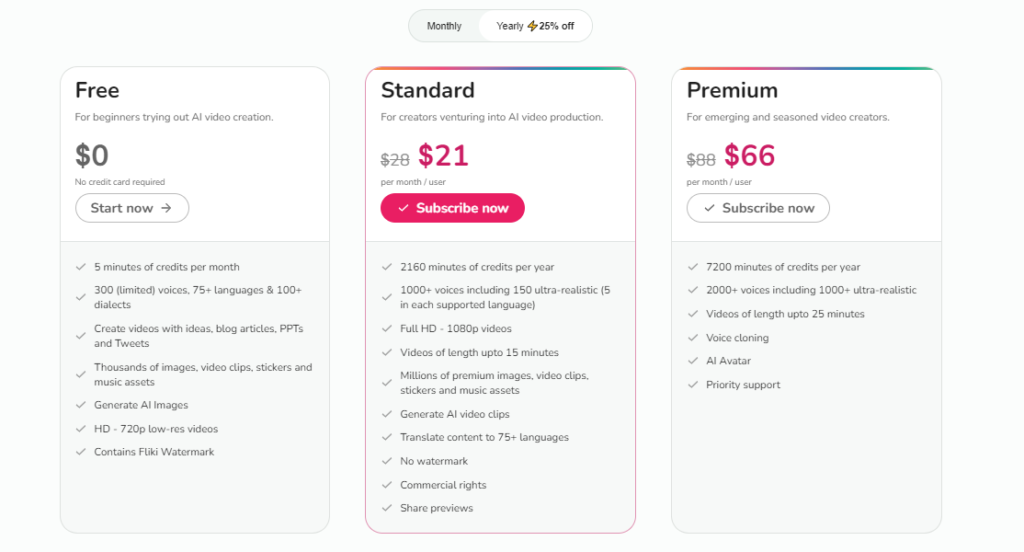
Yes, Fliki offers a free tier that allows users to create up to 5 minutes of content per month. However, more advanced features like higher resolution and additional voice options require a paid subscription.
How does Fliki compare to other tools?
Fliki stands out for combining both text-to-video and text-to-speech features in one platform, offering a seamless content creation process. Its ultra-realistic voices and voice cloning feature add authenticity and uniqueness to your content.
Can I use Fliki for commercial purposes?
Yes, all content created with Fliki’s premium plans comes with commercial rights, allowing you to monetize and distribute your videos on platforms like YouTube.