
Dr.Fone by Wondershare is a comprehensive all-in-one mobile management toolkit for iOS and Android. It solves the most common smartphone headaches, including locked screens, lost data, failed system updates, and cross-platform transfers, all from a single desktop application for Windows and Mac.
Dr.Fone consolidates essential mobile management tasks into one unified platform. Whether you need to unlock a forgotten passcode, recover accidentally deleted photos, transfer contacts to a new phone, or fix a crashed iOS system, Dr.Fone provides a guided, step-by-step experience designed for everyday users without technical expertise.
The toolkit appeals to a wide audience: everyday smartphone users who need a quick fix, IT administrators managing device fleets, and businesses needing reliable WhatsApp data migration. With support for 6,000+ Android models and all modern iPhone and iPad generations, Dr.Fone stands out as a deeply versatile solution trusted by over 50 million active users worldwide.
Key Features of Wondershare Dr.Fone
- Screen Unlock (iOS): Remove forgotten iPhone passcodes, Apple ID, iCloud activation locks, MDM profiles, and SIM locks quickly.
- Screen Unlock (Android): Bypass PIN, pattern, fingerprint, and Google FRP locks across Samsung, Xiaomi, Vivo, and more brands.
- iOS Data Recovery: Recover deleted photos, messages, WhatsApp chats, and contacts directly from iPhone or from iTunes and iCloud backups.
- Android Data Recovery: Retrieve lost files from Android internal storage without rooting, including broken or water-damaged devices.
- WhatsApp Transfer: Seamlessly move WhatsApp chats, media, and attachments between iOS and Android with full data integrity preserved.
- Phone Transfer: Migrate contacts, messages, photos, videos, and app data between any two iOS or Android phones in one click.
- iOS System Repair: Fix 150+ iOS issues like boot loops, frozen screens, and failed updates without causing data loss.
- Android System Repair: Resolve Android crashes, black screens, app errors, and stuck recovery modes across popular device brands.
- Data Eraser: Permanently wipe sensitive data from iOS and Android with military-grade overwrite standards before resale.
- Virtual Location: Spoof GPS location to any place on Earth on iPhone or Android for privacy or location-based apps.
- iOS Password Manager: Discover and view saved Wi-Fi, app, email, website, Apple ID, and Screen Time passwords stored on iPhone.
- Android Backup and Restore: Create wireless, incremental backups covering 24 data types and restore selectively with ease.
- Screen Mirror: Cast iPhone or Android display to a PC or Mac in real time with screenshot and recording capabilities.
- Phone Verification: Generate a detailed health report covering storage, battery, system version, and device condition score.
- iCloud Activation Unlocker: Bypass iCloud activation lock on compatible iPhone and iPad models without requiring a jailbreak.
- DocPassRemover: Remove password protection from locked PDF, Word, Excel, and PowerPoint files quickly and safely.
- Online IMEI Check: Instantly verify any device IMEI number online for free to check carrier status and device authenticity.
- Dr.Fone Air (Online Mirror): Wirelessly mirror and transfer files from mobile devices directly through a web browser without installing software.
How to Use Wondershare Dr.Fone
- Download and install the Dr.Fone desktop application on your Windows PC or Mac from the official website.
- Launch the app and select the module that matches your task, such as Screen Unlock, Data Recovery, or Phone Transfer.
- Connect your iOS or Android device to your computer using the provided USB cable and follow the on-screen prompts.
- If prompted, enable USB debugging on Android or trust the connected computer on iPhone to allow full access.
- Preview the results, such as recoverable files or detected device status, and confirm before applying changes.
- Complete the process by following the guided wizard and wait for Dr.Fone to finish the selected operation.
- Disconnect the device once confirmed and verify the result directly on your phone.
Key Use Cases for Wondershare Dr.Fone
- Forgotten Passcode Recovery: Unlock a locked iPhone or Android when the user cannot remember their PIN or pattern password.
- Switching to a New Phone: Transfer all data from an old iPhone or Android to a brand-new device without losing anything.
- WhatsApp Migration: Move full WhatsApp chat history and media files when switching between Android and iOS platforms.
- Recovering Accidentally Deleted Photos: Retrieve lost images from device storage, broken phones, or cloud and local backups.
- Fixing Crashed or Frozen Devices: Repair iOS and Android system errors that leave devices stuck on a logo or black screen.
- Selling or Recycling an Old Device: Permanently erase all personal data before handing over or reselling a used smartphone.
- Privacy and Location Spoofing: Change GPS coordinates on mobile devices for privacy protection or location-based gaming.
- Business Device Fleet Management: Manage, back up, and unlock multiple employee devices using volume licensing plans.
Pros and Cons
Pros
- All-in-one solution covering unlock, recovery, repair, and transfer
- Supports 6,000+ Android models and all modern iOS devices
- Simple guided interface suitable for non-technical users
- Free trial available to test features before purchasing
- Trusted by 50 million users with 22 years of experience
Cons
- Some advanced features like iCloud bypass and FRP removal only work with specific device models and firmware versions.
- Desktop installation required for most features, meaning mobile-only users cannot access the full toolkit.
Frequently Asked Questions
Can I get Dr.Fone for free?
Not fully. Dr.Fone is free to download and includes a free trial that lets you scan your device and preview what can be recovered, plus a check on whether your device is supported. Saving or recovering the files, and the full toolkit features, require a paid licence. The mobile Dr.Fone app also offers a 3-day free trial with no charge before day 3.
Is Dr.Fone for Android free?
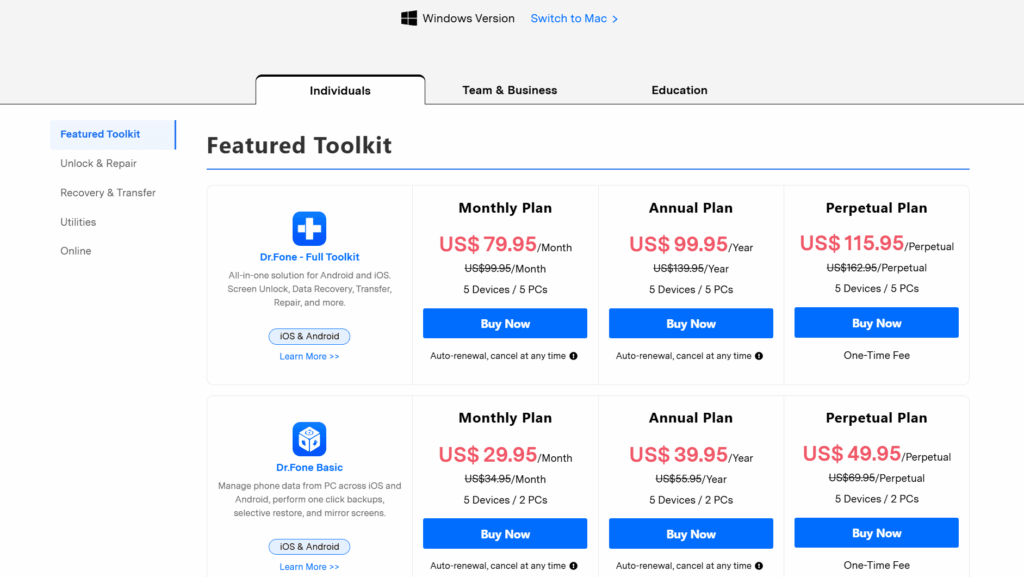
The Android version follows the same model: free to download and free to scan and preview results, but recovering and saving data needs a paid licence. The Dr.Fone Android toolkit for Windows and Mac is around $79.95 per year. There is no permanently free full version for Android.
How much does Dr.Fone cost in 2026?
Dr.Fone pricing depends on the toolkit. The Android toolkit is around $79.95 per year and the iOS toolkit around $99.95 per year, with the full cross-platform toolkit around $139.95 per year. Perpetual one-time licences are also available for a single major version. One licence covers up to 2 computers and 5 mobile devices.
Is Dr.Fone free to use?
Dr.Fone offers a free trial with limited functionality – you can scan and preview recoverable data, but a paid subscription or one-time licence is needed for full access and to actually save recovered files.
Is it safe to use Dr.Fone on my phone?
Dr.Fone is a legitimate product from Wondershare, an established software company, and processes data locally on your computer rather than uploading it. As with any recovery tool, download only from the official site, and be aware that some features require deep device access.
Does Dr.Fone work with both iPhone and Android?
Yes. Dr.Fone fully supports both iOS and Android, including current iPhone and Android releases. Toolkits are sold separately per platform, or together in the full cross-platform bundle.
Can Dr.Fone recover permanently deleted files?
Often yes, if the data has not yet been overwritten. Dr.Fone scans the device storage for recoverable traces of deleted photos, messages, contacts and other files. Success drops the longer you keep using the phone after deletion, so stop using the device and scan as soon as possible.
Does Dr.Fone offer a refund policy?
Yes. Wondershare provides a money-back guarantee on Dr.Fone purchases, subject to their refund terms. Because the free trial lets you preview whether your data is recoverable before paying, it is worth running the scan first.