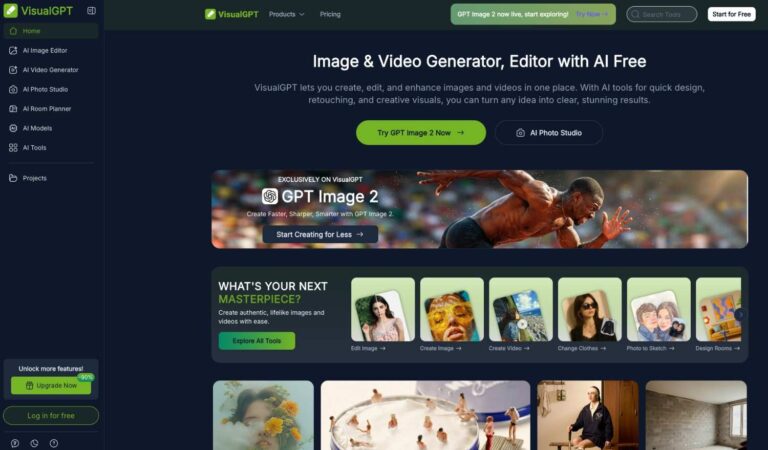
VisualGPT is an all-in-one AI-powered image and video creation platform that lets users generate, edit, and enhance visuals directly in a browser. It solves the problem of needing multiple design tools by combining hundreds of AI-driven features in a single, easy-to-use interface.
Built for speed and simplicity, VisualGPT integrates top-tier AI models such as GPT Image 2, Seedance 2.0, Flux Kontext Pro, and Nano Banana Pro to deliver high-quality images and videos from simple text prompts or uploaded photos. It caters to a wide range of industries including social media marketing, real estate, fashion, e-commerce, and education, making professional-grade visual content creation accessible to everyone.
Key Features of VisualGPT
- AI Image Generator: Create realistic, high-resolution images from text prompts using advanced models like GPT Image 2 and Seedream 5.0.
- AI Video Generator: Transform text or static images into dynamic, high-quality videos using Seedance 2.0 and Kling 3.0 models.
- AI Image Editor: Refine, retouch, and enhance photos with intelligent tools that improve clarity, color, and creative effects.
- Background Remover: Instantly remove or replace image backgrounds with precision, preserving fine details like hair and edges.
- AI Photo Studio: Generate professional headshots, LinkedIn photos, portraits, and business visuals with AI assistance.
- AI Virtual Try-On: Allow users to visualize clothing and accessories on themselves or AI fashion models before purchasing.
- AI Room Planner: Transform empty or cluttered spaces into styled interiors with realistic room design and decor visualization.
- AI Clothes Changer: Swap outfits and explore different fashion styles on any photo with a single click.
- Object Remover: Intelligently detect and erase unwanted elements from images while preserving background integrity.
- Image Upscaler: Enhance low-resolution images to high-quality output without losing sharpness or detail.
- AI Logo Generator: Create professional logos and brand assets using AI tailored to business identity and style.
- AI Hairstyle Changer: Preview different hairstyles and hair colors on any photo in seconds without a salon visit.
- Batch Editing: Process up to 10 images at once, saving significant time for large-scale visual production projects.
- AI Infographic Generator: Convert data and ideas into visually clear infographics and structured content visuals instantly.
- Multiple Language Support: Access the platform and its tools in eight languages including Spanish, French, Japanese, and Arabic.
- AI Product Photography: Generate clean, polished product images ideal for e-commerce listings and marketing campaigns.
- AI Mockup Generator: Create branded mockups for products, devices, and print materials without any design software.
- Photo to Cartoon: Convert real photos into cartoon or sketch art styles using AI-driven image transformation tools.
- AI Meme Generator: Quickly create shareable memes with AI-generated or user-uploaded images and custom text overlays.
- Mind Map Maker: Visualize ideas and concepts as structured mind maps for brainstorming, planning, or presentation purposes.
How to Use VisualGPT
- Visit visualgpt.io and log in for free or start without an account for basic features.
- Select the tool you need from categories such as AI Image, AI Video, AI Photo Studio, or AI Room Planner.
- Upload a photo or type a text description of the visual you want to create or edit.
- Choose an AI model if applicable, such as GPT Image 2, Nano Banana Pro, or Seedance 2.0 for video.
- Adjust any available settings like style, resolution, or batch count based on your project needs.
- Click generate or apply and wait a few seconds for the AI to process your request.
- Preview the output and download in standard or high-quality format depending on your plan.
- Save your project to your account for future editing or export it directly for use in campaigns.
Key Use Cases for VisualGPT
- Social Media Content Creation: Generate on-brand images and short videos for posts, ads, and stories across all platforms.
- E-Commerce Product Visuals: Create polished product photos, remove backgrounds, and design promotional banners for online stores.
- Real Estate Marketing: Enhance property photos, visualize room renovations, and design brochures to attract more potential buyers.
- Fashion and Virtual Try-On: Let shoppers visualize outfits on models or themselves before making purchasing decisions online.
- Professional Headshots: Generate corporate-quality headshots and LinkedIn profile photos without a photographer or studio setup.
- Interior Design Visualization: Explore furniture layouts, color schemes, and room styles for residential or commercial spaces quickly.
- Educational Visual Content: Create infographics, diagrams, and illustrated visuals to support academic presentations and research papers.
- AI Video Production: Transform product images or creative concepts into engaging video content for marketing campaigns.
Pros and Cons
Pros
- Hundreds of AI tools available in one platform
- No installation needed, fully browser-based
- Supports top models like GPT Image 2 and Seedance 2.0
- Free tier available with daily credits
- Available in eight languages globally
Cons
- Free plan has daily credit limits and only 15-day history storage, restricting heavy usage.
- Watermarks and standard download quality options are with paid plans.
Frequently Asked Questions
What is VisualGPT?
VisualGPT is a browser-based AI platform for generating, editing, and enhancing images and videos using advanced AI models.
Is VisualGPT Free to Use?
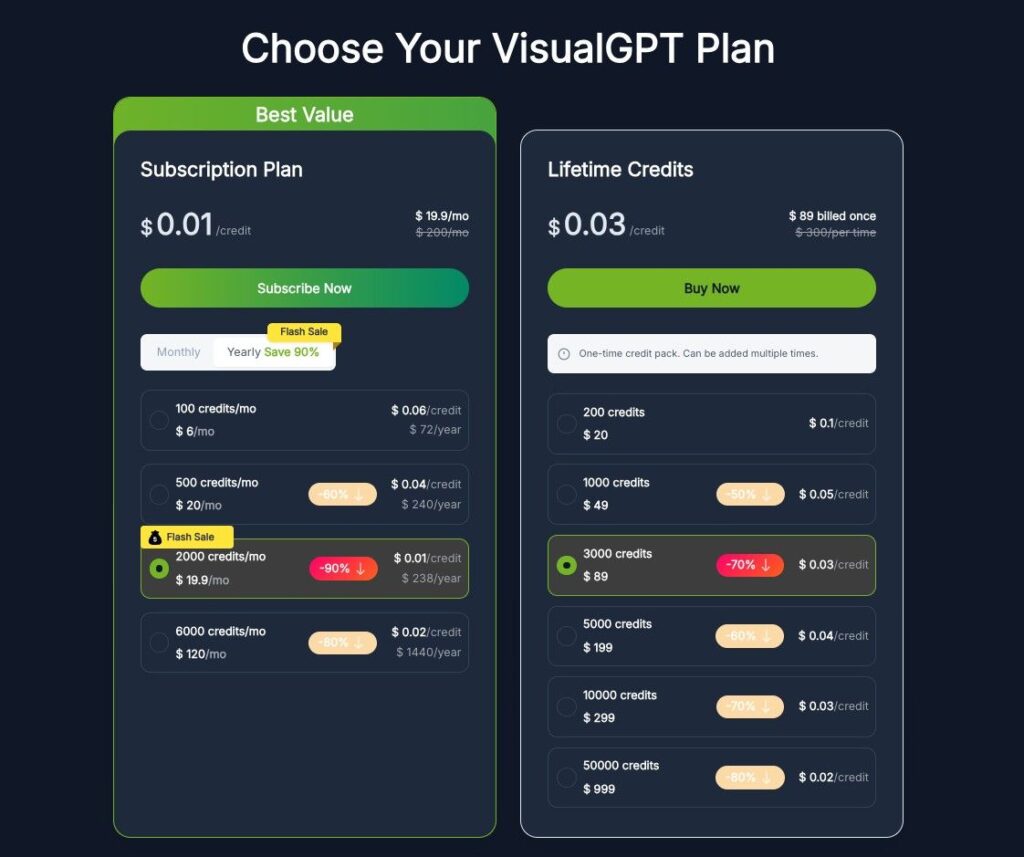
Yes, VisualGPT offers a free tier with limited daily credits; paid plans unlock more credits and premium features.
Do I need to install any software to use VisualGPT?
No installation is required. VisualGPT runs entirely in your browser on any device including desktop and mobile.
What AI models does VisualGPT support?
It supports GPT Image 2, Seedance 2.0, Kling 3.0, Flux Kontext Pro, Nano Banana Pro, and several others.
Does VisualGPT support batch image editing?
Yes, paid plan users can batch-edit up to 10 images simultaneously, saving considerable time on large visual projects.
Is my uploaded data safe on VisualGPT?
Yes, VisualGPT processes images securely and does not use uploaded content to train its AI models at all.
What languages does VisualGPT support?
VisualGPT is available in English, Spanish, French, Russian, Japanese, German, Arabic, and Simplified Chinese.
If you need spokesperson-style talking avatars, compare the best AI avatar generators.