How much does Trello cost?
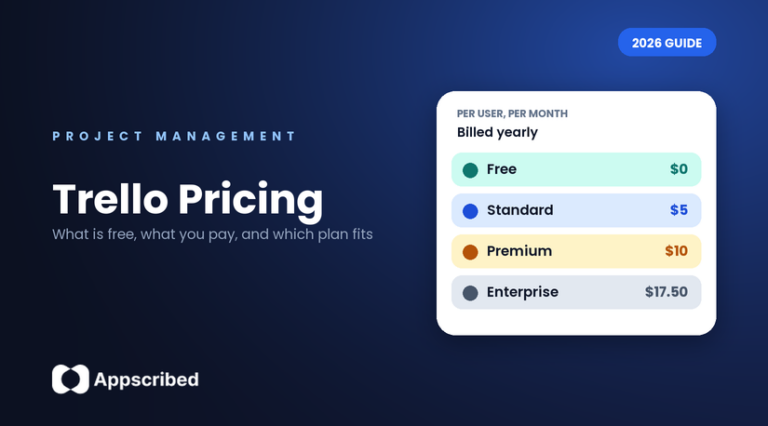
Trello is free for small teams, and paid plans start at $5 per person a month. The free plan gives you unlimited cards, up to 10 boards and up to 10 people in a workspace. Standard costs $5 per user a month if you pay yearly ($6 if you pay monthly). Premium costs $10 yearly ($12.50 monthly). Enterprise costs $17.50 per user, billed yearly.
So a team of 5 pays $25 a month on Standard or $50 on Premium when billed yearly. Prices checked on Trello’s website on 12 October 2026.
Trello has four plans: Free, Standard, Premium and Enterprise. This guide explains what each one gives you, what it costs for a real team, and which one fits you, so you do not pay for things you will never use.
Is Trello free?
Yes. The Trello free plan is yours to keep for as long as you like. It is made for individuals and small teams. Here is what you get and what you do not.
What the free plan includes:
- Unlimited cards, so you can add as many tasks as you want.
- Up to 10 boards in your workspace.
- Up to 10 people (collaborators) in one workspace.
- Free apps for iPhone, Android and desktop.
- Unlimited Power-Ups (add-ons that connect Trello to other apps). Some Power-Ups made by partner companies charge their own fee.
- Built-in automation, templates, a to-do inbox and two-step login. The calendar-style planner is view-only.
What the free plan does not include:
- More than 10 boards or more than 10 collaborators in a workspace.
- Trello’s AI features, such as AI-generated boards, AI summaries and AI organizing.
- Card mirroring (showing one card on several boards), custom fields and advanced checklists.
- The Timeline, Calendar, Table, Dashboard and Map views.
- Unlimited automation runs. These start on Premium.
How much does each Trello plan cost?
Trello pricing per user works like this: you pay a set price for each person, per month, and less per month if you pay for a full year at once. A “user” is anyone you add to your workspace. Trello Standard pricing is $5 per user a month billed yearly, and these are the prices on Trello’s own site:
| Plan | Price if you pay yearly | Price if you pay monthly | Who it is for |
|---|---|---|---|
| Free | $0 | $0 | One person or a small team that uses up to 10 boards |
| Standard | $5 per user a month | $6 per user a month | Teams that need more boards, AI features and custom fields |
| Premium | $10 per user a month | $12.50 per user a month | Teams that want Timeline, Calendar, Dashboard and Table views and admin controls |
| Enterprise | $17.50 per user a month ($210 a year per user) | Billed yearly only | Large companies that need company-wide security and permissions |
To see what that means for a real team, here is the monthly bill. Multiply the price per user by the number of people:
| Team size | Standard (yearly) | Standard (monthly) | Premium (yearly) | Premium (monthly) |
|---|---|---|---|---|
| 5 people | $25 a month ($300 a year) | $30 a month | $50 a month ($600 a year) | $62.50 a month |
| 10 people | $50 a month ($600 a year) | $60 a month | $100 a month ($1,200 a year) | $125 a month |
Trello free vs Premium (and Standard): what is the difference?
Standard gives you more room and the AI tools. Premium adds the extra ways to look at your work and the controls an admin needs.
Standard ($5 per user a month, billed yearly) adds:
- Unlimited boards and unlimited collaborators.
- AI features: quick capture with AI, AI summaries, AI organizing and AI-generated boards.
- Card mirroring, advanced checklists, custom fields, collapsible lists and list colors.
- The full planner, where you drag cards onto a calendar to block time.
- Support during local business hours.
Premium ($10 per user a month, billed yearly) adds everything in Standard, plus:
- Five extra views: Timeline, Calendar, Table, Dashboard and Map, plus Table and Calendar views across all your boards.
- Unlimited automation runs.
- Admin controls: observers, board collections, domain-restricted invites, the ability to deactivate members, and workspace-level templates.
- Simple data export.
- 24/5 Premium support, and a free trial for your workspace.
What does Trello Enterprise include?
Enterprise costs $17.50 per user a month, billed yearly, which is $210 a year per user. It includes everything in Premium plus unlimited workspaces, company-wide permissions, controls over Power-Ups and attachments, Atlassian Guard Standard (which includes single sign-on), and 24/7 admin support. You contact Trello’s sales team to buy it. Other plans can add single sign-on through Atlassian Guard, a separate subscription that starts at $4 per user a month.
Which Trello plan is right for you?
- If you work alone, or in a small team with 10 boards or fewer, start with Free.
- If you need more than 10 boards or more than 10 people, or you want AI help, custom fields or card mirroring, choose Standard.
- If you want Timeline, Calendar, Table or Dashboard views, or admin controls such as observers and data export, choose Premium.
- If you run a large company and need security, single sign-on and many workspaces, ask Trello about Enterprise.
- If you need single sign-on but not the rest of Enterprise, add Atlassian Guard to Standard or Premium.
How does Trello count users on your bill?
- Everyone you add to a workspace as a member or an admin counts as a user on your bill.
- A guest who is on more than one board in the workspace also counts, and is billed at the same rate as a member.
- If you are a team of one and want Standard or Premium, create a workspace first, then upgrade that workspace.
- You can pay monthly or yearly with any major credit card. Enterprise has more payment options.
Is there a Trello free trial, and are there discounts?
Yes to both. Any workspace can start a free trial of Trello Premium, which unlocks unlimited boards, unlimited automation and the extra views. Trello does not say how long the trial lasts on its pricing page, so check the trial screen when you start it. Trello also offers a discount for nonprofit organizations and a discount for education.
How do you cancel or downgrade Trello?
You can downgrade from Standard or Premium at any time. Your workspace keeps its paid features and unlimited boards until the end of the period you already paid for. After that, it becomes a free workspace that can hold 10 boards. If you have more than 10 boards, plan which ones to keep before the paid period ends. Our guide to Trello alternatives includes the steps to cancel Premium.
Is Trello still popular, and what has happened to it?
Trello is still one of the best-known project boards. It is part of Atlassian, the company behind Jira, and it is a cloud product only, so there is no version you install on your own servers. Interest has cooled, though. Google searches for Trello in the US are down about a third from a year ago, and the same is true for most project-management tools: Asana, ClickUp, monday.com and Notion are all down by roughly 30% to 45%. The drop is across the whole category, not just Trello.
Where does Trello fall short?
- The free plan stops at 10 boards and 10 people, so a growing team hits the limit quickly.
- Timeline, Calendar, Table and Dashboard views are only on Premium, which costs double Standard.
- Unlimited automation runs are only on Premium.
- You pay per person, so the bill rises with every person you add, including guests who are on more than one board.
- Single sign-on needs Enterprise or a separate Atlassian Guard subscription.
What if Trello’s free plan is too small and the paid plans cost too much?
Look at other tools before you pay. For example, ClickUp has a free plan with unlimited tasks, unlimited members and Kanban boards, and its paid plans start at $7 per user a month when billed yearly. ClickUp also has an official tool to import your Trello boards, so you do not have to rebuild them by hand. Its free plan includes 60MB of storage, so check that is enough for your files. We may earn a commission if you sign up through our links, at no cost to you.
To compare more options, see our full list of Trello alternatives, or read our Trello review.
Bottom line
Trello is free for individuals and small teams with up to 10 boards and 10 people. Standard at $5 per user a month removes those limits and adds AI features. Premium at $10 per user a month adds Timeline, Calendar, Table and Dashboard views and admin controls. For a team of 5 paying yearly, that is $25 a month on Standard or $50 on Premium.
Prices and plans change, so confirm on Trello’s pricing page before you buy.
Frequently asked questions
How much does Trello cost per month?
Trello is free to start. Standard costs $5 per user a month if you pay yearly ($6 if you pay monthly). Premium costs $10 per user a month yearly ($12.50 monthly). Enterprise costs $17.50 per user a month, billed yearly. For 5 people on Standard paid yearly, that is $25 a month.
Is Trello free?
Yes. Trello has a free plan with unlimited cards, up to 10 boards and up to 10 collaborators in a workspace. Paid plans add more boards, AI features, extra views and admin controls.
What is free on Trello?
The free plan includes unlimited cards, up to 10 boards, up to 10 collaborators per workspace, mobile and desktop apps, unlimited Power-Ups, built-in automation, templates and two-step login. AI features, custom fields, card mirroring and the Timeline, Calendar, Table, Dashboard and Map views are paid.
What is the difference between Trello Standard and Premium?
Standard ($5 per user a month, billed yearly) adds unlimited boards, AI features, card mirroring, custom fields and advanced checklists. Premium ($10) adds Timeline, Calendar, Table, Dashboard and Map views, unlimited automation runs, admin controls and data export.
Is Trello Premium worth it?
It is worth it if your team needs the Timeline, Calendar, Table or Dashboard views, unlimited automation or admin controls such as observers and data export. If you only need boards, cards and AI help, Standard costs half as much.
Does Trello have a free trial?
Yes. Any workspace can start a free trial of Trello Premium. Trello does not state the trial length on its pricing page, so check the trial screen when you start.
Does Trello offer discounts for nonprofits or schools?
Yes. Trello offers a nonprofit community discount and an education discount.
How are users counted for Trello billing?
Each member or admin you add to a workspace counts as a billable user. A guest who is on more than one board in the workspace also counts and is billed at the same rate as a member.
How do I downgrade or cancel Trello?
You can downgrade Standard or Premium at any time. The workspace keeps its paid features and unlimited boards until the end of the period you paid for, then becomes a free workspace that holds 10 boards.
What is a free alternative to Trello?
ClickUp has a free plan with unlimited tasks, unlimited members and Kanban boards, plus an official tool to import Trello boards. Its free plan has 60MB of storage. See our list of Trello alternatives for more options.
Is there anything better than Trello?
It depends on what you need. If the free plan is too small or you want more views at a lower price, ClickUp, Jira, Wrike and MeisterTask have free plans, and Wekan and Planka are free Kanban tools you can host yourself. See our list of Trello alternatives for the full comparison.
Add us as a preferred source on Google, and our reviews and picks show up in your Top Stories and AI Overviews.