What is the best free alternative to Trello?
It depends on what you need. ClickUp has a free plan with unlimited tasks and unlimited members. Jira is free for up to 10 users, Teamwork for up to 5 users and 5 projects, and Wrike has unlimited users but only 200 active tasks. If you can host software yourself, Wekan and Vikunja are open source and have Kanban boards.
Paid plans for most of these start at $5 to $10 per person a month. Prices checked on each company’s website on 12 October 2026.
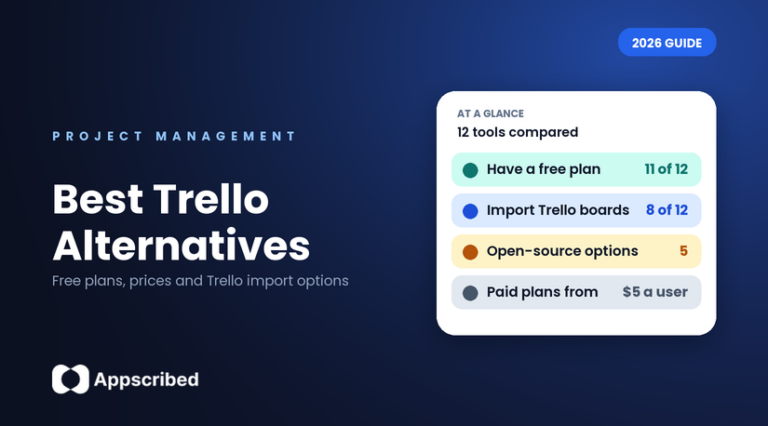
People leave Trello for the same few reasons. The free plan stops at 10 boards and 10 people. The Timeline, Calendar, Table and Dashboard views only come with Premium. Unlimited automation runs are Premium-only too, and you pay per person, so the bill grows with your team. Our guide to Trello pricing has the exact numbers. Below you can compare 12 free Trello alternatives and paid ones, apps like Trello that work as a Kanban board app or as full project software, on free-plan limits, price and whether they can import your Trello boards.
How do the best Trello alternatives compare?
| Tool | Free plan | Cheapest paid plan (per user a month, billed yearly) | Imports from Trello? | Good for |
|---|---|---|---|---|
| ClickUp | Yes: unlimited tasks and members, 60MB storage | $7 | Yes, official tool | Teams that want a lot for free |
| monday.com | Yes: 2 seats, 3 boards | $9 (minimum 3 seats) | Yes, official (limited) | Visual teams that want automations |
| Asana | Yes: 2 users | $10.99 (minimum 2 seats) | Yes, through a CSV file only | Teams that want clear task tracking |
| Notion | Yes: limited once there are 2+ owners | $10 | Yes, official importer | Teams that also want notes and docs |
| Airtable | Yes: 1,000 records per base, 5 editors | $20 | Yes (listed in its import guide) | Teams that think in spreadsheets and databases |
| Jira | Yes: up to 10 users | About $7.50 at a full tier (from $900 a year for up to 10 users) | Yes, official | Software teams |
| Teamwork | Yes: 5 users, 5 projects | $9.99 (minimum 3 seats) | Yes, official guide | Agencies and client work |
| Wrike | Yes: unlimited users, 200 active tasks | $10 (2 to 15 users) | Not documented | Teams that outgrow simple boards |
| MeisterTask | Yes: 3 projects, unlimited members | $7 | Yes (listed on its pricing page) | Small teams that want simple boards |
| Basecamp | Yes: 1 project, 5 users | $25 a month flat for the whole team (up to 20 users) | Not documented | Small teams that want a flat price |
| Microsoft Planner | No separate free plan; included in Microsoft 365 business plans | Included, or Planner Plan 1 at $10 | Not documented | Teams already on Microsoft 365 |
| Todoist | Yes: 5 projects | $5 | No | One person or a very small team |
How much will it cost for a team of 5?
Most tools charge per person, so multiply the price by your team size. This table shows the monthly cost for 5 people when you pay for a year at once. It does not include extras or add-ons.
| Tool and plan | Monthly cost for 5 people |
|---|---|
| Todoist Pro ($5 per user) | $25 |
| Trello Standard ($5 per user), for comparison | $25 |
| Basecamp Freelancer (flat fee for the team) | $25 |
| ClickUp Unlimited ($7 per user) | $35 |
| MeisterTask Pro ($7 per user) | $35 |
| monday.com Basic ($9 per user) | $45 |
| Teamwork Basics ($9.99 per user) | $49.95 |
| Notion Plus ($10 per user) | $50 |
| Wrike Team ($10 per user) | $50 |
| Trello Premium ($10 per user), for comparison | $50 |
| Microsoft Planner Plan 1 ($10 per user) | $50 |
| Asana Starter ($10.99 per user) | $54.95 |
| Jira Standard (about $900 a year for up to 10 users) | $75 |
| Airtable Team ($20 per user) | $100 |
Which Trello alternative should you choose?
- If you want the most for free, look at ClickUp (unlimited tasks and members) and Wrike (unlimited users, 200 active tasks).
- If you want something that looks and feels like Trello, look at MeisterTask, Wekan or Planka. They are board-first tools. MeisterTask is the simplest Trello alternative for small teams, and Wekan and Planka are free Kanban board software you host yourself.
- If you also want notes, docs and a wiki, look at Notion.
- If you work in software development, look at Jira, which is free for up to 10 users.
- If you run client projects and need to track time and billing, look at Teamwork.
- If you hate per-person pricing, look at Basecamp, which charges one flat fee for the whole team.
- If your company already uses Microsoft 365, check Microsoft Planner first, because it is included.
- If you want to keep your data on your own server, see the open-source tools further down.
- If you only need a personal to-do list, Todoist is simpler than any project tool.
ClickUp
ClickUp’s Free Forever plan has unlimited tasks, unlimited members, Kanban boards, docs and 24/7 support, with 60MB of storage. Paid plans start at $7 per user a month billed yearly ($10 monthly). ClickUp has an official tool to import Trello boards, so you do not have to rebuild them by hand. The catch is the small free storage, and the large feature list takes time to learn. ClickUp is a link we may earn a commission on. See also our ClickUp review.
monday.com
monday.com’s free plan covers up to 2 seats and 3 boards, and includes a Kanban view. Paid plans start at $9 per seat a month billed yearly ($12 monthly), and you need at least 3 seats. The Standard plan only includes 250 automation actions a month. monday.com has an official Trello import, but it brings over only names, labels and dates, not descriptions, checklists or files. Read our monday.com review.
Asana
Asana’s free plan (called Personal) is for up to 2 users and has unlimited tasks and projects with list, board and calendar views. Starter costs $10.99 per user a month billed yearly ($13.49 monthly), with a minimum of 2 seats. Timeline, forms and custom fields only start on the paid plans. There is no one-click Trello import: Asana’s official route is a CSV file.
Notion
Notion has a board view and a free plan, but a free workspace with 2 or more owners is limited to 1,000 blocks, which a small team uses up quickly. Plus costs $10 per member a month billed yearly ($12 monthly). Notion has an official Trello importer that turns a board into a database with each card as an item. It imports up to 10 boards at a time, and Power-Ups, automations and permissions do not carry over.
Airtable
Airtable is a spreadsheet and database with a Kanban view. The free plan allows 1,000 records per base and 5 editors, and Airtable says you cannot add more records once you reach the limit. Team costs $20 per user a month billed yearly ($24 monthly), the highest per-user price in this list. Airtable lists Trello in its import guide. Read our Airtable review.
Jira
Jira is made by Atlassian, the same company as Trello. Its free plan covers up to 10 users and includes board, list, timeline and calendar views, 2GB of storage and 150 automation steps a month. Standard is priced in tiers by team size, starting at $900 a year for up to 10 users. Jira can import from Trello, but archived cards, checklists and custom fields are not imported into a Jira Software space. It is built for software teams, so it can feel heavy for other kinds of work.
Teamwork
Teamwork’s free plan allows up to 5 users and 5 projects, with a board view and 100MB of storage. Basics costs $9.99 per user a month billed yearly ($13.99 monthly), with a minimum of 3 seats. Teamwork has an official guide to importing Trello boards, where each board becomes a project. It is aimed at client work, so many of the paid features cover billing and time. Read our Teamwork review.
Wrike
Wrike’s free plan has unlimited users, 2GB of storage and a board view, but is limited to 200 active tasks and has no Gantt chart. The Team plan costs $10 per user a month billed annually and covers 2 to 15 users. Wrike does not document a Trello import, only Excel. Its plans changed in January 2026. Read our Wrike review.
MeisterTask
MeisterTask’s free plan has unlimited tasks and unlimited team members, with up to 3 projects. Pro costs $7 per user a month billed yearly ($9 monthly). Its pricing page lists an import from Asana and Trello. Subtasks, Gantt and custom fields are on the Business plan only. Read our MeisterTask review.
Basecamp
Basecamp charges one flat fee for the whole team instead of a price per person. The free plan allows 1 project and 5 users with 1GB of storage. Freelancer is $25 a month for 3 projects and up to 20 users, Studio is $59 and Pro is $99. Its Kanban-style tool is called Card Tables. Basecamp does not document a Trello import. Read our Basecamp review.
Microsoft Planner
Planner comes with Microsoft 365 business plans at no extra cost, and it has a board view. Microsoft 365 Business Basic is $7 per user a month billed yearly. Timeline and Gantt views and sprints need Planner Plan 1 at $10 per user a month. Microsoft does not list a separate free version and does not document a Trello import. It is the obvious choice only if your company already pays for Microsoft 365.
Todoist
Todoist is a to-do list more than a team board. The free plan allows 5 projects and has a board layout for personal projects. Pro costs $5 per user a month billed yearly ($7 monthly). Todoist says it has no official tool to import from Trello. Team projects and the team board layout need the Business plan at $8 per user a month billed yearly. Read our Todoist review.
What are the best free and open-source Trello alternatives?
Trello is a cloud-only product, so there is no version you can install yourself. If you want to run your own board on your own server, these open-source tools (free Kanban board software) can do it. They are free to install, but you need to be comfortable setting up and updating a server.
| Tool | Cost | Still updated? | Imports from Trello? | What to know |
|---|---|---|---|---|
| Wekan | Free to self-host. Hosted version: €50 a year for the whole team | Yes (new version on 11 October 2026) | Yes, from a Trello JSON file | Closest to Trello. Needs a recent Node.js version |
| Vikunja | Free to self-host. Hosted: €5 per user a month | Yes | Yes, built in | More of a task manager with a Kanban view |
| Taiga | Free to self-host. Hosted: flat €5, €20 or €60 a month, unlimited users | Yes | Yes (self-hosted setup needs a key) | Setup needs Docker and several services |
| Planka | Free to self-host. Hosted: about €8.50 to €9.40 per user, minimum 5 users | Yes | Yes, one board at a time | Its licence is not fully open source |
| Kanboard | Free to self-host | Yes, but in maintenance mode | Not officially | Plain interface, simple to run |
How do you move your boards from Trello?
- Check the tool’s own import page before you commit. The tables above show which tools have an official Trello import.
- Expect to lose some things. monday.com does not bring over descriptions, checklists or files. Notion does not carry over Power-Ups, automations or permissions. Jira does not import archived cards or checklists into a software space. Planka brings in one board at a time and no attachments.
- Try one board first. Import a single board, check that cards, labels and due dates look right, then move the rest.
- Keep Trello running until your team has used the new tool for a week or two. If you downgrade Trello, the free workspace holds 10 boards, as explained in our Trello pricing guide.
Does Microsoft have an alternative to Trello?
Yes. Microsoft Planner has a board view like Trello’s and comes with Microsoft 365 business plans. It is a good fit if your team already lives in Teams and Outlook. It has fewer extras than Trello Premium unless you buy Planner Plan 1.
Bottom line
If you want alternatives for Trello with a big free plan, start with ClickUp, Jira or Wrike. If you want something that feels like Trello, try MeisterTask or the open-source Wekan. If you want to avoid per-person pricing, look at Basecamp. For a team of 5 paying yearly, the options range from $25 to $100 a month.
Prices and plans change, so confirm on each company’s website before you buy.
Frequently asked questions
Is there a better alternative to Trello?
It depends on what you need. ClickUp has the biggest free plan, Jira is free for up to 10 users and suits software teams, Notion combines boards with notes and docs, and Basecamp charges one flat fee for the whole team. If you only need simple boards, Trello may already be enough.
Is there a completely free alternative to Trello?
Yes. ClickUp, Jira, Teamwork, Wrike, MeisterTask and Basecamp all have free plans with limits. The open-source tools Wekan, Vikunja, Taiga, Planka and Kanboard are free to install on your own server.
What is the best self-hosted alternative to Trello?
Wekan is the closest self-hosted Trello alternative and can import a Trello JSON file. Vikunja is a good choice if you want a task manager with a Kanban view. Trello itself is cloud-only, so it cannot be self-hosted.
Does Microsoft have a Trello alternative?
Yes. Microsoft Planner has a board view and comes with Microsoft 365 business plans at no extra cost. Timeline and Gantt views need Planner Plan 1 at $10 per user a month.
Which Trello alternatives can import my Trello boards?
ClickUp, Notion, Jira, Teamwork, monday.com, Wekan, Vikunja, Taiga and Planka have Trello imports, and MeisterTask and Airtable list one. Asana accepts a CSV file. Wrike, Basecamp, Microsoft Planner, Todoist and Kanboard do not document an official Trello import.
How much do Trello alternatives cost?
Most paid plans cost $5 to $10 per user a month when billed yearly. For a team of 5, that is about $35 to $55 a month for ClickUp, MeisterTask, monday.com, Notion and Asana. Airtable costs more at $20 per user, and Basecamp charges a flat $25 a month for up to 20 users.
What are the downsides of Trello?
The free plan is limited to 10 boards and 10 people per workspace. Timeline, Calendar, Table and Dashboard views and unlimited automation runs need Premium. You pay per person, and AI features need a paid plan.
Is Microsoft Planner or Trello better?
Planner is better if your team already uses Microsoft 365, because it is included. Trello is simpler for visual boards and has a free plan. Planner has no separate free plan.
Is Trello still popular?
Trello is still one of the best-known project boards. Interest in it has fallen, but so has interest in most project-management tools, including Asana, ClickUp, monday.com and Notion.
How do I switch from Trello to another tool?
Check the new tool’s import guide, import one board first, and check that cards, labels and dates came across. Keep Trello running for a week or two while your team settles in.
What are some free apps similar to Trello?
Free apps similar to Trello include ClickUp (unlimited tasks and members), Jira (up to 10 users), Wrike (200 active tasks), MeisterTask (3 projects) and Basecamp (1 project, 5 users). For a free Kanban board app you can host yourself, try Wekan, Planka or Kanboard.
Add us as a preferred source on Google, and our reviews and picks show up in your Top Stories and AI Overviews.