In seven weeks, the three biggest AI labs each shipped the same idea: a personal agent that never clocks off. This guide answers the questions people are actually asking about them, what each one is, what work it is good at, what it really costs, and how to get started, so you can pick the right one without wading through the launch hype.
First, what is an “always-on AI agent”?
A normal chatbot answers your question and stops. An always-on agent is different in three ways:
- It gets its own cloud computer. The agent runs on a machine in the cloud with its own browser, so it keeps working even when your laptop is shut or your phone is in your pocket.
- It works toward a goal over time. You hand it a task, it takes multiple steps across apps, checks in when it needs a decision, and reports back, sometimes minutes later, sometimes hours.
- It takes actions, not just words. With your permission it can fill forms, send messages, book things, update files or open a pull request, rather than only telling you how.
All three tools below share that DNA. What separates them is who they were built for and what they cost to run.
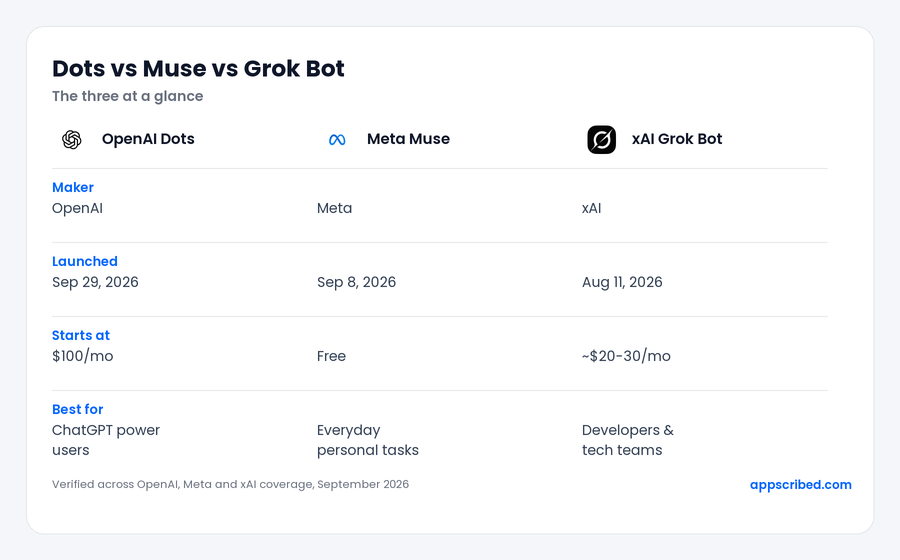
The three at a glance
| OpenAI Dots | Meta Muse | xAI Grok Bot | |
|---|---|---|---|
| Maker | OpenAI | Meta | xAI |
| Launched | Sep 29, 2026 | Sep 8, 2026 | Aug 11, 2026 |
| Model | GPT-6 Astra | Muse Spark 1.3 | Grok |
| Where you use it | ChatGPT (web, desktop, mobile), Slack, Teams | iOS and Android app, web (muse.ai), WhatsApp | Shared cloud workspace, tied to Cursor |
| Starts at | $100/mo (ChatGPT Pro) | Free | Bundled from ~$20-30/mo (free with SuperGrok Heavy) |
| Built for | ChatGPT power users, connected work | Everyday personal tasks | Developers and technical teams |
Meta Muse: the everyday-life agent
What is it?
Muse is Meta’s consumer AI agent, launched September 8, 2026 and built on the Muse Spark 1.3 model. Where the old Meta AI answered questions and drafted text, Muse actually does things: it opens a browser, fills forms, sends messages and buys things on your behalf, then comes back when it needs a decision. It is deliberately built for people with no technical background, and it worked, Muse hit number one on the US App Store within about ten days of launch.
What work is it best for?
Personal life admin, the stuff you keep meaning to get to:
- Booking travel, hotels and restaurant tables (it connects to services like OpenTable and Expedia).
- Filling out and submitting web forms, and organising events.
- Drafting and sending emails and messages; Muse even has its own email address you can forward things to.
- Negotiating and lowering bills, or listing and selling items for you.
- Shopping and checking out through Link by Stripe, so Muse never sees your real card number and purchases come with protections. Retailers like Best Buy, Walmart, Sephora and Instacart are connected.
- Turning a saved Instagram recipe reel into a grocery list, and suggesting tasks proactively through an “Ideas” tab.
It is not a developer tool and not a coding assistant. If that is what you need, look at Grok Bot or Dots instead.
What does it cost?
Free tier: up to about 100 million tokens a week, which Meta says covers most people’s use, including the agent, browser and connectors. Paid plans exist for heavier use: coverage widely reports a Power tier at $20/month and a Maximum tier at $100/month, though Meta had not officially named or priced them on its own pages at launch, so treat those figures as reported rather than confirmed. Billing is metered by usage, not per seat, and Muse adds no fee to the things you buy, you pay only the item price.
How do I get started?
- Download the Muse app for iPhone or Android, or go to muse.ai on the web.
- Sign in with a Meta account. You do not need Facebook or Instagram, and on the web you can log in with just your phone number.
- Give it a name and avatar, then open Settings and set your Data Controls (you can opt out of model training here) and your action permissions.
- Connect only the accounts you are comfortable with, and choose read-only or full access for each one.
- Start small, organise your saved recipes or build a restaurant shortlist, before handing over anything sensitive.
You can also message Muse as a contact inside WhatsApp for quick tasks. That version is lighter, though, no Ideas feed and less handling of complex multi-step jobs.
What to watch out for
Muse has real safety plumbing: each user gets an isolated cloud computer, a separate “Sentinel” agent approves internet access, your passwords and card number are hidden from it, and it must ask before sensitive actions like sending messages or spending money. That said, it wants a lot of access to be useful (email, messages, even bank and card details), independent reporting has raised privacy and safety questions, and Amazon has blocked Muse from its store. Grant permissions deliberately and review what you connect. Muse is currently US only, for adults 18 and up, with AI-glasses support and wider Mac use flagged as coming.
xAI Grok Bot: a team of AI coworkers for builders
What is it?
Grok Bot, launched in beta on August 11, 2026, is not one assistant but a team of named bots that share a cloud workspace. Each bot signs into your real tools and operates them through the interface like a person would, clicking, typing and browsing, so it works even with apps that have no clean API. This is a different product from the @grok chatbot on X, which just replies to posts; Grok Bot runs multi-step jobs to completion on its own machine.
What work is it best for?
Developers and technical teams who want persistent help:
- Long-running jobs that keep going after you close the laptop, long coding tasks, bug reproduction and fixes, data pulls.
- Multi-bot collaboration: put two to six bots in a group chat, @-mention to add one mid-task, and let them hand work between themselves. A common setup is a “Chief of Staff” bot that delegates to specialists (sales, research, ops).
- Teaching a repeatable skill: do a workflow once, or screen-record yourself doing it, and save it as a reusable skill.
- Scheduled routines: put a skill on a timer or trigger so it runs on its own (a morning brief, an inbox watcher).
It is overkill for non-technical users, and not suited to customer-facing queues, it has no dry-run or rollback yet.
What does it cost?
There is no standalone Grok Bot price, it is bundled into Cursor and SuperGrok subscriptions. Since late August 2026 it comes with every paid individual plan, from Cursor Pro at $20/month and SuperGrok at $30/month, and it is included at no extra charge with SuperGrok Heavy. Team options include Cursor Premium Teams at $120 per seat and Cursor Ultra at $200/month. Two cost warnings worth knowing up front: each subscription includes only a weekly usage allowance, and anything beyond it is billed at raw model and token cost with no spend cap yet, so heavy use can run well past the sticker price. There is also no model picker to route work to a cheaper model.
How do I get started?
- Subscribe to any paid Cursor or SuperGrok plan and sign in with that account.
- Create your first bot (a good first move is a “Chief of Staff”), give it a name, role and description.
- Connect the tools it needs (Gmail, GitHub, Notion, Salesforce and so on).
- Run one task and get it reliable, then save it as a skill.
- Add more bots, put them in a group chat, and schedule your best skills as routines. Set clear approval rules so reversible actions run on their own but anything that sends, buys or deletes waits for you.
What to watch out for
Despite the marketing, your bots share one cloud computer per account, not one each, which means files, browser sessions and logins are available across your whole bot roster. xAI’s own guidance is blunt: do not use separate bots as a security boundary, and every action is logged as you. There is no audit trail yet and no compliance certifications claimed, so keep it away from regulated or customer-facing work for now. It runs on macOS, Windows and iOS, with enterprise access still waitlisted.
OpenAI Dots: the most capable, and the most expensive
What is it?
Dots is OpenAI’s always-on agent, launched at DevDay on September 29, 2026 and running on its flagship GPT-6 Astra model. A “dot” is a named, persistent agent that lives inside ChatGPT with its own cloud computer and browser, keeps working in the background, and remembers context across ChatGPT, Slack and Teams. Unlike a normal ChatGPT chat, it keeps going after the conversation ends, builds up its own memory from the apps you connect, and does quiet background research between tasks. It can reach more than 4,000 apps.
What work is it best for?
Recurring, accumulating work that benefits from a standing owner who checks in with you:
- Monitoring research, vendors or changelogs and flagging only what changed.
- Updating reports and reconciling spreadsheets, catching duplicates and mismatches.
- Document prep and invoicing, in OpenAI’s own demo a dot noticed an unsent invoice, prepared it, and sent it after approval.
- Investigating a bug and drafting a pull request with test evidence.
- Building meeting-prep briefs and clipping content with timestamps.
It is not the tool for a quick one-off question (use a normal chat) or a tightly-specified coding task (use a dedicated coding tool). Its long-run reliability is also still unproven this early.
What does it cost?
Dots is not on the free or Plus tiers. You need a paid ChatGPT plan: Pro 100 at $100/month, Pro 200 at $200/month, or Pro 500 at $500/month, or a Business Premium plan, each of which includes your first dot at no extra cost. Only Pro 500 gets the fastest “Ultrafast” speed and the largest allowance. Two honest unknowns: the price for adding more than one dot has not been published, and neither has the permanent usage allowance once the launch-month grace period ends, so ongoing cost is hard to budget precisely today. Dots are also unavailable on Pro plans in the EEA, Switzerland and the UK at launch, though Business Premium covers all supported regions.
How do I get started?
- Make sure you are on an eligible plan (a ChatGPT Pro tier or Business Premium).
- Create the dot in the ChatGPT desktop app or a desktop browser, this is the only way to create one, there is no mobile setup.
- Name it, connect your apps, review the connections, and let it introduce itself and take a first task.
- After that, talk to it from ChatGPT on desktop, web or mobile, or through Slack and Teams, and watch its cloud computer work in real time.
- If you want, grant access to your local files or browser through the desktop app, this is off by default and needs a per-use approval.
What to watch out for
At launch a dot cannot phone you (you contact it, not the other way round, despite some headlines), has no email address of its own until you connect yours, and its background research is read-only, it needs your approval to actually send or change anything. The permission controls are strong: you set rules for what it can do on its own versus what needs a check, and sensitive actions like changing a password always require you. One gotcha, disconnecting an app does not erase what the dot already learned, resetting the dot is the only way to wipe its memory.
Which one should you choose?
- You want help with everyday life, bookings, forms, bills, shopping, from your phone: Meta Muse. It is free to start and the only one built for regular people first.
- You write code or run a technical team and want agents that run long jobs and collaborate: xAI Grok Bot, especially if you already use Cursor.
- You live inside ChatGPT and want the most capable, most-connected agent, with budget as a secondary concern: OpenAI Dots.
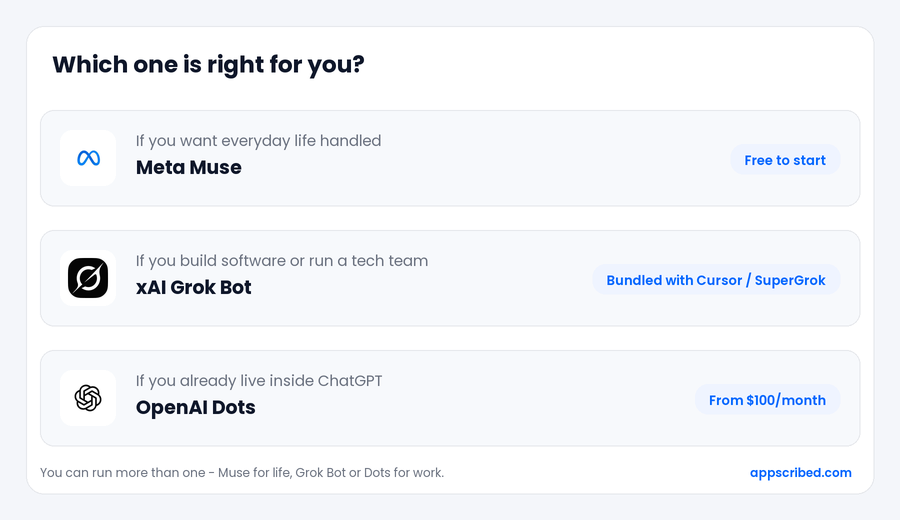
Cheapest to try: Muse (free), then Grok Bot if you already pay for Cursor or SuperGrok. Dots is the most expensive by a wide margin. Can you use more than one? Yes, and many people will, Muse for personal life and Grok Bot or Dots for work are a natural pair, since they barely overlap.
Are they safe to let act on your behalf?
These agents can spend money, send messages and change accounts, so treat setup as the important part. Three rules that apply to all three:
- Connect the minimum. Give each agent only the apps it needs for the task in front of you, and prefer read-only access until you trust it.
- Keep approvals on for anything irreversible. Let it act freely on reversible things, but require a check before it sends, buys, deletes or signs.
- Start with low-stakes tasks and watch what it actually does before handing over anything sensitive or financial.
Each tool has its own safeguards, Muse hides your passwords and card, Dots always requires you for sensitive actions, and Grok Bot lets you set approval boundaries per bot, but the responsibility for what you connect stays with you.
The bottom line
Most people should start with Meta Muse, it costs nothing to try and targets real daily chores. xAI Grok Bot is the specialist’s pick for building and automation, best value if Cursor or SuperGrok is already in your stack. And OpenAI Dots is the premium option that earns its price only once ChatGPT is already central to how you work. Pick by the job you actually have, not by whose launch was loudest.
Related reading: Best AI Models 2026: Claude vs GPT vs Gemini (the models these agents run on), the best AI voice agent platforms, and the best AI customer service software.
Frequently asked questions
Which of the three is cheapest?
Meta Muse, it has a free tier that Meta says covers most people, with paid plans reported at $20 and $100 a month for heavier use. Grok Bot is free if you already pay for a Cursor or SuperGrok plan (from about $20 to $30 a month). OpenAI Dots is the most expensive, starting at $100/month for ChatGPT Pro.
Do I need ChatGPT Pro to use Dots?
Yes. Dots is not available on the free or Plus tiers. It requires a ChatGPT Pro plan (from $100/month) or Business Premium, which includes your first dot.
Is Grok Bot the same as the @grok bot on X?
No. The @grok account on X is a chatbot that replies to posts. Grok Bot is a separate agent product, a team of bots on their own cloud workspace that run multi-step jobs, bundled into Cursor and SuperGrok subscriptions.
Can these agents really spend my money or send messages?
Yes, that is the point of an agent, and it is why permissions matter. All three ask for approval before sensitive actions by default, and Muse routes purchases through a Stripe virtual card so it never sees your real card number. Start with low-stakes tasks and keep approvals on for anything irreversible.
Can I use more than one at the same time?
Yes. They target different jobs, so pairing Muse for personal life with Grok Bot or Dots for work is common and there is little overlap.
Which should a non-technical person pick?
Meta Muse. It is built for people with no technical background, works from a phone app or WhatsApp, and is free to start. Grok Bot assumes you are a developer, and Dots assumes ChatGPT is already central to your work.
Add us as a preferred source on Google, and our reviews and picks show up in your Top Stories and AI Overviews.