If you keep seeing SKILL.md in Claude discussions and wondering whether it is just another prompt file, the short answer is no. Claude Skills are reusable workflows: folders of instructions, scripts, and resources that Claude loads when a task matches.
That is the useful shift. Skills turn repeatable work into a playbook instead of a one-off prompt. They are available on Free, Pro, Max, Team, and Enterprise plans when code execution and file creation are enabled, and they also work in Claude Code beta and the API code-execution path. Anthropic’s Skills overview and the help-center walkthrough cover the surface-level rollout, while the open-source anthropics/skills repository on GitHub shows production-grade examples (Excel, Word, PowerPoint, PDF) you can read and adapt.
In short: prompts are for one-off asks, Projects hold ongoing context, MCP connects Claude to tools and data, and Skills teach Claude how to do a repeatable job the same way every time.
What are Claude Skills?
Claude Skills are specialized instruction packages that Claude can load dynamically when a task fits. Think of them as reusable operating manuals. If you keep repeating the same process, Skill logic lets Claude follow the same standards without you restating them in every chat.
That makes Skills useful for work that needs consistency more than creativity. A good Skill can capture a brand voice, a reporting format, a data-cleaning method, a QA checklist, or a coding workflow that you want Claude to follow every time.
Skills are not locked to one surface either. They live inside the regular Claude apps, inside Claude Code, and inside any workflow that runs through the API’s code-execution tool. That breadth is what makes them feel less like a power-user toggle and more like a baseline part of how Claude is supposed to work.
What is SKILL.md?
SKILL.md is the entry file inside a Claude Skill folder. It defines what the Skill is for, when Claude should use it, and what instructions Claude should follow once it loads the Skill. The folder can also include scripts, reference files, and other supporting assets.
That structure matters because it keeps the Skill lightweight until it is actually needed. Claude does not need to load every detail up front. It can read the Skill name and description first, then pull in the full instructions only when the task matches.
In practice, that is what makes Skills feel different from dumping a giant prompt into chat. A Skill is closer to a reusable workflow package than a one-time instruction.
How do Claude Skills work?
Claude uses a progressive loading approach. It looks at the Skill name and description first. If the task matches, it loads the full SKILL.md instructions. If the Skill needs extra files, Claude only loads those resources when they are relevant.
The result is simple: Claude gets procedural knowledge without burning context on everything at once. That is why Skills are better suited to repeatable work than to random, ad hoc questions.
- Use the Skill name and description to signal when it should apply.
- Keep the main instructions focused on the actual workflow.
- Add supporting files only when they make the result better.
- Test the Skill on a real task, then tighten the wording if Claude drifts.
SKILL.md format: what actually goes in the file
Every Claude Skill lives in a folder. The folder name is the Skill name. Inside that folder, SKILL.md is the only required file. It has two parts: YAML frontmatter between --- markers at the top, and a markdown body underneath. The frontmatter is what Claude reads first to decide whether the Skill is relevant; the body is the procedure Claude follows once it activates.
---
name: weekly-status-report
description: Use when generating the Monday weekly status email for the leadership team. Pulls metrics from the dashboard sheet and formats the standard 4-section summary.
---

# Weekly Status Report

When this Skill activates, follow these steps:

1. Read the latest tab in dashboard.xlsx and extract weekly totals.
2. Compare against last week. Flag any line item with > 15% movement.
3. Draft the email in this exact structure:
   - Headline (1 sentence)
   - What worked (3 bullets)
   - What did not (3 bullets)
   - Asks for the team (numbered list)
4. Keep the tone direct. No filler. No emojis.
The two required frontmatter fields are name and description. The hard limits are worth memorising before you start writing one:
- name: 64 characters max, and it must match the folder name exactly.
- description: 200 characters max. This is the single most important field — Claude uses it to decide when to activate the Skill, so write it like a routing rule, not a marketing tagline.
- SKILL.md body: keep it under 500 lines. If you need more, split detail into companion files in the same folder and reference them from the body.
- Optional folders inside the Skill:
scripts/for executable helpers,references/for docs Claude can open on demand,assets/for templates or images. None of these are required.
The description field is where most first-time Skills fail silently. If it is vague, Claude will not pick the Skill up when it should — or worse, will pick it up when it should not. Write the description so a reader can guess the trigger condition in one sentence.
Where can you use Claude Skills?
Skills are live in Claude apps across Free, Pro, Max, Team, and Enterprise plans whenever code execution and file creation are enabled. They are also in beta inside Claude Code and available to API users through the code-execution tool.
That is important because it means Skills are not locked to one narrow workflow. They can live inside normal Claude usage, team workflows, and more technical environments too.
For Team and Enterprise, there is also a sharing layer. Skills can be personal, shared with specific colleagues, or provisioned org-wide by an admin. That makes them useful when a team wants the same standards applied across multiple users.
How do you create a Claude Skill?
The cleanest way to think about Skill creation is this: choose a repeated workflow, write down what “good” looks like, and package that into a reusable format.
The conversational route follows the same basic shape. You describe your process, share any templates or materials that matter, answer Claude’s questions, and let it structure the Skill into a reusable format. If you want full control, you can also write the files yourself and package them manually — the custom Skills guide covers the file structure, and the anthropics/skills repo is the cleanest reference for what a production-grade Skill folder actually looks like.
- Pick one repeatable task, not a broad category.
- Describe the output standards clearly.
- Write the core instructions in
SKILL.md. - Add scripts, templates, or reference files only if they improve consistency.
- Test the Skill on real examples and tighten the instructions until the output is stable.
The best Skills are usually narrow. If you have to explain the same procedure over and over, that is probably a Skill. If you only need the instruction once, keep it as a prompt.
What should you build as a Skill?
Skills make the most sense when the work is procedural. They are especially useful for brand standards, document formats, QA steps, spreadsheet rules, research methods, or code review habits that you want Claude to follow every time.
Good Skill candidates usually share three traits: the work repeats often, the output should look consistent, and the process benefits from a defined playbook. If all three are true, a Skill is usually a better fit than a long prompt.
- Brand voice enforcement
- Weekly reporting formats
- Research or analysis workflows
- Document or deck standards
- Recurring coding or review procedures
Bad Skill candidates are one-off requests, vague personal preferences, or giant catch-all workflows that try to do too much at once.
Common Claude Skills examples
The fastest way to understand Claude Skills is to look at the kind of work people are already wrapping into them. The patterns below are the ones that show up most often in real teams and inside the official anthropics/skills repo.
| Skill | What it does | Why a Skill (not a prompt) |
|---|---|---|
| PDF / DOCX / XLSX / PPTX creator | Generates formatted documents directly from a brief — Anthropic ships these as built-in Skills. | The formatting rules are stable; you do not want Claude inventing layout each time. |
| Brand voice enforcement | Rewrites drafts so they match your style guide, banned-word list, and tone rules. | Voice has to be identical every run, not “creative.” |
| Weekly status report | Pulls metrics, compares to last week, and drafts the email in a fixed 4-section structure. | Same shape every Monday; the procedure should not change. |
| Contract risk scan | Reads an uploaded contract and produces a ranked list of legal, financial, and operational risks. | The checklist of clauses to look for is repeatable and worth encoding. |
| End-of-session code review | Runs through coding standards, security checks, and feature completeness before you commit. | The standards are the same every time — the review questions should not drift. |
| MCP debugging | Walks each tool call in an MCP chain and produces a structured report of where it failed. | Diagnostic format needs to be consistent across runs. |
| SQL formatter / query reviewer | Enforces house SQL style and flags performance anti-patterns before code review. | Style rules are deterministic — perfect for a Skill, wrong fit for a prompt. |
| Research synthesis | Takes a folder of source PDFs or notes and outputs a fixed-shape brief with claims, evidence, and gaps. | The output schema matters more than the input variety. |
The pattern in all of these: the shape of the output is fixed, and the steps to get there do not change. That is the line between “Skill” and “prompt.” If the steps change every time, leave it as a prompt. If they do not, write the Skill once and stop re-explaining.
How are Claude Skills different from prompts, Projects, and MCP?
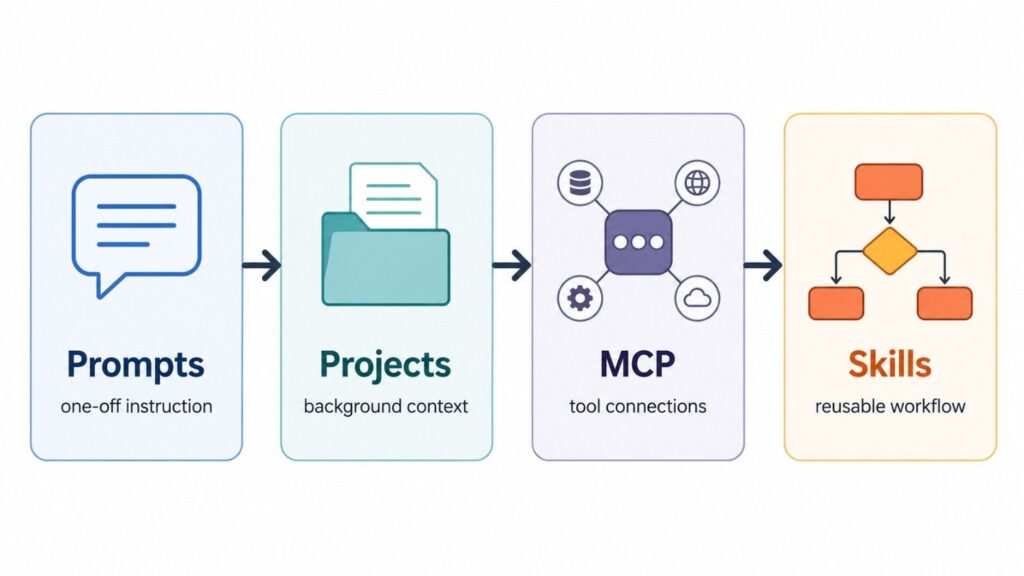
This is the question most people really want answered. The short version is that each piece does a different job.
- Prompts are one-time instructions in a conversation.
- Projects hold background context for an ongoing body of work.
- MCP connects Claude to external tools and data sources.
- Skills teach Claude a reusable procedure or workflow.
Anthropic’s own explanation on how Skills compare with prompts, Projects, MCP, and subagents is basically this: MCP gives Claude the connection, while Skills give Claude the procedure. If Claude needs access to a database or file system first, that is MCP. If Claude already has the data and needs to know how to process it correctly, that is a Skill.
Projects and Skills can also work together. A Project can hold the background for a specific body of work, while a Skill can keep Claude aligned to the way you want that work done. If you find yourself copying the same instructions across multiple Projects, that is usually a sign to turn the repeated procedure into a Skill instead.
Claude Skills vs subagents
Subagents and Skills look similar from a distance but solve different problems. A subagent is a separate Claude instance that runs in parallel or sequentially under a parent agent — it gets its own context window, its own tools, and a specific task to finish. A Skill is a procedure the main Claude follows; it does not spawn a new process or claim its own context window.
The rule of thumb: use a subagent when you need isolation — fresh context for a complex sub-task, parallel work, or a job that would pollute the main thread. Use a Skill when you need consistency — the main Claude should keep doing the work, just the same way every time. Most real workflows end up combining both: a parent Claude follows a Skill, and inside that Skill it spawns subagents for the heavy isolated work.
Claude Skills vs plugins
Plugins (in the Claude Code sense) and Skills overlap conceptually but ship through different surfaces. A plugin is a packaged extension that adds commands, tools, or behaviours to Claude Code — it can include MCP servers, slash commands, hooks, and Skills bundled together. A Skill on its own is just the procedural knowledge: how to do one task, well, every time.
If you only need to teach Claude how to do something, write a Skill — it is the simplest unit and travels with you across the Claude app, Claude Code, and the API. If you need to distribute a whole bundle of capability to a team (a new slash command, a hooked behaviour, an MCP connection, plus a Skill that uses all of it), package it as a plugin. Skills are the atom; plugins are the molecule.
Claude Skills vs Projects
Projects are about context; Skills are about procedure. A Project holds the background material for a body of work — uploaded files, instructions, conversation history — and Claude reads from that context as it operates inside the Project. A Skill, by contrast, travels across every Project (and outside any Project) and tells Claude how to execute a specific repeatable task.
The clearest split: if the thing that should not change is the information Claude reads from, use a Project. If the thing that should not change is the way Claude does the work, use a Skill. A team running multiple Projects for different clients often has the same Skills active across all of them — that is exactly the intended pattern.
Are Claude Skills safe?
Skills are safe when you keep them narrow, review them carefully, and do not give them more power than they need. Because a Skill can include scripts and supporting files, you should treat it like a workflow package, not just a note.
That means the same basic hygiene applies as with any operational asset: keep instructions clear, test edge cases, and do not share a Skill broadly until it behaves the way you expect.
For teams, the sharing model matters too. Personal skills stay personal unless you intentionally share them, and organization-level Skills should be treated like internal process documentation with real operational impact.
Who should use Claude Skills?
Claude Skills are worth using if you keep repeating the same task and want Claude to handle it the same way every time. That is the real use case. Not novelty, not theory, and not generic automation hype.
- Teams with standard operating procedures
- Marketers who need consistent output formats
- Researchers who follow the same analysis method repeatedly
- Developers who want repeatable code or review workflows
- Operators who are tired of rewriting the same instructions
If you want the most practical rule of thumb, use this: if the task is repeatable, write it as a Skill. If it is one-off, keep it as a prompt. If it needs a connection to data or tools, use MCP. If it needs long-term context, use a Project.
Final take
Claude Skills matter because they make Claude more consistent. They turn repeating instructions into reusable procedures, which is exactly what most teams and power users actually need.
The file name matters, the instructions matter, and the workflow matters. But the bigger idea is simple: Skills let Claude behave like it has a reusable operating manual instead of starting from scratch every time.
If you want the broader Claude context around this feature, start with our Claude updates hub, our Claude pricing guide, and our Claude Sonnet 4.6 guide. For the broader workspace-tooling lane, our ClickUp pricing breakdown covers a different angle on the same “how do teams actually pay for AI work” question.
Frequently Asked Questions
What are Claude Skills?
Claude Skills are reusable workflow packages — folders containing a SKILL.md file plus optional scripts and reference files — that Claude loads dynamically when a task matches the Skill’s description.
What is the SKILL.md format?
SKILL.md is a markdown file with YAML frontmatter at the top. The frontmatter requires two fields: name (max 64 characters, must match the folder name) and description (max 200 characters, used by Claude to decide when to activate the Skill). The markdown body underneath holds the procedure and should stay under 500 lines.
Are Claude Skills the same as prompts?
No. Prompts are one-off instructions inside a single conversation. Skills are reusable procedures that Claude loads automatically whenever the task matches their description — you write them once and they apply across every future session.
Do Claude Skills replace MCP?
No. MCP connects Claude to external tools and data sources. Skills tell Claude what to do with that data once it is available. Most real workflows combine both: MCP for connectivity, Skills for methodology.
How are Claude Skills different from subagents?
A subagent is a separate Claude instance with its own context window, spawned to handle an isolated sub-task. A Skill is a procedure the main Claude follows without spawning anything new. Use subagents for isolation, use Skills for consistency, and combine them when needed.
How are Claude Skills different from plugins?
A plugin is a packaged bundle that can include slash commands, hooks, MCP servers, and Skills together. A Skill on its own is just the procedural knowledge for one task. Skills are the atom; plugins are the molecule.
Can you create your own Claude Skill?
Yes. You can write the SKILL.md file directly or build a Skill through conversation with Claude, then save the folder and turn it on in Settings > Capabilities > Skills. The anthropics/skills repository on GitHub has production-grade examples to learn from.
What are some Claude Skills examples?
Common examples include PDF/DOCX/XLSX/PPTX document creators, brand voice enforcement, weekly status reports, contract risk scans, end-of-session code reviews, MCP debugging, SQL formatters, and research synthesis. The pattern: any task where the output shape is fixed and the steps do not change.
Who should use Claude Skills?
Teams and individuals that repeat the same workflow and want Claude to handle it the same way every time. Skills are best for standardized, repeatable tasks where consistency matters more than improvisation.
Add us as a preferred source on Google, and our reviews and picks show up in your Top Stories and AI Overviews.