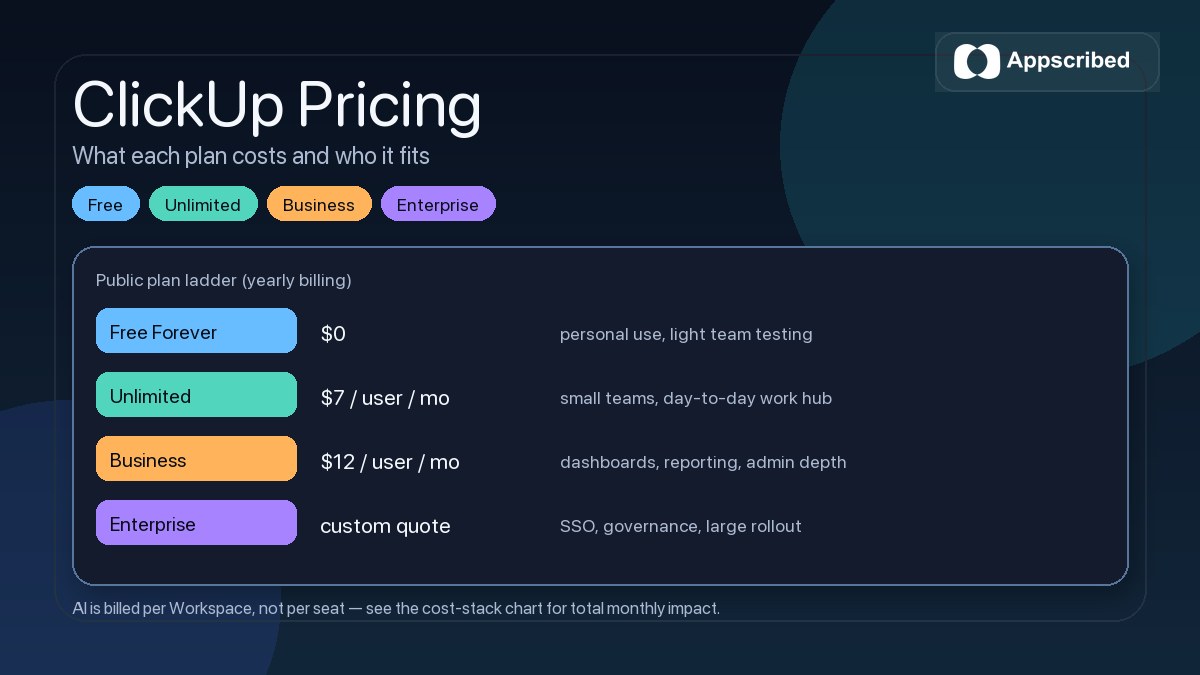
ClickUp pricing starts at $0 for Free Forever, then moves to $7 per user/month billed yearly for Unlimited and $12 per user/month billed yearly for Business. Enterprise pricing is custom, but for most buyers the bigger question is which plan actually fits the way their team works.
If you are leaving ClickUp’s own pricing page to read this, you probably do not need the raw numbers repeated back to you. You need the plan logic in plain English: who should stay on Free, when Unlimited is the sweet spot, when Business is worth the jump, and where AI can make the real cost climb faster than expected.
This guide breaks down the current ClickUp plan ladder, the teams each tier fits best, where buyers usually overpay, and when Unlimited or Business is actually worth it. If you want the broader product context too, see our ClickUp review.
Quick verdict: ClickUp is easiest to justify when you want to consolidate tasks, docs, dashboards, and automation into one workspace. It is harder to justify when you only need a simple task manager, or when adding AI for every member pushes the total cost above what your team will really use.
How ClickUp pricing works
ClickUp starts every new account on Free Forever. From there, you upgrade the entire Workspace when you need paid features. That is one of the most important pricing rules to understand up front: you do not just flip one person into a paid seat and leave the rest behind. For most teams, upgrades are a Workspace decision, not a casual individual add-on.
The public plan ladder is straightforward at a high level:
- Free Forever for personal use and light team testing
- Unlimited for small teams that need fewer restrictions
- Business for teams that need deeper reporting, automation, and admin control
- Enterprise for governance, compliance, and large-scale rollout
There is one nuance many people miss: ClickUp also offers a Business Plus tier built for multiple teams, but it does not appear on the main public pricing page. In practice, that means some buyers see a simpler public ladder than the one available once you move into the actual upgrade flow.
Another useful detail is that ClickUp’s pricing model is not only about plan labels. Billing is also affected by who you invite, what user roles they have, what advanced features you use, and whether you layer AI on top. That is why two teams can both say they are “on ClickUp Business” and still have meaningfully different bills.
ClickUp plans compared
| Plan | Public price | Best for | Main catch |
|---|---|---|---|
| Free Forever | $0 | Individuals, freelancers, and small teams testing ClickUp | Storage and advanced feature limits show up quickly for serious team use |
| Unlimited | $7 per user/month billed yearly | Small teams that want unlimited storage, integrations, and a more usable day-to-day setup | Still not the right fit if you need heavier reporting, governance, or deeper automation layers |
| Business | $12 per user/month billed yearly | Growing teams that need dashboards, advanced views, workload reporting, and stronger admin controls | AI is still extra, and the real cost rises once you add more members and add-ons |
| Business Plus | Not publicly listed on the main pricing page | Multiple teams that need stronger permissions and support | You have to move deeper into the upgrade flow to evaluate it properly |
| Enterprise | Custom quote | Large organizations that need SSO, governance, auditability, and scale | Requires a sales process instead of a quick self-serve decision |
The public prices above are the yearly-billing numbers ClickUp is currently surfacing. Monthly billing is available, but the effective per-user cost is higher, so if you are cost-sensitive, the billing cycle matters almost as much as the plan label.
The biggest practical jump for most buyers is from Free to Unlimited. That is where ClickUp stops feeling like a restricted test environment and starts feeling like a real work hub. Unlimited removes some of the most annoying ceilings around storage, spaces, folders, forms, integrations, and custom fields.
The next real jump is from Unlimited to Business. Business is where ClickUp starts making more sense for ops teams, marketing teams, agencies, and cross-functional groups that need heavier dashboards, advanced reporting, portfolio workload views, webhooks, and tighter admin control.
That is why the cheapest paid plan is not always the smartest choice. Unlimited is good value for teams that mainly want breadth. Business is where ClickUp becomes more defensible for teams that are buying it as an operating system, not just a to-do app.
What ClickUp AI costs on top
AI is now the most important pricing nuance in ClickUp. There is trial access to AI in Workspaces, but if your team wants sustained use, AI becomes a separate paid decision on top of the base plan.
| AI layer | Public price | What it changes |
|---|---|---|
| Free AI trial access | Included on a limited basis | Lets teams test AI features before committing |
| Brain AI | $9 per user/month | Adds ClickUp Brain features plus monthly AI Super Credits |
| Everything AI | $28 per user/month | Adds the broader agentic AI layer, more features, and more Super Credits |
| AI Super Credits | $10 per 10,000 credits | Adds more usage when your included credit allowance is not enough |
This is where the “hidden” cost conversation gets real. ClickUp AI is not something you casually sprinkle onto one person. AI is billed per Workspace, not per seat — once it is on, the fee applies to every Workspace member. That single rule can materially change the economics of an otherwise cheap-looking plan.
For example, using the public yearly base-plan pricing:
- Unlimited + Brain AI starts from about $16 per user/month
- Business + Brain AI starts from about $21 per user/month
- Unlimited + Everything AI starts from about $35 per user/month
- Business + Everything AI starts from about $40 per user/month
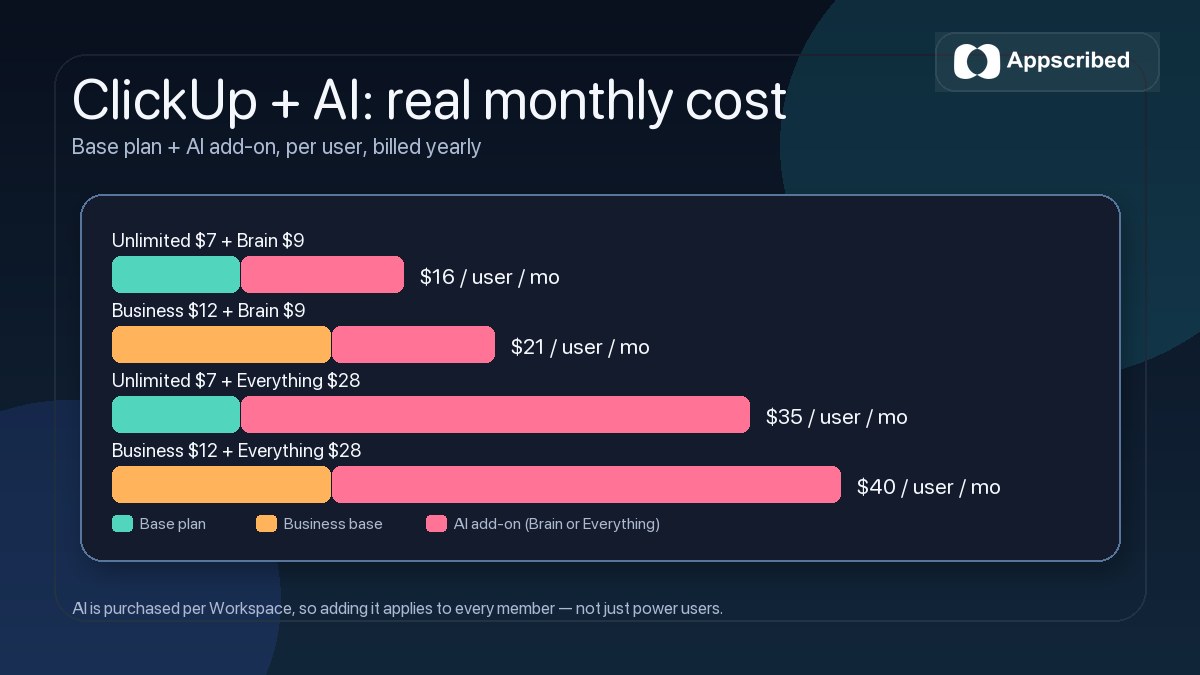
That does not automatically make ClickUp overpriced. It just means the real bill depends on whether your team will genuinely use AI enough to justify adding it for everyone. If the answer is no, the AI layer can turn a smart buy into dead spend very quickly.
Pricing-fit tip: If your team mainly wants better task and project management, start without the heavier AI layer and validate core adoption first. If you are also buying ClickUp as a central AI-assisted work system, the AI add-on math matters much more.
Which ClickUp plan is worth it for different teams
Free Forever is still a good starting point for solo users, freelancers, and very small teams that want to get familiar with ClickUp before they commit. If your main job is simple task tracking and basic collaboration, the free plan is strong enough to prove whether the product fits your workflow.
Unlimited is the sweet spot for many small teams. It makes sense when the free plan starts feeling cramped, especially around storage, forms, integrations, custom fields, and general day-to-day usability. If your team wants one place for tasks, docs, chat, and planning but does not yet need heavier reporting or enterprise controls, Unlimited is usually the first paid tier worth considering.
Business is the tier that starts making real sense for ops, agency, product, and marketing teams with more complexity. If dashboards, advanced views, workload management, proofing, webhooks, admin control, and more mature reporting are central to how your team works, Business is where ClickUp becomes easier to justify.
Business Plus and Enterprise are for a different buyer. Once you care about custom permissions at a deeper level, SSO, governance, audit logs, residency, compliance, or large-scale rollout, you are no longer making a lightweight productivity-tool purchase. You are evaluating ClickUp as a broader operating platform.
If your use case is more around content operations, launch checklists, and recurring execution, our SaaS execution guide shows why teams often start valuing ClickUp once the workflow gets scattered across tools.
Where ClickUp pricing gets more expensive than it first looks
The headline price is only one part of the real ClickUp cost. The bill usually changes in one of five ways.
- The whole Workspace upgrade rule: upgrading is usually a team decision, not an individual one.
- AI is a separate layer: if you add AI, you are not just paying the base plan anymore.
- Feature limits matter: some usage-based limits are effectively test ceilings that push real teams upward.
- User-role pricing can get nuanced: members, admins, and some guest or limited-member scenarios affect how the setup is billed.
- Enterprise-style needs create quote friction: once you need SSO, governance, or deeper permissions, the self-serve simplicity drops.
There is also one buyer-friendly detail worth knowing: new customers get a 30-day satisfaction guarantee that covers add-ons purchased alongside the paid plan. That does not remove pricing risk, but it does reduce the pain of testing the wrong tier.
If your team only needs lightweight project tracking, ClickUp can look cheap on paper and still be more platform than you need. If your team is trying to replace multiple workflow tools, centralize docs and tasks, and add AI later, the same pricing can look much more reasonable.
Is ClickUp worth paying for?
For the right team, yes. ClickUp is usually worth paying for when you want more than task lists. It becomes much easier to justify when your team will actually use the broader stack: docs, goals, dashboards, automation, chat, forms, whiteboards, and centralized planning.
It is less compelling when your team mainly wants a cleaner, simpler task manager. In that situation, the main risk is not just overpaying. It is paying for workflow depth that slows adoption or never gets used fully.
The most sensible buying path for many teams is simple:
- start on Free Forever if you are still validating fit
- move to Unlimited when the restrictions start getting in the way of real work
- upgrade to Business only when reporting, workload management, proofing, or admin depth becomes part of the job
- treat AI as a separate budget decision, not as a default checkbox
That is the real ClickUp pricing story in 2026. The public entry price is still attractive, but the smart decision comes from matching the plan to the team’s operating complexity, not from chasing the lowest sticker price. If you are comparing ClickUp against AI-first work tools while you decide, our breakdown of Claude pricing and ChatGPT pricing covers how those budgets stack against a workspace platform like this one.
If ClickUp already looks like the right fit, the next step is not overthinking the headline price. It is testing whether the plan you are considering actually supports how your team works day to day.
Bottom line: ClickUp is easiest to justify when you want one tool to run work, not just track it. Start free, move to Unlimited for small-team depth, go to Business when reporting and admin control become real needs, and only add AI if the whole team will use it enough to earn the extra cost.
Frequently Asked Questions
How much does ClickUp cost?
ClickUp’s public pricing starts at $0 for Free Forever, $7 per user per month billed yearly for Unlimited, and $12 per user per month billed yearly for Business. Enterprise is custom, and Business Plus exists in the upgrade flow even though it is not listed on the main public pricing page.
Is ClickUp free?
Yes. ClickUp has a Free Forever plan that is strong enough for personal use and light team testing. The main reason teams upgrade is not because the free plan is bad, but because storage, advanced workflows, or collaboration needs grow beyond it.
Does ClickUp AI cost extra?
Yes. ClickUp AI is a separate pricing layer. Public AI options include Brain AI, Everything AI, and AI Super Credits, and ClickUp AI is billed per Workspace, not per individual member.
Which ClickUp plan is best for small teams?
For many small teams, Unlimited is the best balance of cost and usability. It removes many of the restrictions that make the free plan feel cramped without forcing a jump into the heavier Business tier too early.
Is ClickUp worth paying for?
ClickUp is usually worth paying for when your team will use it as a central work hub for tasks, docs, planning, dashboards, and automation. It is less worth paying for if you only need a simple task manager or if AI add-ons push the cost above what your team will actually use.