Claude Design is Anthropic’s workspace for turning a prompt into a prototype, slide deck, one-pager, or other visual draft. You describe what you want, Claude generates a first version, and then you keep editing it inside the same flow.
Most people searching for Claude Design want to know three things: what it can actually build, who gets access, and whether it is a real workflow or just a demo. This guide answers those questions first, then shows where Claude Design fits with Claude Code and Figma.
- Builds: prototypes, slides, one-pagers, and marketing assets.
- Access: research preview for paid Claude users, including Pro, Max, Team, and Enterprise.
- Best for: founders, product teams, and marketers who need a fast visual draft.
- Not for: teams that already need deep Figma control and full production handoff from day one.
What Claude Design can build
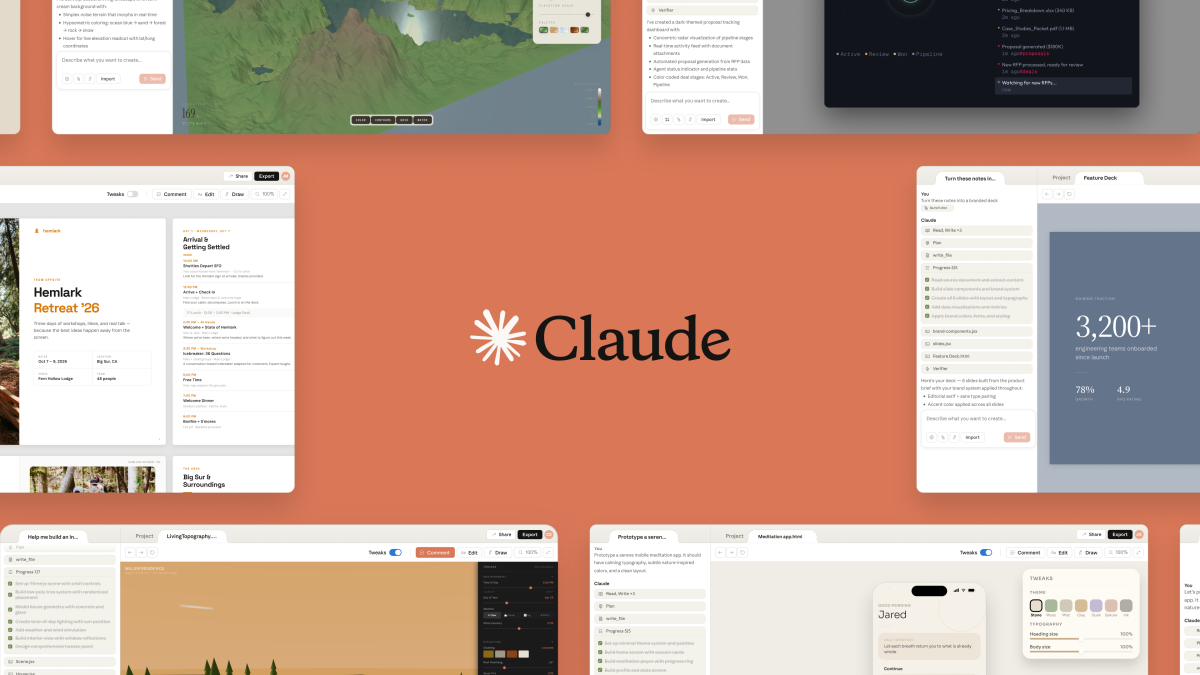
Claude Design is built for fast visual drafting. The core output types are prototypes, slides, one-pagers, and marketing assets, but the bigger value is that it can take a rough brief and turn it into something concrete enough for a team to review.
That makes it most useful at the “blank page to first draft” stage. It can help you shape a pitch deck, a product concept, a landing page direction, or a branded one-pager much faster than starting from nothing. It is not the final production environment. It is the fast first pass that gets everyone something visual to react to.
- Strong fit: prototypes, presentation slides, one-pagers, event assets, and marketing collateral.
- Weaker fit: deep product design systems, complex app handoff, and production-grade design operations.
How Claude Design works
The workflow is simple: prompt on one side, working canvas on the other. You describe the asset you want, Claude builds the first draft, and then you keep refining it with follow-up instructions instead of restarting from scratch every time.
- Start with the asset type: prototype, deck, one-pager, or visual concept.
- Give Claude structure, tone, and brand direction, not just a vague one-line prompt.
- Review the first draft in the canvas, then refine sections, layout, or content in place.
- Share, export, or hand the draft forward once it is good enough for review or further polish.
The important mindset is that Claude Design is iterative. The best results come from tightening an existing draft, not from expecting one prompt to land a final design on the first try.
Chat, comments, and revisions
Claude Design gives you two useful ways to steer the work: the main chat for broad direction and inline comments for targeted changes. The chat is best when you want to reshape the whole asset. Comments are better when one section, block, or slide needs surgery without reopening the entire design.
This split matters because it makes iteration faster. Instead of rewriting a full prompt every time, you can keep the overall direction stable and use comments to tighten specific pieces. That is closer to how real teams review design work than a one-shot prompt workflow.
Design systems, brand assets, and setup
Claude Design gets more useful once you stop treating it like a blank toy and start feeding it brand context. Logos, product screenshots, existing decks, copy guidelines, and design references help the tool stay closer to how your team already works.
If you want consistent output, do the setup work first. Load the examples that define your visual language, show Claude the kind of asset you are trying to produce, and be explicit about tone, hierarchy, and audience. That setup time pays back much faster than trying to prompt your way out of a weak starting context.
Claude Design vs Claude Code and Figma
Claude Design, Claude Code, and Figma solve different parts of the workflow. Claude Design is for fast visual drafting. Claude Code is for code-facing build and implementation work. Figma is still the stronger environment for deep design control, systemized collaboration, and production handoff.
- Use Claude Design when: you need a visual draft, concept, slide, or one-pager quickly.
- Use Claude Code when: the next step is building or modifying the actual frontend.
- Use Figma when: the team needs precise layout control, system components, review cycles, and production design workflow.
For many teams the best pattern is not choosing one over the others. It is using Claude Design to get to a first strong draft faster, then using Figma or Claude Code for the deeper design or build stage.
Versions, export, and sharing
Claude Design is most useful when people can compare directions, not just accept one output. Save alternate takes when you are exploring different layouts or messages, then share the stronger version forward once the team is aligned.
Export and sharing matter because Claude Design often sits in the middle of a workflow, not at the end of it. The deliverable might still need to move into a deck, a doc, Figma, or another team handoff. Think of Claude Design as the place where the draft becomes legible fast, not necessarily the final stop.
Pricing and access
Claude Design is in research preview and available to paid Claude users rather than the full free tier. The practical question is less “is there a separate standalone product?” and more “does my current Claude plan give me access, and how much usage does that plan allow?”
If Claude Design becomes part of a real team workflow, check its usage model separately from ordinary Claude chat. Visual generation, revisions, and exported assets can turn into their own operational budget much faster than a simple text workflow.
Strengths and limits
Claude Design’s biggest strength is speed to first draft. It helps teams get from idea to something visible much faster than a blank canvas does. Its biggest limitation is that visual drafting is not the same thing as deep design execution.
- Strengths: fast concepting, quick iteration, easier collaboration on early assets, and better momentum for non-designers.
- Limits: still preview-stage, not a full Figma replacement, and not the right place for final design-system rigor.
- Operational reality: treat the output as a high-quality draft that still needs taste, review, and handoff discipline.
Who should use Claude Design?
Claude Design is best for founders, product managers, marketers, and small teams who need high-quality visual drafts faster than their current process allows. It is less compelling for design teams that already live inside a mature Figma workflow and need precise production control from the first minute.
Frequently asked questions
What is Claude Design?
Claude Design is Anthropic’s new prompt-to-visual workflow for prototypes, slides, one-pagers, and marketing collateral.
Who can use Claude Design?
Claude Design is rolling out in research preview for Pro, Max, Team, and Enterprise users.
Is Claude Design a Figma replacement?
No. Claude Design is better thought of as a fast first-draft layer, not a full replacement for Figma.
What model powers Claude Design?
Claude Design is powered by Claude Opus 4.7, Anthropic’s premium generally available model.
What can Claude Design export?
Launch coverage points to exports and handoffs such as PDFs, URLs, PPTX files, Canva, and HTML-based outputs.
If you want the wider Claude context, read next: Claude Opus 4.7, Claude Opus 4.7 vs 4.6, Claude Code, and Claude updates.
Add us as a preferred source on Google, and our reviews and picks show up in your Top Stories and AI Overviews.