
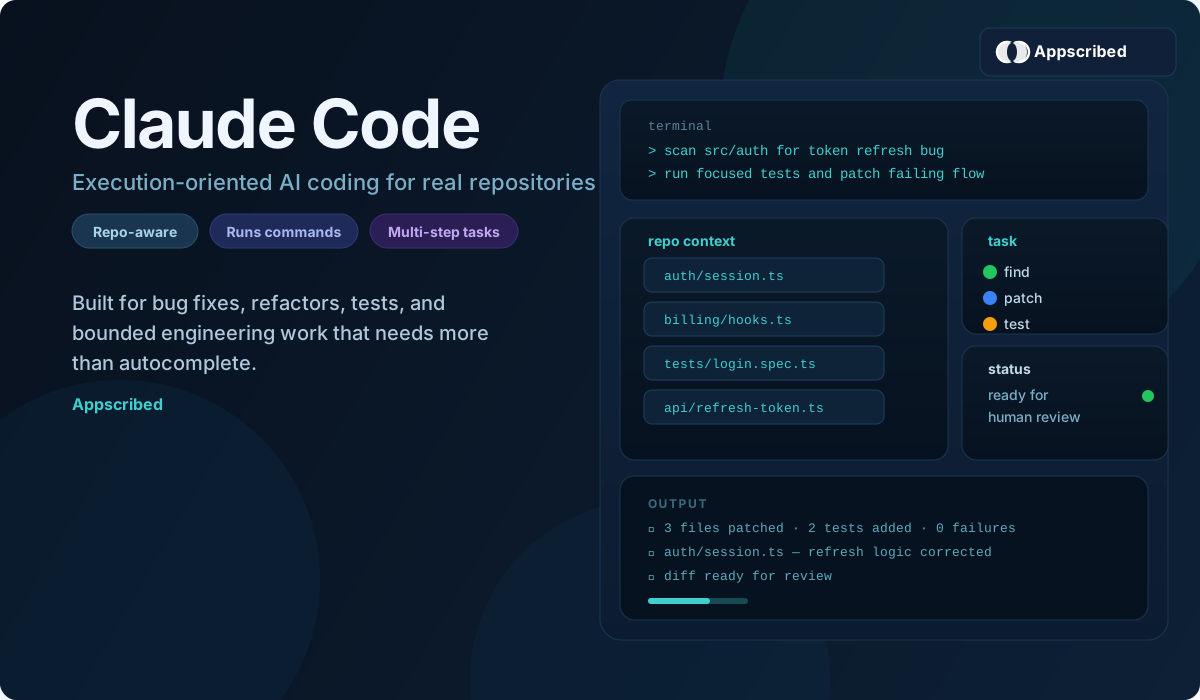
Claude Code is Anthropic’s coding agent for people who want AI to do more than suggest snippets. It can read a codebase, edit files, run commands, check tests, and push a task toward something you can actually review and ship.
If you are deciding at the broader assistant level before you commit to Anthropic’s coding workflow, start with our Claude vs ChatGPT comparison.
That is why Claude Code matters. It is not just Claude answering programming questions in chat. It is Claude working much closer to the code itself, either from the terminal or through Anthropic’s newer web workflow.
If you want the broader Anthropic product picture, pair this page with our Claude updates timeline. If you are choosing between Pro, Max, Team, and API usage, use our Claude pricing and plans guide. If you want Anthropic’s premium model for harder coding and deeper long-context work, also read our Claude Opus 4.7 guide. If your question is whether Claude Code is worth using, this is the page to start with.
Quick Verdict
Claude Code is one of the better options right now if you want AI to take on bounded engineering work, not just help you think through it.
- Best for: developers, technical founders, and product teams that want bug fixes, refactors, test work, and small feature builds moved forward with less manual grind.
- Less ideal for: people who mostly want cheap autocomplete, quick inline edits, or an editor-first experience that stays inside the IDE all day.
- Where it stands out: repo awareness, terminal workflows, multi-step execution, and stronger task delegation than a normal coding chatbot.
- Where it still needs judgment: production code still needs review, vague prompts still waste time, and heavier use gets expensive fast.
In short: Claude Code is strongest when you have clear engineering tasks to hand off and weakens when you want lightweight editor assistance.
What Is Claude Code?
Claude Code is Anthropic’s agentic coding product. In practical terms, that means it can work inside a real repository instead of staying at the level of explanation and suggestion.
It can inspect files, follow project structure, make edits across multiple files, run terminal commands, and help push a task toward completion. That makes it a very different product from opening Claude in a browser and asking for help with a bug. If you want the current mainstream model behind much of everyday Claude usage, read our Claude Sonnet 4.6 guide. If you are weighing the higher ceiling tier for more demanding engineering work, compare that with our Claude Opus 4.7 guide.
- It can understand an existing codebase instead of starting from a blank prompt.
- It can edit multiple files in one pass.
- It can run commands, tests, and checks as part of the workflow.
- It is built for execution-oriented coding work, not just code explanation.
How Claude Code Works
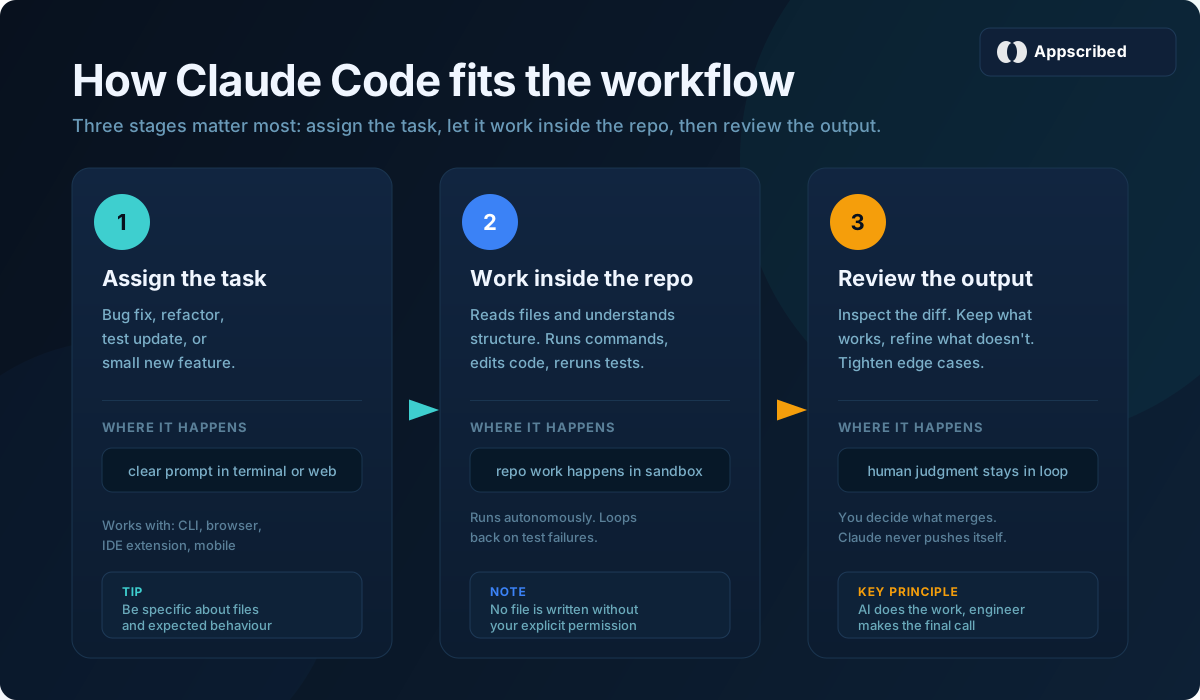
The workflow is straightforward.
- You give Claude Code a concrete task: fix a bug, refactor a component, add tests, ship a small feature, or explain a confusing part of the repo.
- It reads the relevant code and builds a working plan.
- It makes the changes inside the repo instead of only proposing them in chat.
- It can run terminal commands and tests to validate the work.
- You review the result, tighten anything that needs human judgment, and decide what ships.
That is the main value. Claude Code reduces the amount of routine engineering work you have to do by hand.
Claude Code Vs Normal Claude
The difference is bigger than the name suggests.
- Normal Claude is better for reasoning, architecture thinking, code explanation, and working through decisions before you touch the repo.
- Claude Code is better when you want the model inside the repo doing the work: reading files, changing code, running commands, and moving the task forward.
The simplest way to think about it is this: normal Claude helps you think through code, while Claude Code helps you execute coding work.
What Claude Code Is Best For
Claude Code is strongest when the task is clear, real, and bounded.
- fixing bugs that touch several files
- writing or updating tests
- refactoring messy parts of an existing codebase
- building internal tools, scripts, and prototypes
- reviewing a section of code and spotting weak points
- handling repetitive engineering work that keeps stealing human time
That is where it earns its keep. Not on toy prompts. On tasks that are tedious, structured, and expensive to keep doing manually.
Is Claude Code Free?
No, not in the way most people mean it. Claude Code is not part of Claude’s free tier.
If you want terminal access, you are looking at paid Claude plans. If you want heavier usage or team deployment, the cost climbs quickly after that. If your real question is whether you need Claude Pro pricing or Claude Max pricing, that is the comparison to make next.
- Light trial: Pro is enough to see whether Claude Code fits your workflow.
- Serious daily use: Max plans make more sense once you are working in larger repos or running longer sessions, especially if you are leaning toward Claude Opus 4.7 instead of Sonnet.
- Team or automation use: API and workspace-based usage become more relevant than simple individual plan pricing. If you are building rather than just subscribing, look at Claude API pricing.
Claude Code Pricing
The practical pricing view looks like this.
- Pro: $20 monthly, or $17 monthly when billed annually. Good for shorter coding sprints and smaller repos.
- Max 5x: $100 per month. A better fit once Claude Code becomes part of your everyday development workflow.
- Max 20x: $200 per month. Built for power users who want much more room for heavy sessions.
- API and team usage: better suited to engineering teams, automation, and larger operational rollouts than casual solo use.
The main takeaway is simple: Claude Code is not priced like a casual extra. Anthropic is treating it as a serious product for serious usage. If you want the broader plan breakdown beyond Claude Code specifically, read our Claude Pricing guide.
How To Install Claude Code
Claude Code is easy to install if you already work in a modern development setup.
- You need Node.js 18 or newer.
- The standard install command is
npm install -g @anthropic-ai/claude-code. - Anthropic also offers a newer native installer for macOS, Linux, and WSL.
- After install, you launch it with
claudeinside your project directory.
That terminal-first setup is part of why developers like it. Claude Code feels closer to a real tool in the workflow than a browser-only assistant.
The practical install questions are usually these:
- Can I install it locally?
- What plan do I need?
- Is it terminal-only?
- How fast can I get from install to first working session?
If setup friction matters a lot to you, Cursor or Copilot will often feel faster. If you want the stronger task-execution model, Claude Code is worth the extra setup.
Claude Code CLI Vs Web
Claude Code started as a terminal product, and that is still the clearest way to understand it. But Anthropic has pushed it beyond CLI-only usage.
- CLI: best for developers who want direct repo access, terminal control, and a tighter engineering loop.
- Web: better for delegating coding tasks from the browser, running parallel sessions, and working through GitHub-connected flows without living in the terminal.
The web version matters because it broadens the audience. Technical founders, product teams, and operators can use Claude Code for real task delegation without fully adopting a terminal-native workflow.

Claude Code Vs Cursor
This is the comparison that matters most for a lot of people.
The cleanest difference is workflow shape.
- Cursor is better if you want an AI-native editor that feels fast, inline, and natural for day-to-day pair programming.
- Claude Code is better when the work is more agentic, terminal-driven, multi-step, and closer to delegated execution.
If you live in your editor all day and care most about speed inside that environment, Cursor will often feel better. If you want to hand off bug fixes, refactors, repo exploration, and repetitive engineering work more directly, Claude Code has the better argument.
This is less about which model is “smarter” and more about which workflow matches how you build.
What Claude Code Gets Right
- It handles repo-level work much better than a generic coding chatbot.
- It makes terminal-based AI work feel practical instead of gimmicky.
- It is strong on bounded execution: bugs, tests, refactors, internal tools, and repetitive engineering work.
- It gives Claude a credible position in serious software workflows, not just code explanation.
Where Claude Code Still Falls Short
- It still requires human review for important production work.
- It is less useful when the task itself is vague or underspecified.
- Pricing can become a real consideration for heavier usage.
- Some users will still prefer editor-native tools for faster everyday flow.
The right way to think about Claude Code is not “replace engineers.” It is “reduce the amount of routine engineering work humans still do by hand.”
Who Should Use Claude Code
Claude Code is most compelling for:
- developers who want help with bug fixing, refactoring, review, and repetitive engineering work
- technical founders who want to move prototypes and internal tools faster
- product teams that want stronger execution help than a generic coding chatbot can provide
It is less compelling if all you want is cheap autocomplete, basic code explanation, or a simple editor plugin with minimal overhead.
Our Take
Claude Code matters because it is one of the clearest examples of AI coding moving from suggestion into execution.
Plenty of tools can generate code. Fewer are useful once the task touches a real repository, multiple files, terminal commands, and test loops. That is where Claude Code becomes interesting.
If your workflow needs a fast editor companion, Cursor may still fit better. If your workflow benefits from handing off real coding tasks and getting back something closer to finished work, Claude Code is one of the strongest products in the category right now.
Also Read: Claude pricing and plans guide, Claude Sonnet 4.6, and our latest Claude updates hub.
Best AI Models 2026: Claude vs GPT vs Gemini Compared
Claude Pricing and Plans: Pro, Max, Team, Enterprise, and API Costs
Claude Sonnet 4.6: Pricing, Access, Context Window, and Why It Matters
Latest Claude Updates (2026): New Features, Model Changes & Timeline
Frequently Asked Questions
What is Claude Code?
Claude Code is Anthropic’s agentic coding product. It can inspect a codebase, edit files, run commands and tests, and help move engineering tasks toward something reviewable.
Is Claude Code free?
No. Claude Code is tied to Anthropic’s paid plans and heavier usage tiers, so the real question is which usage level fits your workflow.
How much does Claude Code cost?
Individual pricing starts with Pro at $20 monthly or $17 monthly when billed annually, then moves to Max 5x at $100 and Max 20x at $200. Team and API usage are priced separately. For the broader breakdown, use our Claude pricing guide.
How is Claude Code different from Cursor?
Cursor is more editor-native and better for inline daily pair programming, while Claude Code is stronger when the task is repo-level, terminal-driven, multi-step, and closer to delegated execution.
Why is Claude Code important?
Claude Code matters because it pushes AI coding from suggestion into execution. It is one of the clearest examples of Claude becoming a real work platform instead of only a chat product.
Add us as a preferred source on Google, and our reviews and picks show up in your Top Stories and AI Overviews.