If you keep seeing SKILL.md in Claude discussions and wondering whether it is just another prompt file, the short answer is no. Claude Skills are reusable workflows: folders of instructions, scripts, and resources that Claude loads when a task matches.
That is the useful shift. Skills turn repeatable work into a playbook instead of a one-off prompt. Claude’s help center currently shows Skills on Free, Pro, Max, Team, and Enterprise plans when code execution and file creation are enabled, and they also show up in Claude Code beta and the API code execution path. If you want the official product framing, see the Skills overview and the Skills help center guide.
In short: prompts are for one-off asks, Projects hold ongoing context, MCP connects Claude to tools and data, and Skills teach Claude how to do a repeatable job the same way every time.
What are Claude Skills?
Claude Skills are specialized instruction packages that Claude can load dynamically when a task fits. Think of them as reusable operating manuals. If you keep repeating the same process, Skill logic lets Claude follow the same standards without you restating them in every chat.
That makes Skills useful for work that needs consistency more than creativity. A good Skill can capture a brand voice, a reporting format, a data-cleaning method, a QA checklist, or a coding workflow that you want Claude to follow every time.
Anthropic’s current Skills docs also show that this is not just a power-user feature for one app surface. Skills are part of Claude’s broader workflow stack, which is why they now show up across Claude apps, Claude Code beta, and the API code execution path.
What is SKILL.md?
SKILL.md is the entry file inside a Claude Skill folder. It defines what the Skill is for, when Claude should use it, and what instructions Claude should follow once it loads the Skill. The folder can also include scripts, reference files, and other supporting assets.
That structure matters because it keeps the Skill lightweight until it is actually needed. Claude does not need to load every detail up front. It can read the Skill name and description first, then pull in the full instructions only when the task matches.
In practice, that is what makes Skills feel different from dumping a giant prompt into chat. A Skill is closer to a reusable workflow package than a one-time instruction.
How do Claude Skills work?
Claude uses a progressive loading approach. It looks at the Skill name and description first. If the task matches, it loads the full SKILL.md instructions. If the Skill needs extra files, Claude only loads those resources when they are relevant.
The result is simple: Claude gets procedural knowledge without burning context on everything at once. That is why Skills are better suited to repeatable work than to random, ad hoc questions.
- Use the Skill name and description to signal when it should apply.
- Keep the main instructions focused on the actual workflow.
- Add supporting files only when they make the result better.
- Test the Skill on a real task, then tighten the wording if Claude drifts.
Where can you use Claude Skills?
Claude’s help center currently shows Skills in Claude apps on Free, Pro, Max, Team, and Enterprise plans when code execution and file creation are enabled. It also shows beta support for Claude Code users and for API users using the code execution tool.
That is important because it means Skills are not locked to one narrow workflow. They can live inside normal Claude usage, team workflows, and more technical environments too.
For Team and Enterprise, there is also a sharing layer. Skills can be personal, shared with specific colleagues, or provisioned org-wide by an admin. That makes them useful when a team wants the same standards applied across multiple users.
How do you create a Claude Skill?
The cleanest way to think about Skill creation is this: choose a repeated workflow, write down what “good” looks like, and package that into a reusable format.
Claude’s tutorial on creating Skills through conversation shows the same basic flow. You describe your process, share any templates or materials that matter, answer Claude’s questions, and let it structure the Skill into a reusable format. If you want full control, you can also write the files yourself and package them manually. The custom Skills guide covers the file structure if you want to build it yourself.
- Pick one repeatable task, not a broad category.
- Describe the output standards clearly.
- Write the core instructions in
SKILL.md. - Add scripts, templates, or reference files only if they improve consistency.
- Test the Skill on real examples and tighten the instructions until the output is stable.
The best Skills are usually narrow. If you have to explain the same procedure over and over, that is probably a Skill. If you only need the instruction once, keep it as a prompt.
What should you build as a Skill?
Skills make the most sense when the work is procedural. They are especially useful for brand standards, document formats, QA steps, spreadsheet rules, research methods, or code review habits that you want Claude to follow every time.
Good Skill candidates usually share three traits: the work repeats often, the output should look consistent, and the process benefits from a defined playbook. If all three are true, a Skill is usually a better fit than a long prompt.
- Brand voice enforcement
- Weekly reporting formats
- Research or analysis workflows
- Document or deck standards
- Recurring coding or review procedures
Bad Skill candidates are one-off requests, vague personal preferences, or giant catch-all workflows that try to do too much at once.
How are Claude Skills different from prompts, Projects, and MCP?
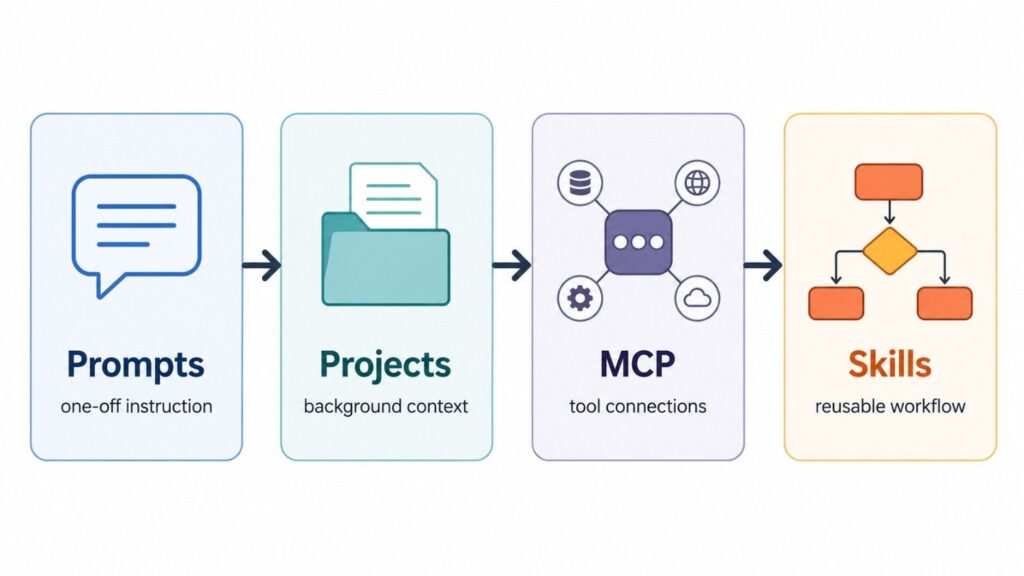
This is the question most people really want answered. The short version is that each piece does a different job.
- Prompts are one-time instructions in a conversation.
- Projects hold background context for an ongoing body of work.
- MCP connects Claude to external tools and data sources.
- Skills teach Claude a reusable procedure or workflow.
Anthropic’s own explanation on how Skills compare with prompts, Projects, MCP, and subagents is basically this: MCP gives Claude the connection, while Skills give Claude the procedure. If Claude needs access to a database or file system first, that is MCP. If Claude already has the data and needs to know how to process it correctly, that is a Skill.
Projects and Skills can also work together. A Project can hold the background for a specific body of work, while a Skill can keep Claude aligned to the way you want that work done. If you find yourself copying the same instructions across multiple Projects, that is usually a sign to turn the repeated procedure into a Skill instead.
Are Claude Skills safe?
Skills are safe when you keep them narrow, review them carefully, and do not give them more power than they need. Because a Skill can include scripts and supporting files, you should treat it like a workflow package, not just a note.
That means the same basic hygiene applies as with any operational asset: keep instructions clear, test edge cases, and do not share a Skill broadly until it behaves the way you expect.
For teams, the sharing model matters too. Personal skills stay personal unless you intentionally share them, and organization-level Skills should be treated like internal process documentation with real operational impact.
Who should use Claude Skills?
Claude Skills are worth using if you keep repeating the same task and want Claude to handle it the same way every time. That is the real use case. Not novelty, not theory, and not generic automation hype.
- Teams with standard operating procedures
- Marketers who need consistent output formats
- Researchers who follow the same analysis method repeatedly
- Developers who want repeatable code or review workflows
- Operators who are tired of rewriting the same instructions
If you want the most practical rule of thumb, use this: if the task is repeatable, write it as a Skill. If it is one-off, keep it as a prompt. If it needs a connection to data or tools, use MCP. If it needs long-term context, use a Project.
Final take
Claude Skills matter because they make Claude more consistent. They turn repeating instructions into reusable procedures, which is exactly what most teams and power users actually need.
The file name matters, the instructions matter, and the workflow matters. But the bigger idea is simple: Skills let Claude behave like it has a reusable operating manual instead of starting from scratch every time.
If you want the broader Claude context around this feature, start with our Claude updates hub, our Claude pricing guide, and our Claude Sonnet 4.6 guide.
Frequently Asked Questions
What are Claude Skills?
Claude Skills are reusable workflow packages that contain instructions, scripts, and resources Claude can load when a task matches.
What does SKILL.md do?
SKILL.md is the entry file for a Claude Skill. It tells Claude what the Skill does, when to use it, and what instructions to follow.
Are Claude Skills the same as prompts?
No. Prompts are one-off instructions inside a conversation. Skills are reusable procedures that Claude can load when they are relevant.
Do Claude Skills replace MCP?
No. MCP connects Claude to tools and data sources. Skills tell Claude what to do with that data once it is available.
Can you create your own Claude Skill?
Yes. You can create a Skill by writing the files yourself or by creating one through conversation with Claude and then packaging it as a reusable workflow.
Who should use Claude Skills?
People and teams that repeat the same workflow should use Claude Skills. They are best for standardized, repeatable tasks where consistency matters more than improvisation.