Midjourney just released the Midjourney Version 6 which is making the headlines because of how realistic images it makes.
We haven’t yet entered into 2024, and the advancements in AI technology has already started making us go awe. First Google’s new announcements relating to AI music, video and new LLM – Gemini 2 and now Midjourney launching Midjourney V6 a much more advanced, creative version of the AI image generator.
Let’s see how you can enable and use the Midjourney V6, what it really is and how is MJ V6 different from the past versions of Midjourney.
How to Enable Midjourney Version 6?
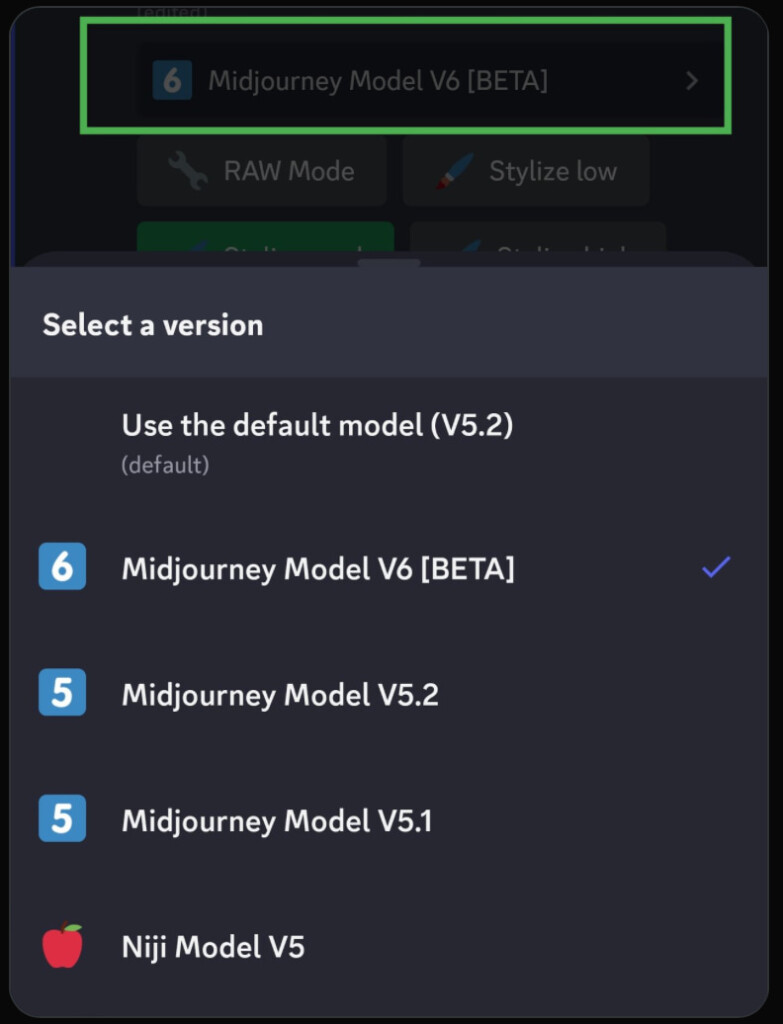
The latest version of Midjourney is launched for the community but it is an alpha version. If you want to use the MJ V6, you need to enable it first.
To enable Midjourney V6, you will need to go the Midjourney Discord server and type “/settings” then use the dropdown menu to select “V6”.
This will enable the Midjourney Version 6 for you.
How to use Midjourney Version 6?
If you are a Midjourney user, you can directly enable it in the Discord server as mentioned above.
However, if you are new user, here is how yo use Midjourney V6:
- Download Discord app on your PC or Mac.
- Signup on Midjourney’s official site create an account.
- To use Midjourney V6, you need to sign up for one of their paid plan which starts from $10 (excluding VAT for some countries)
- Join Midjourney’s Discord server
- Go to #General or #Newbie channels
- Enable Midjourney V6 by typing in “/settings” and selecting V6 from the dropdown menu
- Start creating image by using “/imagine” command in the server and providing your prompt.
Note: You can also type “–v 6” after your prompt to enable Midjourney V6.
Who can use Midjourney Version 6?
Although Midjourney has released the Alpha version of Midjourney V6, anyone can use it. However, you need to subscribe to Midjourney’s paid plans or must have some credits from your trial version.
What is new in Midjourney Version 6?
Midjourney has made the version 6 a lot better than V5. One, most talked about, change is its ability to use text in the images which can be used to create infographics and posters.
Here are the details of some of the notable changes you will see in the MJ V6:
Improved Prompting and Control
Greater Prompt Accuracy: V6 is much better at understanding specific details and instructions in your prompts, leading to more precise and consistent results. This allows for finer control over the generated images, letting you achieve nuanced effects and variations.
Longer Prompts: V6 can handle much longer prompts (360+ words), giving you more freedom to describe your desired scene, characters, and atmosphere in detail.
Enhanced Coherence: V6 generates images with improved overall coherence, meaning elements within the scene look more interconnected and believable. This leads to more natural and realistic-looking outputs.
Model Knowledge: V6’s knowledge base has been significantly expanded, allowing it to draw from a wider range of concepts and references when generating images. This opens up possibilities for creating more specific and detailed outputs.
Enhanced Remix and Prompting Tools
Text Drawing (Limited): Although not fully fleshed out, V6 introduces the ability to directly add text within generated images. While still in its early stages, this opens exciting possibilities for incorporating captions, labels, and even narratives into your AI creations.
Improved Remix Mode: Remixing existing images in V6 is even more powerful. You can refine specific aspects of the image while retaining its overall composition and style, making it a valuable tool for iterative design and exploration.
Visual Enhancements and Upscaling
Photorealistic Quality: V6 boasts a significant improvement in image quality, generating more photorealistic and detailed outputs with better lighting, textures, and composition. This leap in visual fidelity takes AI art to a whole new level.
Improved Upscalers: You can now choose between “subtle” for a clean enhancement or “creative” for a more artistic interpretation, doubling your image resolution with increased detail and clarity.
Additional Features and commands in Midjourney V6
- –ar: Specify the aspect ratio of your generated image.
- –chaos, –weird: Inject an element of randomness or unexpectedness into your outputs.
- –tile: Create seamless repeating patterns from your generated images.
- –stylize, –style raw: Control the artistic style of your outputs, ranging from subtle tweaks to complete style transformations.
- Vary (subtle), Vary (strong): Introduce subtle or significant variations to your generated images, exploring different options and refining your ideas.
- /blend: Blend two existing images, creating unique combinations and transitions.
- /describe: While not new to Midjourney V6, this command allows you to get textual descriptions of existing images generated by the model.
Problems with Midjourney V6
There are not many problems reported so far. However, some users experienced that the updated version is little slower than other Midjourney models.
Pictures created with Midjourney V6
Here are some of the pictures that are created with Midjourney Version 6:
Note: To improve the page speed, we had to optimize the images by compressing them. You can check the original images and more we found in the Midjourney Community created with MJ V6 here.


How much does Midjourney 6 cost?
Here are the Midjourney plans that you can subscribe to get access to Midjourney V6:
| Basic Plan | Standard Plan | Pro Plan | Mega Plan | |
|---|---|---|---|---|
| Monthly Subscription Cost | $10 | $30 | $60 | $120 |
| Annual Subscription Cost | $96 ($8 / month) | $288 ($24 / month) | $576 ($48 / month) | $1152 ($96 / month) |
| Fast GPU Time | 3.3 hr/month | 15 hr/month | 30 hr/month | 60 hr/month |
| Relax GPU Time | – | Unlimited | Unlimited | Unlimited |
| Purchase Extra GPU Time | $4/hr | $4/hr | $4/hr | $4/hr |
| Work Solo In Your Direct Messages | ✓ | ✓ | ✓ | ✓ |
| Stealth Mode | – | – | ✓ | ✓ |
| Maximum Concurrent Jobs | 3 Jobs 10 Jobs waiting in queue | 3 Jobs 10 Jobs waiting in queue | 12 Fast Jobs 3 Relaxed Jobs 10 Jobs in queue | 12 Fast Jobs 3 Relaxed Jobs 10 Jobs in queue |
| Rate Images to Earn Free GPU Time | ✓ | ✓ | ✓ | ✓ |
| Usage Rights | General Commercial Terms* | General Commercial Terms* | General Commercial Terms* | General Commercial Terms* |
People’s reaction on Midjourney V6
Here are some of the top tweets we found on people’s reaction to MJ V6:
Conclusion
The release of Midjourney Version 6 marks a significant leap in AI image generation, offering users enhanced control, improved coherence, and photorealistic quality. The extended capabilities, from handling longer prompts to text incorporation, showcase Midjourney’s commitment to advancing AI art. While some users note a slight decrease in speed, the overall impact on visual fidelity and creative possibilities positions Midjourney V6 as a noteworthy milestone in the evolving landscape of AI technology.
Add us as a preferred source on Google, and our reviews and picks show up in your Top Stories and AI Overviews.