If you are deciding between Automatic1111 and ComfyUI in 2026, the picture has changed. ComfyUI is now the clear winner for most serious Stable Diffusion work: it is 10-30% faster, uses about 14% less VRAM, gets new models like Flux first, and runs SDXL on hardware that would crash Automatic1111. Automatic1111 is still the easier first step, but it can no longer run Flux.1, which is the highest-quality text-to-image model available right now.
If you are already on Automatic1111, the practical 2026 path is either Forge (a drop-in successor with the same interface but better performance) or ComfyUI (steeper learning curve, much higher ceiling). Both are worth the switch for active users. Beginners who just want to try Stable Diffusion can still start with Automatic1111, but should plan for the move within a few months.
Quick Verdict: Automatic1111 or ComfyUI?
Choose Automatic1111 if you want the fastest path to setup, inpainting, and common extensions without building a graph. Choose ComfyUI if you want more control over SDXL pipelines, sampler routing, performance tuning, and custom Stable Diffusion workflows.
- Pick Automatic1111 if you are a beginner, want a cleaner interface, or mainly care about generating images quickly.
- Pick ComfyUI if you are comfortable with node-based tools and want deeper control over multi-step image workflows.
- For most first-time users, Automatic1111 is the easier starting point. ComfyUI usually makes more sense once you outgrow the simpler workflow and want more customization.
That said, the 2026 consensus has shifted. ComfyUI wins on speed, VRAM, and access to new models like Flux.1. Automatic1111 is still defensible for first-time setup and inpainting, but most serious users either upgrade to Forge or switch to ComfyUI within a few months of starting.
What is Automatic1111?
Automatic1111 is a user-friendly web-based interface built for Stable Diffusion models. It makes setup, inpainting, image generation, and extension management easier without requiring deep technical overhead.
Automatic1111 supports a range of features such as:
- Text-to-image generation.
- Image-to-image transformation.
- Inpainting for modifying parts of an image.
- Upscaling for higher resolution outputs.
- Extensive plugin support for additional functionalities.
What is ComfyUI?
ComfyUI is a node-based graphical interface for Stable Diffusion. Unlike Automatic1111, it operates as a standalone application and gives users a modular way to construct workflows. That makes it a stronger fit when you want SDXL control, repeatable graphs, and deeper control over sampling, routing, and custom VAE configurations.
Key highlights of ComfyUI include:
- A portable, lightweight design requiring minimal setup.
- Visual representation of workflows for detailed customization.
- Advanced support for SDXL (Stable Diffusion XL) models.
- Modular architecture, which promotes flexibility.
What changed in 2026: Flux, Forge, and ComfyUI’s lead
The Stable Diffusion UI landscape moved significantly in 2026, and any comparison that ignores it is incomplete. Three shifts matter.
Flux.1 changed the model layer. Flux.1 is now the quality leader for text-to-image generation, and it is the model serious users want access to. Automatic1111 cannot run Flux.1 in its current form, which is its single biggest practical limitation in 2026. ComfyUI supports Flux from day one.
Forge emerged as the Automatic1111 successor. Forge is a fork of Automatic1111 with the same web interface but a leaner backend, better VRAM management, and support for the newer models including Flux. For users who like the Automatic1111 workflow but want 2026-current model support, Forge is the recommended drop-in upgrade. It keeps the familiar UI without the legacy limitations.
ComfyUI moved into the default position for power users. The node-based workflow is no longer the technical option for advanced users only. It is the default for anyone running production AI image pipelines, partly because of Flux support, partly because of VRAM efficiency, and partly because the community has matured enough that good starter workflows are easy to find. The learning curve is still real, but the payoff is now clearer.

The honest 2026 framing: pick Automatic1111 only if you want the gentlest possible first hour with Stable Diffusion. Pick Forge if you like the Automatic1111 UI but want modern model support. Pick ComfyUI if you are willing to learn nodes for a faster, more capable, more future-proof tool.
Ease of Installation and Setup
Automatic1111
Automatic1111 is relatively easy to install, especially for users familiar with Python environments. It requires:
- Setting up Python and pip.
- Downloading the Automatic1111 repository from GitHub.
- Installing dependencies through a straightforward command.
- The tool runs on a local server, accessible via a browser. For newcomers, there are countless tutorials and community resources available to simplify the setup process.
ComfyUI
ComfyUI excels in portability, as it can often run directly after being extracted from a compressed file. It is designed to minimize the initial technical barrier:
- Download and extract the application files from ComfyUI Github repo.
- Open the executable to start the interface.
- However, users need to manually manage models, configurations, and other components, which can be overwhelming without prior knowledge of Stable Diffusion workflows.
User Interface
Automatic1111
The interface of Automatic1111 is clean and straightforward. Its web-based layout is divided into tabs for different functions, including:
- Text-to-image generation.
- Inpainting.
- Model settings.
- Extensions and plugins.
Users can easily switch between tasks, making the interface approachable for beginners. Customizable settings are available for advanced users, but they are often hidden behind user-friendly presets.
ComfyUI
ComfyUI’s node-based interface is significantly more technical and tricky. Users must connect different nodes to build workflows. Each node represents a step in the diffusion process, such as:
- Loading model and applying a specific sampler.
- Adjusting parameters like CFG (classifier-free guidance).
- While this approach provides unparalleled control, it can feel intimidating to users who are not familiar with concepts like encoders, VAEs, or hyperparameters.
Learning Curve
Automatic1111
The learning curve for Automatic1111 is easy. Beginners can start generating images within minutes, thanks to the intuitive interface and helpful presets. Tutorials and guides are abundant, catering to users at every skill level.
ComfyUI
ComfyUI demands a deeper understanding of Stable Diffusion. The modular architecture requires users to understand the underlying mechanics of the diffusion process. For instance:
- Which sampler works best for specific scenarios.
- How to configure pipelines for optimal results.
- The role of additional models like ControlNet.
While advanced users may appreciate this flexibility, newcomers may struggle without prior knowledge or guidance.
Features and Functionality
Automatic1111 Features
- Inpainting: Automatic1111 excels in inpainting, allowing users to mask specific areas of an image and regenerate them. It can resize and refine the masked area automatically for detailed enhancements.
- Plugins: A robust ecosystem of plugins extends the functionality of Automatic1111. These include tools for ControlNet, embeddings, LoRAs (low-rank adaptations), and more.
- Batch Processing: Automatic1111 simplifies batch operations, making it ideal for generating multiple images simultaneously.
- Customization: Users can adjust various parameters such as sampling methods, resolution, and CFG scales through an easy-to-navigate menu.
ComfyUI Features
- Node-Based Architecture: The standout feature of ComfyUI is its node-based design, which allows users to create custom workflows visually. This level of control is unmatched, enabling intricate experiments with different models and settings.
- SDXL Support: ComfyUI is highly optimized for SDXL models, providing features like advanced sampler configurations and support for complex multi-model workflows.
- Visual Workflow Representation: The ability to see a graphical representation of the entire pipeline helps users debug and optimize their workflows effectively.
- Flexibility: With ComfyUI, users can chain multiple processes together, such as combining inpainting with text-to-image generation.
Performance
Automatic1111
Automatic1111 offers reliable performance for most tasks. Its web-based nature can lead to occasional slowdowns on older systems, but it is generally well-optimized for single-model workflows. Tasks like inpainting and upscaling are handled efficiently.
ComfyUI
ComfyUI’s modular design can demand more system resources, especially for complex pipelines. However, its support for advanced hardware configurations, such as multi-GPU setups, makes it highly performant for power users.
Real-world 2026 benchmarks
The performance gap is not just theoretical. Independent benchmarks in 2026 consistently show ComfyUI ahead on every common workload.
- SDXL 1024×1024, 20 steps, single image: ComfyUI completes in 8.2 seconds vs Automatic1111 at 10.9 seconds (25% faster).
- Complex workflow (ControlNet + IPAdapter + 4x upscaling): ComfyUI 52 seconds vs Automatic1111 83 seconds (60% faster when operations stack).
- Batch generation of 50 SDXL images at identical settings: ComfyUI 28 minutes vs Automatic1111 38 minutes.
- Peak VRAM on SDXL: ComfyUI 9.2GB vs Automatic1111 10.7GB (14% less).

The practical implication: an 8GB GPU that crashes on SDXL in Automatic1111 will usually run it in ComfyUI without changes. That alone can decide which tool fits your hardware.
Community and Support
Automatic1111
Automatic1111 benefits from a massive and active community. Users can find:
Detailed tutorials and guides on platforms like YouTube and Reddit.
Extensive plugin libraries for added functionality.
Frequent updates from the development team, ensuring compatibility with the latest models.
ComfyUI
While ComfyUI has a smaller user base, it is growing rapidly. The community often leans toward technically inclined users who share advanced workflows and scripts. Support resources are available but may require more effort to navigate compared to Automatic1111.
Use Cases
When to Choose Automatic1111
- Beginners looking for a quick and easy way to generate AI art.
- Users focused on tasks like inpainting, text-to-image, and upscaling.
- Projects requiring minimal technical knowledge and rapid results.
When to Choose ComfyUI
- Advanced users who need granular control over the diffusion process.
- Scenarios requiring custom workflows and integration of multiple models.
- Experimentation with cutting-edge features like SDXL and complex sampling methods.
Quick Recap – Automatic1111 vs ComfyUI
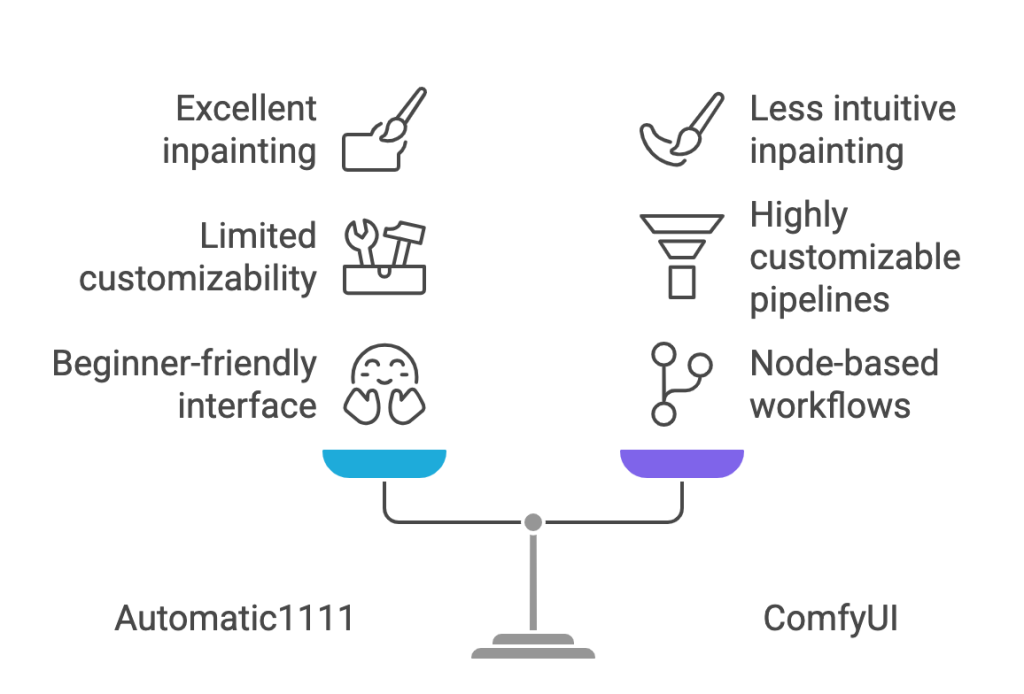
Here is the simple 2026 takeaway: Automatic1111 is easier to set up, quicker for inpainting and standard image generation, and friendlier for beginners. ComfyUI wins when you want SDXL control, node graphs, performance tuning, and repeatable pipelines.
| Feature | Automatic1111 | ComfyUI |
|---|---|---|
| Ease of Use | Beginner-friendly, easy to get started. | Advanced, requires technical knowledge. |
| Interface Style | Web-based, clean, and straightforward. | Node-based, visual workflows. |
| Customizability | Limited to options in menus and plugins. | Highly customizable with modular pipelines. |
| Best For | Beginners and casual users. | Advanced users and tinkerers. |
| Inpainting | Excellent and easy to use. | Possible but less intuitive. |
| Learning Curve | Low, with plenty of guides available. | Steep, requiring an understanding of AI workflows. |
| Performance | Works well on most systems. | Demands more system resources for complex tasks. |
| Community Support | Large and active. | Smaller, but growing rapidly. |
Frequently Asked Questions
Which is better for beginners, Automatic1111 or ComfyUI?
Automatic1111 is still the easier first step for most beginners because the web UI is familiar and the setup is more forgiving. That said, the gentlest 2026 entry point is to start on Automatic1111 only long enough to get comfortable with prompts and basic settings, then move to Forge or ComfyUI within a few weeks. The longer you stay on raw Automatic1111, the more you miss in performance and Flux support.
Which is easier to set up?
Automatic1111 is usually easier for first-time users because the install path is well documented and you get a familiar web interface as soon as it runs. ComfyUI can be lightweight to launch (often portable), but the workflow setup and model management are more technical, especially if you want a serious pipeline going.
Is ComfyUI faster than Automatic1111?
Yes. Independent 2026 benchmarks consistently show ComfyUI 10 to 30 percent faster on a single SDXL image and up to 60 percent faster on complex workflows that stack ControlNet, IPAdapter, and upscaling. ComfyUI also uses about 14 percent less VRAM on identical SDXL tasks, which can be the difference between running and crashing on an 8GB GPU.
Can Automatic1111 run Flux.1?
No. Automatic1111 cannot run Flux.1 in its current form, which is the single biggest practical limitation it has in 2026. If you want Flux support without learning ComfyUI, the right move is Forge, which keeps the Automatic1111 interface but adds support for Flux and other modern models.
Does ComfyUI use less VRAM than Automatic1111?
Yes. On SDXL workflows ComfyUI peaks around 9.2GB of VRAM versus Automatic1111 at around 10.7GB, roughly 14 percent less. The gap can be larger on complex pipelines because ComfyUI dynamically loads and unloads models. The practical result is that ComfyUI runs serious workloads on 8GB cards that would crash Automatic1111.
Which is better for SDXL workflows?
ComfyUI is the stronger choice for SDXL in 2026. It is faster on identical hardware, uses less VRAM, and its node graph lets you build repeatable SDXL pipelines that mix ControlNet, IPAdapter, and upscaling cleanly. Automatic1111 can still run SDXL well for simple text-to-image tasks, but it falls behind once you stack steps.
What is Forge and how is it different from Automatic1111?
Forge is a fork of Automatic1111 that keeps the same web interface but rebuilds the backend for better performance, better VRAM management, and support for modern models including Flux.1. For users who like the Automatic1111 UI and do not want to learn nodes, Forge is the recommended 2026 path. It is the closest thing to a drop-in upgrade.
Which is better for inpainting?
Automatic1111 is still the easier choice for inpainting because the interface is direct and the workflow is less technical. ComfyUI can do inpainting through its node graph but you give up the familiar mask and adjust workflow. If inpainting is your main task, Automatic1111 (or Forge, which keeps the same UI) is the lighter path.
Is Automatic1111 still worth using in 2026?
For first-time Stable Diffusion users who just want the gentlest possible setup and a familiar web UI, yes. For anyone past the first few weeks who cares about Flux support, speed, or VRAM efficiency, no. The active path forward for Automatic1111 users in 2026 is either Forge (keep the UI, gain modern model support) or ComfyUI (steeper learning curve, much higher ceiling).
Should I switch from Automatic1111 to ComfyUI?
If you are running serious workflows, generating in batches, working with Flux, or running into VRAM ceilings, yes. The switch is worth it for the speed and model access. If you mostly do simple text-to-image and inpainting on a comfortable hardware setup, you can hold for longer, but consider switching to Forge first as a low-friction stepping stone toward ComfyUI.
Which one has higher hardware requirements?
On paper neither is magically lightweight once you push bigger models. In real 2026 benchmarks, Automatic1111 has higher effective requirements: it uses around 14 percent more VRAM than ComfyUI on identical SDXL tasks and is 10 to 30 percent slower. ComfyUI also handles low-VRAM setups better by dynamically unloading models. For tight 8GB GPUs, ComfyUI is the more forgiving option.
What is the difference between Automatic1111 and ComfyUI?
Automatic1111 is a web-based UI for Stable Diffusion with a clean tab-style interface that fits familiar workflows like text-to-image, inpainting, and extensions. ComfyUI is a node-based workflow editor that gives you explicit control over every step of the diffusion pipeline. The trade is simplicity (Automatic1111) versus control, performance, and modern model support (ComfyUI). In 2026 the consensus has shifted toward ComfyUI as the default for serious work.
Conclusion
Choosing between Automatic1111 and ComfyUI in 2026 is no longer the close call it was a year ago. ComfyUI has pulled ahead on speed, VRAM efficiency, and model support. Automatic1111 is still the gentlest first step for a complete beginner, but it has hard limits, the biggest being no Flux.1 support.
The pragmatic path for most active users: start with Automatic1111 if you have never touched Stable Diffusion, move to Forge once you outgrow the basics but want to keep the familiar interface, and commit to ComfyUI once you care about performance, Flux access, or repeatable production workflows. For anyone past the first week of usage, ComfyUI or Forge is now the right answer, not raw Automatic1111.
Add us as a preferred source on Google, and our reviews and picks show up in your Top Stories and AI Overviews.