
What is Ideogram?
Ideogram is an AI-powered tool that transforms text prompts into images, addressing the challenge of integrating text within visuals for graphic design and marketing purposes.
Ideogram is designed to assist users in creating images from textual descriptions. It simplifies the process of generating visuals that include text, which is often a complex task in AI-generated imagery. The tool is accessible via web and mobile platforms and caters to a broad audience seeking to enhance their visual content creation.
Key Features of Ideogram
- Text Rendering: Allows users to generate images that include readable and stylized text, enhancing the utility for posters, memes, and advertisements.
- Magic Prompt: Enhances user prompts to produce more detailed and creative images, aiding users in achieving desired outcomes without extensive prompt engineering.
- Remix Function: Enables users to modify existing images by adjusting elements, providing flexibility in refining visuals.
- Aspect Ratios & Resolutions: Offers various aspect ratios and resolutions to suit different platforms and use cases.
- Style Options: Provides multiple style presets such as realistic, 3D, anime, and design, allowing users to tailor the aesthetic of generated images.
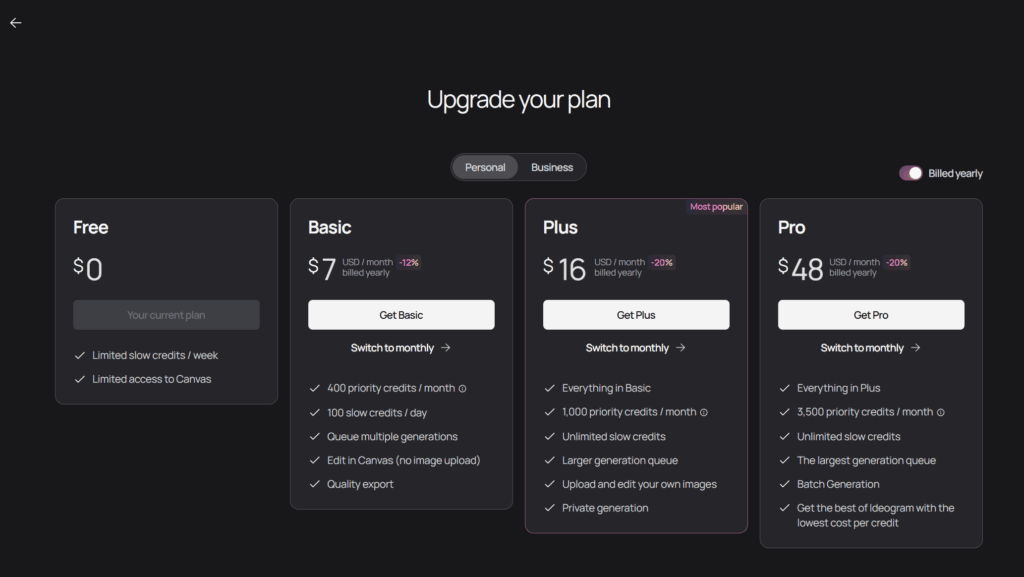
- Private Generations: Allows users to create images privately, ensuring confidentiality for sensitive projects.
- Image Upload: Users can upload their own images to incorporate into new creations, facilitating customization.
- Editor: Includes an editing interface for users to make adjustments to generated images directly within the platform.
- Seed Number: Users can set seed numbers to reproduce specific image outputs, aiding in consistency across projects.
- Upscale Feature: Provides the ability to enhance the resolution of images, improving quality for various applications.
How to Use Ideogram
- Sign up for an account on the Ideogram website or mobile app.
- Enter a descriptive text prompt detailing the desired image.
- Select preferred style, aspect ratio, and other settings.
- Generate the image and review the output.
- Use the editor to make any necessary adjustments.
- Download or share the final image as needed.
Key Use Cases for Ideogram
- Marketing Materials Creation: Generate promotional images with embedded text for campaigns and advertisements.
- Social Media Content: Create engaging visuals with text overlays for platforms like Instagram, Facebook, and Twitter.
- Educational Resources: Develop illustrative content with explanatory text for teaching and presentations.
- Event Promotions: Design posters and flyers with event details prominently displayed within the image.
- Product Mockups: Visualize products with descriptive text for e-commerce listings and catalogs.
Pros and Cons
Pros:
- Generates images with integrated, readable text.
- Offers a variety of style presets for diverse visual outputs.
- User-friendly interface accessible via web and mobile.
- Provides editing tools for post-generation adjustments.
- Supports multiple aspect ratios and resolutions.
Cons:
- Text rendering accuracy decreases with non-English languages.
- Occasional inconsistencies in image generation quality.