
If you go to Appscribed’s blog section, you will realize that I have been a fan of Microsoft’s Copilot from the last couple of months, as I have covered more than 3 articles on it already.
While I don’t think Copilot is a great tool for content writing, you can count on it to provide you the right facts. I don’t trust Bard and ChatGPT on the facts they mention.
Recently, Microsoft launched Copilot Pro which offers some additional features on top of the basic Copilot. But is the Copilot Pro worth it for you?
Microsoft Copilot Pro is the advanced and most powerful version of Copilot that provides advanced AI assistance in various tasks such as writing, coding, designing, and researching. Copilot Pro offers exclusive features like access to cutting-edge OpenAI language models, including GPT-4 Turbo and Copilot GPT.
How much does Copilot Pro cost?
Copilot Pro is priced at $20 per month per user. This gives you access to all the features of Copilot Pro that we will discuss in detail later in the article. However, if you go for a yearly subscription of Copilot Pro, you can get it for $199.99.
| Pricing Option | Price |
| Monthly Subscription | $19.99 |
| Yearly Subscription | $199.99 |
How to access Copilot Pro?
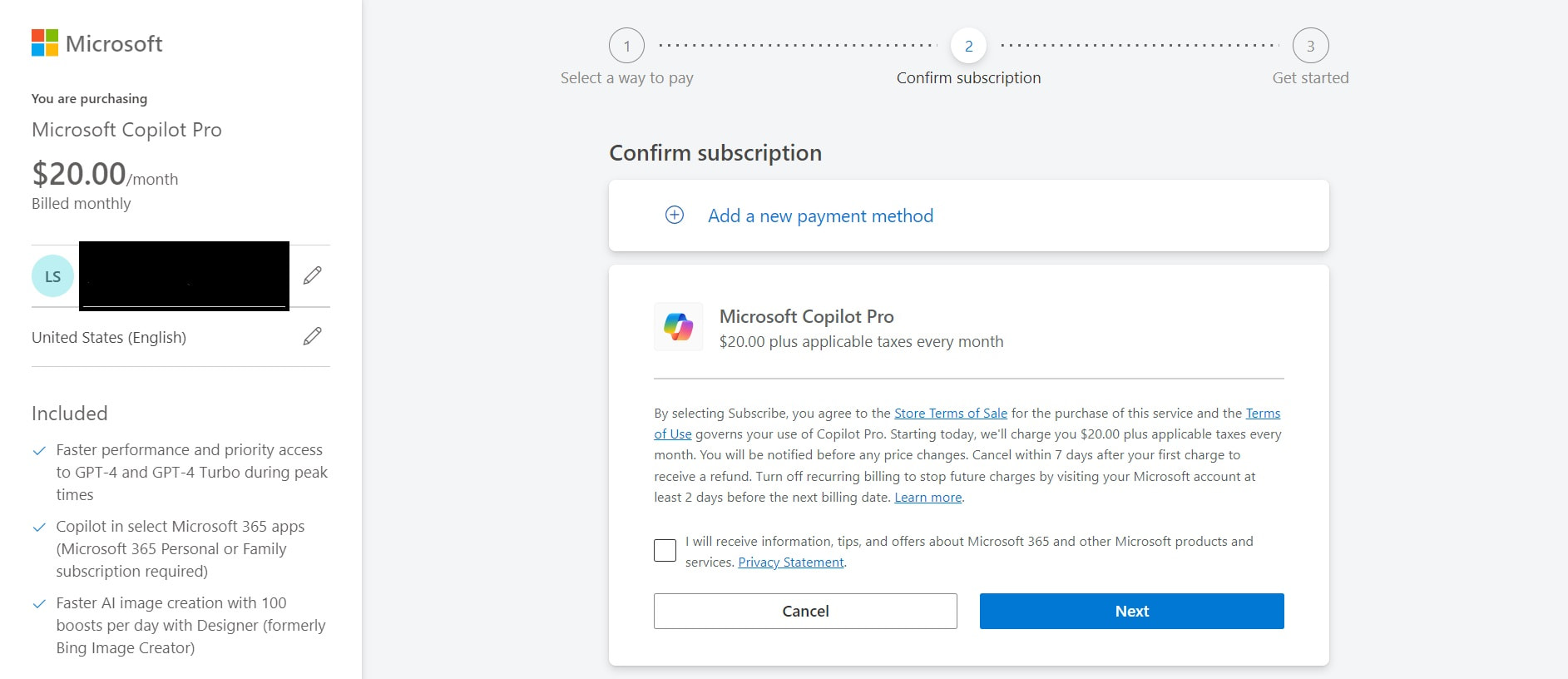
To get access to Copilot Pro:
- Go to https://www.microsoft.com/en-us/store/b/copilotpro
- Log in with your Microsoft account
- Accept the terms
- Choose the payment method
- Make the payment
- Start using Copilot Pro
How to access Copilot Pro for Free?
As of today, Copilot Pro is not available for free access. Nevertheless, you can still enjoy the advantages of GPT-4 through the free version of Copilot, which utilizes GPT-4 based on the complexity of the query.
But the free version won’t provide you the benefits of Copilot Pro that are mentioned below.
Copilot Pro Features
Uses Latest version of GPT: Copilot Pro grants users access to cutting-edge OpenAI language models, including GPT-4 Turbo and Copilot GPT. This enables the creation of personalized GPTs, offering a versatile and dynamic language processing experience.
AI Integration with Office Apps: Copilot Pro introduces innovative AI features seamlessly integrated into Office apps like Word, Excel, and PowerPoint. Users can now leverage powerful AI tools directly within these applications, enhancing productivity and creativity in their workflow.
Enhanced AI Image Generation: Copilot Pro revolutionizes image creation with an improved AI Image Creator from Designer (formerly Bing Image Creator). Boasting increased speed and 100 daily boosts, this feature ensures detailed images while supporting both portrait and landscape formats.
Train your own AI assistant: You can build a personalized Copilot GPT model tailored to your specific data and preferences using Copilot Pro. This can give you suggestions and assistance aligned with your unique needs and workflow.
Draft Generation and Content Organization Across Microsoft Apps: Copilot Pro simplifies content creation and organization across all Microsoft applications.
- In Word, it generates drafts and aids in content rewriting.
- In PowerPoint, it assists in generating outlines and designing slides for a compelling narrative.
- In Outlook, Copilot Pro summarizes lengthy threads, suggests replies, and helps draft emails with the appropriate tone.
- In OneNote, it facilitates the creation, organization, rewriting, summarizing, and searching within lists and notes.
- In Excel, it aids in formula generation, data analysis, summarization, and the addition of useful visuals to spreadsheets.

Difference Between Copilot and Copilot Pro
| Feature | Copilot | Copilot Pro |
|---|---|---|
| AI Model | Standard LLM | GPT-4 Turbo (priority access) |
| Processing Speed | Standard | Faster |
| Image Generation | No | Yes (100 daily boosts, landscape support) |
| Custom Copilot GPT | No | Yes |
| Microsoft 365 Apps | Word, Excel, PowerPoint, Outlook, OneNote | Same, plus additional features in each app |
| Contextual Awareness | Basic | Advanced |
| Email Drafting/Summarization | Basic | Advanced |
| Presentation Creation/Summarization | Basic | Advanced |
| Notetaking/Organization | Basic | Advanced |
| Meeting Preparation (Outlook) | No | Coming soon |
| Email Thread Summarization | No | Coming soon |
| Price | Free | $20 |
Who should use Copilot Pro?
Well, Copilot Pro offers advanced capabilities to help individuals with writing, coding, designing, and researching compared to the free version of the AI chatbot. Copilot Pro provides access to the latest OpenAI language models like GPT-4 Turbo and Copilot GPT, allowing users to create custom GPTs. Copilot Pro also offers new AI features, including access to AI tools within Office apps like Word, Excel, and PowerPoint
Copilot Pro is just the advanced version of Copilot. I mostly use Copilot for research and content creation. And the free version of Copilot does a great job at that.
However, if you are someone who uses Microsoft Office 365 very frequently, Copilot Pro would increase your productivity a lot.
Conclusion
While Copilot has made me its fan, I am not very impressed with Copilot Pro. While the features like access to cutting-edge language models, AI integration with Office apps, enhanced image generation, and personalized AI assistance, Copilot Pro elevates productivity and creativity for Microsoft 365 users, it doesn’t cater much to creators like me. However, with time, Copilot Pro will get even better with more powerful LLM and new features. Maybe then it will become an essential tool for everyone.