AI video tools have slashed music-video costs from thousands of dollars to the price of a browser tab. By late 2025, fifty-two percent of Billboard’s Top 100 artists had released tracks with AI-generated visuals, reports The Digital Insider. Videobolt helped ignite that trend, yet rigid templates and per-export fees now push creators to hunt for fresher looks, tighter beat sync, and predictable pricing.
So we auditioned twenty platforms, scoring each on sync precision, resolution, workflow, and indie-friendly cost. The seven stand-outs below equip you with 2026-ready visuals; from four-minute cinematic reels to fifteen-second social hooks.
How we picked these alternatives
AI music video generators now give indie artists affordable, beat-synced alternatives to Videobolt in 2026
We approached the research like mastering a track: balance first, finish later. Conversations with independent artists, boutique labels, and social-media managers surfaced three recurring gaps in Videobolt: tighter beat sync, fresher aesthetics, and predictable pricing.
To translate those needs into a scoring model, we weighted six factors:

We scored each Videobolt alternative on creativity, quality, price, workflow, control, and community strength
- AI creativity and audio-reactivity – 25 percent
- Output quality and maximum resolution – 20 percent
- Price-to-value for indie budgets – 20 percent
- Ease of use versus creative control – 15 percent
- Workflow integration for musicians – 10 percent
- Community depth and product longevity – 10 percent
Next, we ran two real-world tests: a three-minute pop single and a nine-minute DJ mix. We logged render time, sync precision, and licensing terms. Seven platforms met at least four of the six benchmarks, and they form the core of this guide.
Pro visualizer: Neural Frames

Neural Frames feels more like a cloud studio than a quick generator. You upload a track, the engine splits stems, maps every kick, snare, and vocal hit, then lets you add camera moves or color pulses on those markers. That precision outperforms Videobolt’s fixed templates.
Neural Frames AI music video generator interface screenshot
The platform’s AI music video generator detects BPM, key, mood, lyrics and up to eight separate stems, so you can tie bass drops, drum fills or vocal phrases to different visual parameters instead of relying on a single waveform. That kind of stem-level control explains why it feels closer to a DAW than a template library when you are nudging flashes or camera moves around a chorus.
Editing happens on a DAW-style timeline: set an intro swell, pull back for the verse, punch the chorus, or switch to a fresh model for the bridge. One click exports up to 4 K, and the same docs note support for 10-minute 4K videos, which covers everything from three-minute singles to full DJ mixes.
Plans start at $19 per month for 1,000 credits that roll over for up to three months. Every tier includes 7,200 monthly credits for drafts; the Ninja plan at $66 per month includes 4 K masters with no extra resolution fee.
Choose Neural Frames when you need beat-perfect visuals for album launches, label pitches, or festival screens where every snare deserves its own flash of light.
Creative all-rounder: Kaiber

Kaiber pairs speed with style. Drop in a song, add a prompt or reference image, and the engine generates fluid, music-reactive scenes that sit between an indie video clip and a lucid dream.
Kaiber AI creative music video generator homepage screenshot
You steer with presets such as anime haze, vintage grain, or cyber chrome while Kaiber handles the beat matching in the background. Need room for a prog-rock epic? The Artist tier renders videos up to eight minutes long.
Plans stay simple: Explorer at $5 per month outputs 720p social clips. Pro at $10 per month upgrades to 1080p and a four-minute limit. Artist at $25 per month unlocks 4 K and the full eight-minute canvas. All tiers include audio-reactivity, storyboard mode, and at least 300 monthly credits, with optional credit packs for overflow.
Beyond new prompts, Kaiber can restyle your concert footage. Picture neon watercolor washing over a live guitar solo so you can blend fresh AI animation with real performance in the same timeline.
Choose Kaiber when you want bold, stylized visuals without spending an evening wrangling keyframes; it feels like working with an art director who always meets the deadline.
Instant social clip generator: Freebeat
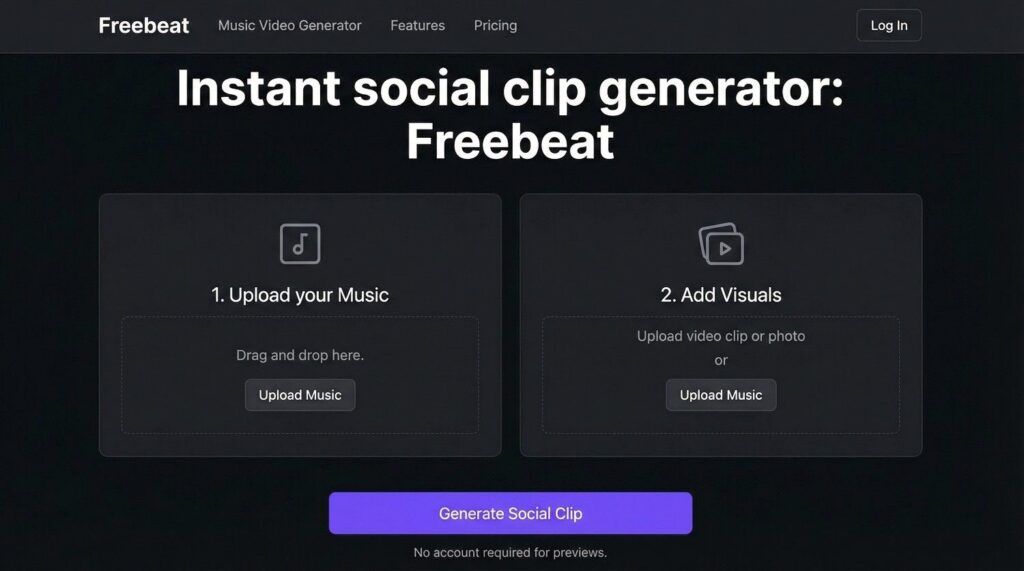
Freebeat is built for quick hits, not marathon edits. Drag in a track, choose a style, and about 60 seconds later you have a vertical video that lands on every down-beat, ideal for TikTok, Reels, or Spotify Canvas.
Freebeat AI music video and social clip generator page screenshot
The engine reads the tempo and places cuts, flashes, and lyric captions exactly on the waveform, so you skip timeline tedium and post right away.
Pricing stays light.
- Free – 500 one-time credits, watermarked tests up to 30 seconds.
- Standard – $13.99 per month, 3,000 credits, videos up to 720p and six minutes.
- Pro – $24.99 per month, 10,000 credits, up to 1080p with faster processing.
Creative control is intentionally limited. Freebeat shines when you need to tease a chorus, loop a dance break, or spark a trend before the algorithm shifts.
Stock-footage auto-editor: Rotor Videos

Rotor works like a seasoned editor behind the curtain. Upload your track, add mood keywords such as “noir streets,” “slow-motion crowd,” or “sunset skatepark,” and the engine searches a library of more than 9 million HD and 4 K clips, then cuts them to your kick and snare so every visual hit lands with the music.
Rotor Videos stock-footage music video creator homepage screenshot
You pay only when you export. A full-length HD music video costs $25 per video (three credits at $9 each). Previews stay free and unlimited with a watermark. That single fee covers all stock-footage rights for YouTube, socials, and stage screens, so you avoid surprise licences later.
Because Rotor relies on real-world footage, results look cinematic and artifact-free. The trade-off is range: if you want neon dragons, choose a generative tool instead. When your song calls for human moments or atmospheric landscapes, and you would rather skip hiring a camera crew, Rotor delivers polished visuals in about the time it takes to brew coffee.
Lyric-video specialist: Pictory

Pictory turns text into motion, making lyric videos its natural stage. Upload your track and the platform auto-transcribes vocals so each line lands exactly on the beat, whether you choose karaoke bounce, word-by-word highlights, or lower-third captions. No keyframes needed.
Pictory AI lyric and text-first video generator homepage screenshot
Backgrounds come pre-selected: the engine suggests stock clips that reflect your lyrics, then layers subtle animation so words stay front and center. Swap any clip in seconds or upload your own footage for a branded touch.
Pricing is minute-based.
- Starter – $25 per month, 200 video minutes at 720p.
- Professional – $49 per month, 600 minutes, up to 1080p, Getty Images access.
- Team – $99 per month for 1,800 minutes and shared brand kits. All plans include a 14-day free trial.
With an interface that feels closer to a document editor than a video suite, Pictory suits weekly single drops or deluxe-album rollouts where clarity is key. Fans read every lyric, algorithms index every word, and accessibility scores rise across platforms.
High-fidelity short-clip generator: Pika Labs

Pika Labs feels like a pocket cinema camera for prompts. Type “a chrome-plated astronaut spinning vinyl under laser lights,” and a few seconds later you have a five-second clip sharp enough for a stage intro.
Pika Labs AI cinematic short-clip generator landing page screenshot
Resolution starts at 720p, yet texture and lighting rival many 1080p generators. Need more runway? Select Extend to add seconds, or use the Region Brush to refine one corner frame by frame.
Clips max out at ten seconds, so the process shifts: break your song into moments, storyboard each vibe, then loop or slow-mo the Pika footage in post. The result is a mosaic of cinematic beats that transform verses into mini-scenes.
Pricing stays light.
- Free – 80 credits each month, watermark-free downloads.
- Standard – $10 per month, 700 credits; enough for about twelve five-second clips at default settings.
- Pro – $35 per month, 2,300 credits and faster queues. Credits do not roll over.
Reach for Pika when you need eye-catching B-roll, surreal transitions, or animated characters that lip-sync a hook, adding the visual spice that makes a lyric or drop unforgettable.
Full AI video toolkit: Runway ML

Runway feels more like a motion-design studio than a single app. Its Gen-4 and Gen-3 models turn text prompts into living scenes, while companion tools handle rotoscoping, background removal, and 4× upscaling inside one browser tab.
Runway ML Gen-4 AI video editor and toolkit homepage screenshot
The workflow rewards curiosity. Generate a six-second “desert skyline in vaporwave neon,” drop it on Runway’s timeline, then sweep a Motion Brush across the sky to morph clouds into pulsing EQ bars. Two prompts later, a holographic drummer bridges the verse.
Exports are modular. Short clips render at 720p, then upscale to 4 K with one click, so you iterate fast without sacrificing the final master. Plug-ins for Premiere and After Effects let you swap assets mid-edit without re-rendering the whole sequence.
Plans are credit-based.
- Free – no monthly fee, one-time 125 credits (about 25 seconds of Gen-4 Turbo).
- Standard – $15 per month (or $12 when billed annually) for 625 credits and 4 K exports.
- Pro – $35 per month for 2,250 credits, ProRes or PNG export, and commercial rights.
- Unlimited – $95 per month, same credits plus unlimited Explore generations at a relaxed rate.
Choose Runway when you enjoy blending filmed performance with AI surrealism or need VFX-style polish without a studio budget; the platform lets you direct, composite, and grade from a single dashboard.
Quick specs at a glance
Most musicians weigh three factors when picking a tool: cost, resolution, and how tightly the visuals follow the beat. The table below puts those numbers side by side.
| Tool | Lowest paid price* | Max resolution | Beat or lyric sync | Stand-out edge |
| Neural Frames | $19 per month (1,000 credits) | 4K | Stem-level beat map | Multi-model timeline |
| Kaiber | $5 per month (Explorer) | 4K (Artist) | Waveform reactive | Style versatility |
| Freebeat | $13.99 per month (Standard) | 1080p | Auto beat cut | 60-second render speed |
| Rotor Videos | $25 per HD export | 1080p | Beat-based stock edit | Licensed footage |
| Pictory | $25 per month (Starter) | 1080p (Pro) | Auto lyric timestamp | Text-first workflow |
| Pika Labs | $10 per month (700 credits) | 720p (4K upscale beta) | No auto sync | Cinematic short loops |
| Runway ML | $15 per month (625 credits) | 4K upscale | No auto sync | All-in-one AI suite |
*Monthly prices are month to month unless noted, and credits do not roll over on Freebeat, Pika, or Runway.
Which tool fits your next release?
Start by matching each tool to the job:

Match your next release goal with the AI music video tool that fits it best
- Flagship 4K video, beat-perfect: Neural Frames. Trade a short learning curve for stem-level sync and cinematic resolution.
- TikTok or Reels in ten minutes: Freebeat. Upload, choose a template, and export; your clip is social ready before the kettle whistles.
- Real-world footage with no camera: Rotor Videos. Pay one $25 export fee and let the stock-clip editor match every groove.
- Lyric clarity first: Pictory. Auto-transcribed captions keep fans reading and search engines indexing every word.
- Stylized animation: Kaiber. Feed a prompt or image, and its audio-reactive engine handles the rest in up to full 4 K.
- Cinematic micro-scenes: Pika Labs. Generate five to ten-second clips, then loop or slow motion them in post for dramatic hits.
- End-to-end AI production: Runway ML. Prompt, rotoscope, upscale, and composite in one browser tab with Premiere plug-ins for finishing touches.
Pick the line that matches your release goal and spend more time on music, less on menus.