





TL;DR: insMind is an AI-driven photo editor that simplifies product image enhancement with tools like background removal and AI-generated backgrounds.
insMind addresses the need for quick and professional product image editing, especially for e-commerce sellers and marketers. Its AI-powered tools allow users to remove backgrounds, generate new ones, and resize images effortlessly. This streamlines the creation of high-quality visuals without the need for extensive design skills.
What truly makes insMind unique is its laser focus on addressing the specific needs of e-commerce sellers and marketers. Unlike general-purpose photo editing tools, it integrates niche features like batch editing and platform-specific smart resizing. These capabilities are designed to save time and ensure consistency for users managing large volumes of product images.
Who is it for?
insMind is best suited for e-commerce sellers, marketers, and small business owners looking to create professional-quality images without a design background. It’s ideal for individuals who need quick and efficient solutions for editing product photos, creating social media content, or designing marketing visuals. The platform is also valuable for freelancers managing multiple clients and content creators who want to produce polished visuals.
Key Features
- Background Remover: Automatically removes image backgrounds with precision, preserving fine details.
- AI Background Generator: Generates high-definition backgrounds that complement the subject, enhancing visual appeal.
- Smart Resize: Adjusts image dimensions to fit various platforms, ensuring consistency across media channels.
- AI Image Enhancer: Improves image quality by adjusting blur, noise, and color balance for a more vibrant appearance.
- Magic Eraser: Removes unwanted objects from photos, seamlessly blending the background for natural-looking edits.
How to Use
- Visit the insMind website and sign up for a free account.
- Choose the desired tool, such as Background Remover or AI Background Generator.
- Upload the image you wish to edit.
- Apply the selected tool’s features to enhance your image.
- Download the edited image for your use.
Pros and Cons
Pros:
- User-friendly interface suitable for beginners and professionals.
- Comprehensive suite of AI-powered tools for efficient photo editing.
- No prior learning or training required to use the platform.
- Offers a free plan with access to core features.
- Supports a wide range of design needs beyond just product imagery.
Cons:
- AI may sometimes produce results that require manual touch-ups.
FAQs
Is insMind free to use?
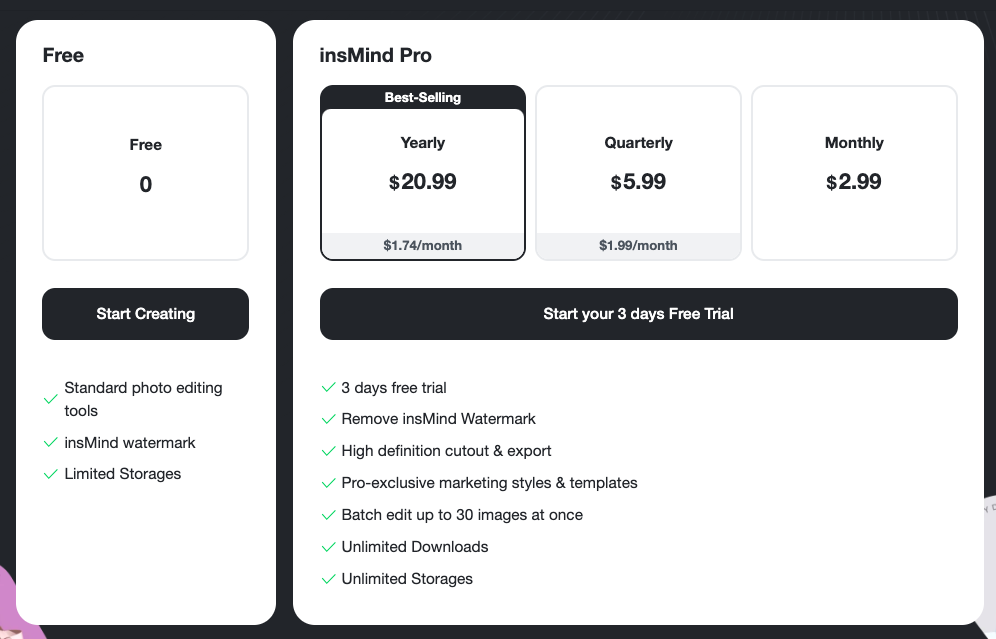
Yes, insMind offers a free plan with access to standard tools, though it includes a watermark on exported images.
What are the main features of insMind?
The main features include background removal, AI background generation, smart resizing, image enhancement, and object removal.
Who can benefit most from insMind?
E-commerce sellers, marketers, freelancers, and content creators who need polished visuals for product photography or campaigns.
Does insMind require any prior design experience?
No, insMind is designed to be user-friendly and accessible to individuals without prior design or editing skills.