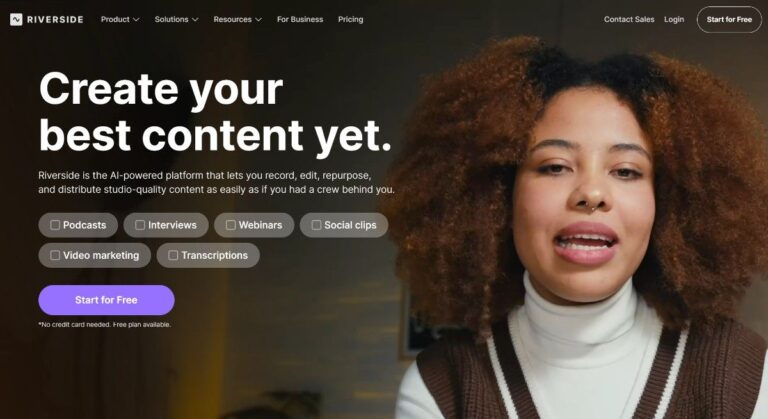
Riverside is an AI-powered platform for recording, editing, and streaming studio-quality podcasts and videos remotely. It solves poor audio and video quality issues that plague remote content creators by using local recording technology that captures up to 4K video and uncompressed audio directly on each participant’s device, independent of internet connection speed.
Riverside is used by podcasters, content creators, marketers, educators, and media companies who need professional-grade recordings without a physical studio. The platform serves everyone from individual creators to enterprise organizations like Spotify, Marvel, Netflix, and The New York Times. It streamlines the entire content creation workflow from recording through editing, repurposing, and distribution, making professional content creation accessible to creators at any level.
Key Features of Riverside
- 4K Local Recording: Captures up to 4K video and 48kHz uncompressed audio locally on each device, ensuring studio quality.
- Separate Track Recording: Records individual audio and video tracks for each participant for easier post-production editing.
- AI Text-Based Editor: Edit videos by editing the transcript – cut, copy, paste text to trim video automatically.
- Magic Audio: AI-powered noise removal and audio enhancement makes any microphone sound professional-grade without extra equipment.
- AI Co-Creator: Automatically generates promotional clips, show notes, titles, descriptions, and social media content from recordings.
- Magic Clips: AI identifies and creates shareable short-form clips optimized for social media platforms like TikTok and Instagram.
- Live Streaming: Stream in full HD to multiple platforms simultaneously including YouTube, LinkedIn, Facebook, Instagram, and Twitch.
- Automated Transcription: Generates accurate transcripts in over 100 languages with speaker identification and timestamps for accessibility.
- Customizable Captions: One-click animated captions with customization options perfect for short-form social media video content.
- Webinar Hosting: Host webinars with registration forms, automated reminders, Q&A, polls, and HubSpot integration for leads.
- Producer Mode: Full remote control over guest inputs, outputs, and layouts for professional live production capabilities.
- Podcast Hosting: Built-in distribution to Spotify, Apple Podcasts, YouTube, and other directories with performance analytics included.
- Eye Contact Correction: AI adjusts eye gaze to make it appear speakers are looking directly at the camera.
- Filler Word Removal: Automatically detects and removes “um,” “uh,” and other filler words with one click.
- Correct Speech: Fix mistakes by editing the transcript – AI syncs voice and lips to match changes.
- Studio Branding: Add logos, colors, intros, and outros once, then apply with one click for consistency.
- Mobile Apps: Record high-quality content from iOS and Android devices for on-the-go content creation.
- Teleprompter: Built-in teleprompter for hosts and guests to read scripts while maintaining eye contact with camera.
How to Use Riverside
- Sign up for a free account at riverside.fm and create your first studio workspace for recordings.
- Invite guests via a simple link – no downloads or accounts required for participants to join.
- Configure your audio and video settings, select recording quality up to 4K, and test equipment.
- Start recording – content saves locally on each device and uploads progressively to cloud storage.
- After recording, use the text-based editor to trim clips by editing the auto-generated transcript directly.
- Apply AI tools like Magic Audio, filler word removal, eye contact correction, and auto-layout changes.
- Use AI Co-Creator to generate social clips, show notes, titles, and promotional content automatically.
- Download separate high-quality tracks for advanced editing or export directly from Riverside’s editor.
- Publish directly to YouTube, Spotify, Apple Podcasts, and other platforms from the Riverside dashboard.
- For live events, enable multistreaming to broadcast to multiple platforms simultaneously in full HD.
Key Use Cases for Riverside
- Remote Podcast Production: Record studio-quality podcasts with remote guests without expensive equipment or technical expertise required.
- Video Interview Creation: Conduct professional video interviews for YouTube, documentaries, or corporate content with separate tracks.
- Webinar Hosting: Host professional webinars with registration, audience engagement tools, and automated follow-up email sequences.
- Live Streaming Events: Multistream live shows, conferences, or product launches to multiple platforms simultaneously in HD.
- Educational Content: Create training videos, online courses, and educational content with screen sharing and presentation recording.
- Social Media Content: Repurpose long-form content into short clips optimized for TikTok, Instagram Reels, and YouTube Shorts.
- Corporate Communications: Record internal communications, town halls, and executive messages with professional quality and branding.
- Customer Testimonials: Capture high-quality video testimonials from remote customers for marketing and sales materials.
- Marketing Video Production: Create professional marketing videos, product demos, and promotional content without video production crew.
Pros and Cons
Pros
- Superior audio and video quality compared to Zoom
- Guests join via link with no downloads
- Text-based editing saves massive time in post-production
- AI tools automate tedious editing tasks effectively
- All-in-one platform from recording to distribution
Cons
- Initial learning curve.
- Limited recording hours on lower-tier plans may require upgrades for heavy users
Frequently Asked Questions
What is Riverside?
Riverside is an AI-powered platform for recording and editing studio-quality podcasts and videos remotely without studio equipment.
Is Riverside Free to Use?
Yes, Riverside offers a free plan with 2 hours of recording, basic editing tools, and 720p video quality.
How does Riverside ensure high-quality recordings?
Riverside uses local recording technology that captures audio and video directly on devices, independent of internet connection.
Can I live stream with Riverside?
Yes, Riverside supports live streaming in full HD to multiple platforms like YouTube, Facebook, LinkedIn, and Twitch simultaneously.
Does Riverside work on mobile devices?
Yes, Riverside has iOS and Android apps for recording high-quality audio and video from smartphones and tablets.
What file formats does Riverside support?
Riverside exports WAV for audio and MP4 for video with separate tracks for each participant available.
Can guests join without creating an account?
Yes, guests simply click a link to join recordings without downloads, signups, or software installations required.
Does Riverside offer transcription services?
Yes, Riverside provides automatic AI transcription in over 100 languages with speaker identification and editable text.